CLI: Updating a Local Certificate Using CMPv2
Networking Requirement
An enterprise deploys a FW as the security gateway at the network boarder, as shown in Figure 1. The FW uses CMPv2 to apply for the certificate towards the CA server on the public network online in signature mode, automatically downloads the local certificate to the storage media, and updates the local certificate through CMPv2.
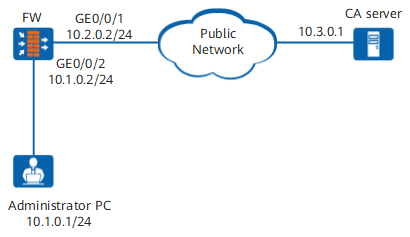

This example describes only how to configure the FW in the use of CMPv2 to update a local certificate. For CA server deployment and configurations, see product documents.
For the local certificate update, you can select manual or automatic update as required. After a local certificate update, you can change the update mode. This example describes how to configure the device for initial local certificate update in the two modes.
Configuration Procedure
The roadmap of configuring manual local certificate update through CMPv2 is as follows:
- Apply for the certificate for the first time and import the certificate to the memory.
- Configure manual update.
The roadmap of configuring automatic local certificate update through CMPv2 is as follows:
- Apply for the certificate for the first time and import the certificate to the memory.
- In the CMP session view, enable the usage of CMPv2 for automatic certificate update and configure the certificate update time.
Data Planning
You need to configure the PKI entity and CMP session, apply for the certificate for the first time, and import the certificate to the memory. This example describes how to use CMPv2 to apply for local certificate cmp_ir.cer online for the first time in signature mode.
Submit an initial certificate request to the CMPv2 server based on the CMP session configuration.
<sysname> system-view
[sysname] pki cmp session cmp
[sysname-pki-cmp-session-cmp] quit
[sysname] pki cmp initial-request session cmp
Import the local certificate to the memory.
[sysname] pki import-certificate local filename cmp_ir.cer
Info: import file successfully
Procedure
- Configure manual certificate update.
Manual certificate update applies only to the scenario where certificates are updated in KUR mode for the first time.
- Submit a key update request (KUR) to the CMPv2 server based on the CMP session configuration.
<sysname> system-view
[sysname] pki cmp keyupdate-request session cmp
After the manual update for the first time, all CA certificates are updated. A new local certificate named cmp_kur.cer appears under the root directory of the CF card. The previous local certificate cmp_ir.cer is also reserved. Delete the previous local certificate from the memory, write the new local certificate to the memory, modify the CMP session configuration, and change the authentication certificate to cmp_kur.cer.
- Delete the previous local certificate from the memory.
[sysname] pki delete-certificate local filename cmp_ir.cer
Deleting the local certificate from flash.......Done!
- Write the new local certificate to the memory.
[sysname] pki import-certificate local filename cmp_kur.cer
Info: import file successfully
- Modify the CMP session configuration.
[sysname] pki cmp session cmp
[sysname-pki-cmp-session-cmp] cmp-request authentication-cert cmp_kur.cer
- Submit a key update request (KUR) to the CMPv2 server based on the CMP session configuration.
- Configure automatic update.
In the CMP session view, enable the usage of CMPv2 to automatically update a certificate.
<sysname> system-view
[sysname] pki cmp session cmp
[sysname-pki-cmp-session-cmp] cmp-request authentication-cert cmp_ir.cer
[sysname-pki-cmp-session-cmp] certificate auto-update enable
If the local certificate has been updated, change the name of certificate in the CMPv2 request to the name of the updated certificate, that is, change cmp_ir.cer to the name of the updated certificate. For example, cmp_ir.cer is changed to cmp_kur.cer in step 1, and therefore the certificate name in this step shall be cmp_kur.cer.
Set the automatic update time to 80% of the validity period of the existing certificate. After the specified update time is due, local certificate cmp_ir.cer is automatically updated and written to the memory. No manual operation is required.
[sysname-pki-cmp-session-cmp] certificate update expire-time 80
[sysname-pki-cmp-session-cmp] quit
Configuration Scripts
Configuration scripts for manual certificate update:
#
pki cmp keyupdate-request session cmp
pki delete-certificate local filename cmp_ir.cer
pki import-certificate local filename cmp_kur.cer
pki cmp session cmp
cmp-request authentication-cert cmp_kur.cer
#
display this
quit
#
pki delete-certificate local filename cmp_kur.cer
pki cmp keyupdate-request session cmp
#
pki import-certificate local filename cmp_kur.cer
Configuration scripts for automatic certificate update:
#
pki cmp session cmp
cmp-request authentication-cert cmp_ir.cer
certificate auto-update enable
certificate update expire-time 80
quit