CLI: Example for Applying for a Local Certificate for a PKI Entity in Offline Mode
Network Requirements
On an enterprise network shown in Figure 1, the FW is located at the edge to function as the egress gateway and a CA server is located on the public network. The network administrator applies for a local certificate from the CA server in offline mode.
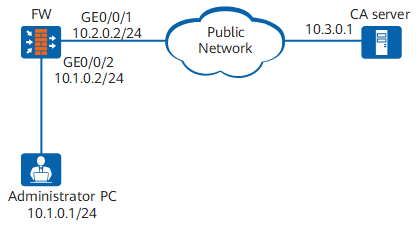

This example provides only the configurations on FW. For the configurations on the CA server, see the CA server product manual.
Configuration Roadmap
The configuration roadmap is as follows:
- Create an RSA key pair so that the local certificate application request contains the public key.
- Configure the PKI entity and related information to identify the PKI entity.
- Configure local certificate application for the PKI entity in offline mode and generate a local certificate request file.
- Send the local certificate request file in out-of-band mode and download the local certificate.
- Install the local certificate so that the device can protect communication data.
Procedure
- Create an RSA key pair.
# Create a 2048-bit RSA key pair named rsa and allow it to be exported.
<sysname> system-view
[sysname] sysname FW
[FW] pki rsa local-key-pair create rsakey exportable
 Info: The name of the new key-pair will be: rsakey
 The size of the public key ranges from 2048 to 4096.
 Input the bits in the modules:2048
 Generating key-pairs...
................................+++
...+++
- Configure a PKI entity to identify the certificate applicant.
# Configure the PKI entity user01.
[FW] pki entity user01
[FW-pki-entity-user01] common-name hello
[FW-pki-entity-user01] country cn
[FW-pki-entity-user01] email user@test.abc.com
[FW-pki-entity-user01] fqdn test.abc.com
[FW-pki-entity-user01] ip-address 10.2.0.2
[FW-pki-entity-user01] state jiangsu
[FW-pki-entity-user01] organization huawei
[FW-pki-entity-user01] organization-unit info
[FW-pki-entity-user01] quit
- Apply for a local certificate in offline mode.
[FW] pki realm abc
[FW-pki-realm-abc] entity user01
[FW-pki-realm-abc] rsa local-key-pair rsakey
[FW-pki-realm-abc] quit
[FW] pki enroll-certificate realm abc pkcs10 filename cer_req.req
 Info: Creating certificate request file...
 Info: Create certificate request file successfully.
After the configurations are complete, run the display pki cert-req command to view content of the certificate request file.
[FW] display pki cert-req filename cer_req Certificate Request: Data: Version: 0 (0x0) Subject: C=CN, ST=jiangsu, O=huawei, OU=info, CN=hello Subject Public Key Info: Public Key Algorithm: rsaEncryption Public-Key: (2048 bit) Modulus: 00:a2:db:e3:30:17:8e:f6:2d:2e:64:15:46:51:ad: 70:86:dd:32:c4:bb:6b:58:3a:8c:5f:a0:06:a1:e1: 56:2e:a4:eb:7e:12:06:05:04:28:b2:6d:64:7a:9c: 4f:85:24:c1:aa:b8:99:dc:e9:bb:c4:1e:e2:9d:a0: 18:51:1f:ad:b5:2f:60:18:06:8b:c1:cc:6f:32:58: f2:21:2c:16:e8:29:c2:a8:c5:aa:9d:6c:1e:ca:14: fc:7a:e9:bc:07:91:ce:ed:a0:c0:52:d9:0c:e9:ba: 9b:64:43:e0:9a:3f:c5:d1:2c:86:36:96:6b:4b:4f: d4:df:05:d0:4b:41:2c:ec:0a:d7:0e:45:83:ed:cd: 07:78:40:ed:d5:3d:7f:fe:0f:08:90:04:2e:ac:e5: 42:b9:81:ea:ec:77:e2:cc:04:6e:e4:63:9f:69:ed: 60:06:5e:c7:e8:bf:30:57:6a:5d:e0:46:68:d3:ee: b0:da:47:24:e3:b6:a5:f3:20:d8:5a:75:92:70:c2: a9:a6:97:07:07:0d:1c:94:9a:03:6f:f7:8c:db:6f: b7:06:de:51:50:9e:71:fd:86:f3:b5:c9:99:05:bf: f1:10:20:28:d3:a6:29:3d:e0:f4:a7:ba:1e:27:85: a9:66:fc:a9:90:49:f0:35:f7:d9:6d:06:a2:43:3f: 18:87 Exponent: 65537 (0x10001) Attributes: Requested Extensions: X509v3 Subject Alternative Name: IP Address:10.2.0.2, DNS:test.abc.com, email:user@test.abc.com Signature Algorithm: sha256WithRSAEncryption 0e:0a:a5:b7:d5:54:11:10:c4:ea:ff:77:da:f9:24:4b:a9:98: a1:75:36:08:10:59:60:fa:1a:30:70:2c:b7:f6:5f:5e:31:b7: 55:a5:7a:26:e5:af:4a:cd:83:c5:f3:90:f3:b9:d5:f9:0a:6d: 6e:8f:25:b4:ed:95:9c:75:a5:d7:b6:25:fc:8d:39:89:fb:af: 37:fc:01:7b:09:07:9c:96:7c:fa:28:6d:e2:11:49:a7:95:94: ed:26:5b:ca:f8:98:b0:e7:64:7e:dd:2d:75:ff:89:03:b7:0a: 92:53:25:d4:a1:23:b9:5c:eb:5b:29:1d:8a:92:8f:36:68:7b: 77:32:bc:48:92:48:84:fa:87:5a:d7:2e:3e:be:d5:6b:e4:df: b1:f2:02:35:91:6a:eb:cd:fc:5a:ea:37:85:6c:12:74:5f:a5: 5c:c0:05:09:cd:34:59:0d:c6:c8:75:ca:1c:18:d6:48:e5:4b: e7:8e:e3:ff:25:99:0f:2e:a8:b4:c5:8e:4d:8f:dd:64:c5:1f: 61:3c:58:21:4f:d5:35:ba:c8:8e:5f:76:41:9f:27:41:0a:94: 59:2c:59:25:2d:de:60:5c:92:07:ac:8a:a5:7a:ba:75:af:2c: 82:5f:bb:55:a8:48:49:54:0f:99:54:af:8d:12:4d:4b:7d:8b: 95:28:ce:dc - Transfer the certificate request file to the CA server in out-of-band mode, for example, web, disk, and email, to apply for a local certificate.
When the local certificate is successfully registered, download the local certificate abc_local.cer also in out-of-band mode. Transfer the certificate file to the device storage using a file transfer protocol.
- Install the local certificate.
[FW] pki import-certificate local filename abc_local.cer
 Info: Succeeded in importing file.
Install the local certificate so that the device can protect communication data.