CLI: Configuring Certificate Filtering to Implement Access Control
Network Requirements
On the enterprise network shown in Figure 1, the FW functions as the gateway. The FW and devices on networks A and B authenticate each other using certificates. Only the device passing certificate filtering check can set up an IPSec tunnel with the FW and access resources on network C.
A certificate access policy permits the following certificates:
Certificates with the issuer name networkb_ca
Certificates with the subject name cert_ca
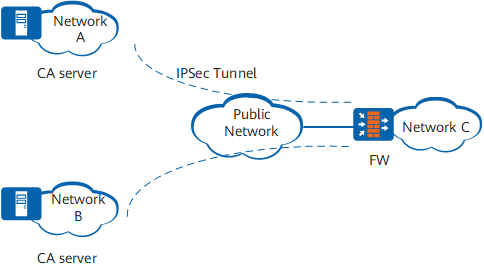

This example provides only the configurations related to certificate access policy.
Configuration Roadmap
The configuration roadmap is as follows:
Create a certificate attribute group and specify the attributes issuer name and subject name.
Create a certificate access policy and permit the certificates matching the specified attributes.
Procedure
- # Configure the default certificate access control policy action is Deny. That is, the certificate is not allowed to pass verification.
<sysname> system-view
[sysname] sysname FW
[FW] pki certificate access-control-policy default deny
- # Create a certificate attribute group group.
[FW] pki certificate attribute-group group - # Specify the issuer name networkb_ca and subject name cert_ca.
[FW-pki-attribute-group] attribute 1 issuer-name dn equ networkb_ca
[FW-pki-attribute-group] attribute 2 subject-name dn equ cert_ca
[FW-pki-attribute-group] quit
- # Create a certificate access policy policy.
[FW] pki certificate access-control-policy name policy - # Configure the certificate access rule to permit the certificates matching the specified attributes.
[FW-pki-access-policy] rule 1 permit groupAfter the configurations are complete, only the device matching the certificate attributes (issuer name networkb_ca and subject name cert_ca) can set up an IPSec tunnel with the FW.