CLI: Example for Manually Importing the RSA Key Pair and Certificate of Another Device
Networking Requirements
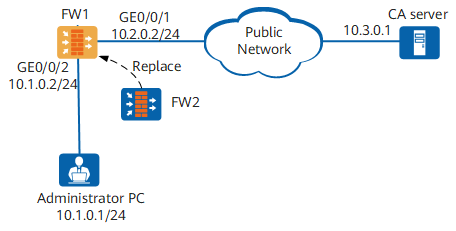
On an enterprise network shown in Figure 1, FW1 is located at the edge to function as the egress gateway and a CA server is located on the public network. FW1 has applied for a local certificate from the CA server.
The enterprise wants to replace FW1 with FW2 because FW1 is outdated. However, FW1's RSA key pair and certificate can only be manually imported to FW2 because of network factors.

If FW1 is a non-Huawei device, see its configuration manual for related commands.
Configuration Roadmap
The configuration roadmap is as follows:
- Export FW1's RSA key pair and certificate to the storage card.
- Save the RSA key pair and certificate in FW1's storage card to the PC using TFTP.
- Save FW1's RSA key pair and certificate on the PC to FW2's storage card using TFTP.
- Import the RSA key pair and certificate in FW2's storage card to the memory.
Procedure
- Export FW1's RSA key pair and certificate.
# Export the RSA key pair rsa_key and corresponding certificate cer_test.cer to the test02.pem file in PEM format and set the encryption mode to AES.
<sysname> system-view
[sysname] sysname FW1
[FW1] pki export rsa-key-pair rsa_key and-certificate cer_test.cer pem test02.pem aes password Huawei@123
 Warning: Exporting the key pair impose security risks, are you sure you want to
 export it? [y/n]:y
 Info: Succeeded in exporting the RSA key pair in PEM format.
When the pki rsa local-key-pair create command is executed on FW1 to create an RSA key pair, it is not allowed to export this RSA key pair if the exportable parameter is not configured.
# Check whether the test02.pem file exists in the storage card.
[FW1] quit
<sysname> system-view
Directory of hda1:/
  Idx  Attr     Size(Byte)  Date        Time       FileName

    0  -rw-         3,016   Jun 15 2017 18:48:26   test02.pem
1,179,616 KB total (434,592 KB free)
- Save the test02.pem file in FW1's storage card to the PC using TFTP.
- Save the test02.pem file on the PC to FW2's storage card using TFTP.
- Import FW1's RSA key pair and certificate to FW2.
# Import the RSA key pair file test02.pem in the PEM format. The RSA key pair is named rsakey and marked exportable, and the decryption password is Huawei@123.
<sysname> system-view
[sysname] sysname FW2
[FW2] pki import rsa-key-pair rsakey pem test02.pem exportable password Huawei@123
 Info: Succeeded in importing the RSA key pair in PEM format.
After the test02.pem file is imported to FW2, the RSA key pair rsakey, local certificate rsakey_local.cer, and CA certificate rsakey_ca.cer are generated in the memory.
If the test02.pem file exported from FW1 does not contain a CA certificate, no CA certificate is generated in the memory of FW2 after this file is imported to FW2. If a CA certificate needs to be imported to FW2, run the pki export-certificate ca and pki import-certificate ca commands by following the preceding steps.
- Verify the configuration.
# Run the display pki rsa local-key-pair command on FW2 to check information about the RSA key pair imported to the memory.
[FW2] display pki rsa  local-key-pair name rsakey public
=====================================================
Time of Key pair created: 20:47:15  2017/8/14
Key Name: rsakey
Key Index: 0
Key Modules: 2048 bit
Key Exportable: Yes
Key Type: RSA signature key
=====================================================
Key code:
30820109
  02820100
    D5667ACC 2A913858 17197737 BF37A144 83DF295E
    96C13014 61001366 57907283 D0DD8A4C 3332F6FF
    4A69C482 E4F1298F 5D5A922A 983F5006 27253BFA
    EC5069C8 D80D031B AE7B8E8C 35716A62 A1948345
    774664B4 E8DA1EC4 AF669526 B953D86E 07AC5766
    BE53B632 9D58EC68 A93CD7C0 CA3BFA10 6504E2C8
    182377DB 967F119B 222EED39 20CB4293 8689BD8E
    65924C72 83E955B9 181FBBA0 5BE8F33D BA2A537C
    DD5D2DD5 A78912D1 10558585 C33AFA60 1C5FF513
    80EC335B 2AC46435 C59D9247 54E69DC2 E471A0CB
    D7F83F1B 4D2CCD98 1D7C6C2C CBD59E45 FE8B6B08
    5E473912 E719554A D280F8C7 D9D9D15F 794735BC
    27B67F27 8DD23784 82696050 9A41F883
  0203
    010001
# Run the display pki certificate local filename command on FW2 to check the content of the local certificate imported to the memory.
[FW2] display pki certificate local filename rsakey_local.cer
 The  x509_obj type is Cert:
Certificate:
    Data:
        Version: 3 (0x2)
        Serial Number: 1144733510 (0x443b3f46)
        Signature Algorithm: sha1WithRSAEncryption
        Issuer: C=cn, ST=beijing, L=BB, O=BB, OU=BB, CN=BB
        Validity
            Not Before: Jun 12 09:33:10 2012 GMT
            Not After : Aug 13 02:38:27 2016 GMT
        Subject: C=CN, ST=jiangsu, O=huawei, OU=info, CN=hello
        Subject Public Key Info:
            Public Key Algorithm: rsaEncryption
                Public-Key: (2048 bit)
                Modulus:
                    00:d3:12:fe:57:48:c6:a5:10:12:e9:2f:f9:2a:ff:
                    7b:2a:d8:45:69:11:c4:85:30:c4:9a:4d:0f:ad:58:
                    e7:56:cd:5c:f0:18:e1:c3:6d:44:c2:c3:5e:64:22:
                    d1:28:c9:c3:37:3c:34:ed:28:04:7f:62:9e:8b:94:
                    af:bc:72:de:f6:72:7f:e4:d8:45:31:fd:f9:ac:ce:
                    5a:b9:c7:1b:23:53:00:28:a6:3b:f5:61:69:5d:ab:
                    67:cb:bb:e8:96:2f:ce:ab:2c:6b:91:5b:26:91:86:
                    8f:80:a9:b0:66:c1:16:3d:31:55:a2:d4:b5:5a:af:
                    85:88:6e:99:f8:f8:53:58:77:26:91:ed:0e:94:ad:
                    c5:8d:53:67:67:55:08:8d:90:38:e0:5e:96:37:b9:
                    64:0e:36:e7:cf:9a:d2:77:e4:b0:24:05:a6:eb:03:
                    6e:ff:f7:ab:be:93:9e:8c:66:7d:31:66:be:6d:c8:
                    f3:17:9d:86:19:88:21:2d:d9:69:86:5f:b2:55:a4:
                    db:bc:d7:d0:6b:ac:66:ac:e4:63:9c:66:79:9c:42:
                    5c:83:b8:9e:4b:6e:67:85:a2:47:19:f1:5c:c0:3c:
                    c9:a3:47:02:a8:53:69:59:9e:d9:c7:5e:90:83:8d:
                    ac:cd:21:3c:d5:31:39:49:84:e6:f8:f4:e0:44:dd:
                    5d:7b
                Exponent: 65537 (0x10001)
        X509v3 extensions:
            X509v3 Subject Alternative Name:
                IP Address:10.2.0.2, DNS:test.abc.com
    Signature Algorithm: sha1WithRSAEncryption
        53:d5:79:31:7b:40:52:aa:ec:a9:35:ed:07:62:32:c4:ce:22:
        d3:37:0e:83:0c:4c:fa:61:dd:8c:db:a8:d3:fd:6a:ca:0e:3c:
        91:2c:91:ab:92:31:34:b5:87:1e:30:a4:ff:94:9c:d2:71:3c:
        6b:1f:4f:be:a7:20:f2:e1:c2:ad:71:8b:c2:79:0f:50:1f:3c:
        f9:87:df:1d:ee:3d:38:8c:f3:30:b7:3b:00:9b:72:38:b0:68:
        e1:c0:08:f4:02:91:81:a8:fa:51:9e:53:0d:03:b3:6b:0e:e2:
        62:80:ef:2a:a0:cb:9b:9b:91:21:7c:df:fe:6a:38:cc:03:36:
        9c:fc
Pki realm name: -

Certificate file name: rsakey_local.cer
Certificate peer name: -
# Run the display pki certificate ca filename command on FW2 to check the content of the CA certificate imported to the memory.
[FW2] display pki certificate ca filename rsakey_ca.cer
 The x509 object  type is certificate:
Certificate:
    Data:
        Version: 3 (0x2)
        Serial Number: 2 (0x2)
        Signature Algorithm: sha1WithRSAEncryption
        Issuer: C=cn, ST=beijing, L=BB, O=BB, OU=BB, CN=BB
        Validity
            Not Before: Aug 15 02:38:27 2011 GMT
            Not After : Aug 13 02:38:27 2016 GMT
        Subject: C=CN, ST=jiangsu, O=huawei, OU=info, CN=hello
        Subject Public Key Info:
            Public Key Algorithm: rsaEncryption
                Public-Key: (1024 bit)
                Modulus:
                    00:b7:3e:65:7f:3b:3c:18:b8:87:34:39:76:3c:87:
                    39:f7:a9:b3:35:9b:e0:e0:5b:c7:4f:3c:bb:fa:dd:
                    da:93:0b:55:6e:eb:ba:52:c8:86:d1:cf:14:1e:1c:
                    35:c6:53:68:f3:51:e7:2c:d4:b8:fa:0f:b3:04:ef:
                    3f:a0:b3:4d:78:c1:26:88:26:15:41:3d:14:7f:67:
                    3e:2f:35:32:ce:c7:73:73:43:5c:12:d3:0f:a0:ec:
                    96:ae:55:61:27:32:39:a4:f8:32:a1:68:50:e6:3d:
                    2b:39:6d:42:e8:09:5d:4f:98:46:6e:fc:80:87:0e:
                    36:ca:09:7a:ca:2f:dd:ad:d3
                Exponent: 65537 (0x10001)
        X509v3 extensions:
            X509v3 Basic Constraints: critical
                CA:TRUE
            X509v3 Subject Key Identifier:
                4F:67:F4:CB:F4:C3:F7:61:2C:BD:FF:1D:D1:29:FD:39:28:9F:3B:8B
            X509v3 Key Usage:
                Certificate Sign, CRL Sign
            Netscape Cert Type:
                SSL CA, S/MIME CA, Object Signing CA
            Netscape Comment:
                xca certificate
    Signature Algorithm: sha1WithRSAEncryption
        75:43:24:eb:db:ee:7d:05:30:88:b8:1b:d5:32:ca:51:49:74:
        04:94:fe:d0:31:29:6f:72:c7:4a:86:ac:2a:4c:45:24:9d:3c:
        b4:30:b5:d1:43:88:29:f7:b4:88:b8:37:dc:dd:f4:fa:42:34:
        1c:e6:a5:bc:bb:0b:37:ef:db:8c:b2:b0:bd:97:7f:15:ae:6c:
        71:1b:ff:f1:90:13:74:a4:1f:7c:f7:4e:80:5b:42:aa:6b:22:
        2a:cf:04:48:29:20:c0:b2:95:38:11:06:be:76:f0:cb:8d:4a:
        c6:1a:50:af:31:81:58:ac:14:fe:89:f2:e0:bb:95:3c:94:d0:
        54:96
Pki realm name: -

Certificate file name: rsakey_ca.cer
Certificate peer name: -