Logging In to the CLI Through the Console Port
By default, the FW allows an administrator to log in to the CLI administrator interface using the console port.
Procedure
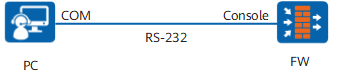
- Connect the console cable.
- Shut down the FW and power off the configuration terminal.
- Connect the RS-232 serial port of the configuration terminal to the configuration interface of the FW with a cable.
- After checking the installation, power on the configuration terminal.
- Configure the terminal. You can obtain free terminal software such as PuTTY from the Internet. The following uses PuTTY as an example to describe how to configure the terminal.
- Download the PuTTY software to the local device and double-click it to run the software.
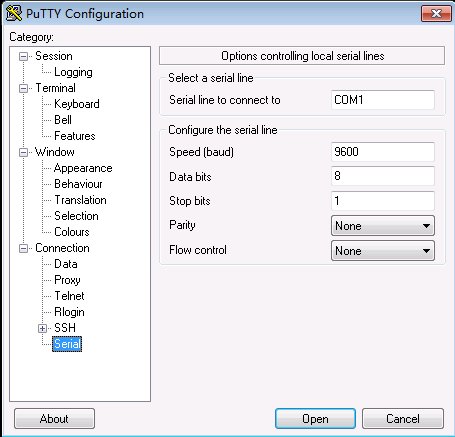
- Choose Session and set Connection type to Serial.
Set the parameters for connecting the serial port to the device.
Figure 2 shows detailed parameter settings.
- Click Open.
- Click Enter until information similar to the following is displayed. Enter a password and confirm the password as prompted.
An initial password is required for the first login via the console.
Set a password and keep it safe. Otherwise you will not be able to login via the console.

Please configure the login password (8-16)
Enter Password:
Confirm Password:
Warning: The authentication mode was changed to password authentication and the user level was changed to 15 on con0 at the first user login.
Warning: There is a risk on the user-interface which you login through. Please change the configuration of the user-interface as soon as possible.
*************************************************************************
*         Copyright (C) 2014-2020 Huawei Technologies Co., Ltd.         *
*                           All rights reserved.                        *
*               Without the owner's prior written consent,              *
*        no decompiling or reverse-engineering shall be allowed.        *
*************************************************************************
You must set a login password upon first login to the device through the console port.
- To enhance security, the password must meet the following requirements:
- The password is a string of 8 to 16 case-sensitive characters.
The password must meet the minimum strength requirements, that is, the password needs to contain at least three types of the following characters: uppercase letters (A to Z), lowercase letters (a to z), digits (0 to 9), and special characters, such as exclamation points (!), at signs (@), number signs (#), dollar signs ($), and percent (%).
In interactive mode, the entered password is not displayed on the terminal screen.
Keep the new password safe for your next login.
Follow-up Procedure
Log in to the device through the console port for management and configuration. You can also create more administrators or establish the Telnet, STelnet, and web login environment. For details, refer to Administrator.