Configuring a DHCPv6 Server
This section describes how to configure a DHCPv6 server.
Context
A DHCPv6 server globally maintains parameters, such as IPv6 addresses, prefixes, and information leases. DHCPv6 also assigns configuration information, such as the IPv6 addresses of DNS and SIP servers, to DHCPv6 clients.
Procedure
- Choose .
- Click Add.
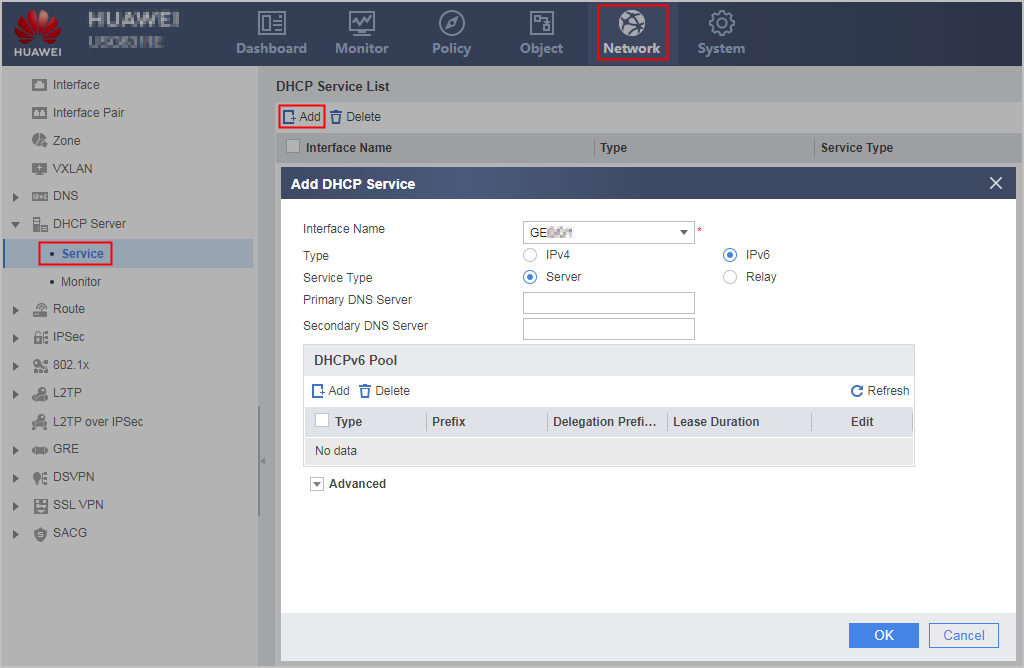
- Set the following basic DHCPv6 server parameters.
Parameter
Description
Interface Name
Name of the interface on which the DHCPv6 server function is configured.
The interface must be an existing interface, and its Connection Type must be set to Static IP.
Type
Protocol type on the interface:
- IPv4: enables DHCP.
- IPv6: enables DHCPv6. Select IPv6 in this example.
Service Type
Enable server service on this interface.
(Optional)Primary DNS Server
Primary DNS server address to be assigned to a DHCPv6 client.
(Optional)Secondary DNS Server
Secondary DNS server address to be assigned to a DHCPv6 client.
- Click Add in Delegated
Prefix. In the dialog box, click OK, and set parameters for the address pool.
- Set the following advanced DHCPv6 server parameters.
Parameter
Description
Domain Name
DNS suffix that a DHCPv6 server assigns to a DHCPv6 client.
SNTP Server
SNTP server address that a DHCPv6 server assigns to a DHCPv6 client.
SIP Server
SIP server address that a DHCPv6 server assigns to a DHCPv6 client.
- Click Apply.
Repeat previous operations to configure the DHCPv6 server function on multiple interfaces.