Web: Example for Enabling Remote Users to Access the Headquarters through SSL VPN (RADIUS Two-Factor Authentication + Local Authorization)
Networking Requirements
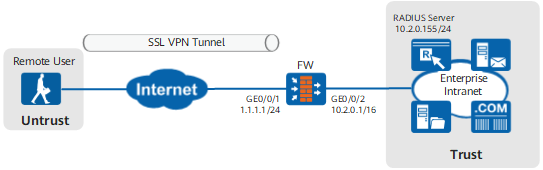
Figure 1 shows the network topology. Mobile users can access resources at the headquarters using SSL VPNs. The enterprise has higher security requirements on user authentication. Therefore, use the RADIUS two-factor authentication mode to authenticate access users.
Requirements are as follows:
- Top executives on the move or working at home can obtain IP addresses and access the intranet smoothly and securely. They can also access the Webmail and ERP systems using a browser.
- Employees on the move or working at home can access the Webmail and ERP systems using a browser.
Data Planning
Item |
Data |
|---|---|
Interface |
Interface ID: GigabitEthernet 0/0/1 IP address: 1.1.1.1/24 Security zone: Untrust |
Interface ID: GigabitEthernet 0/0/2 IP address: 10.2.0.1/16 Security zone: Trust |
|
Teleworker account |
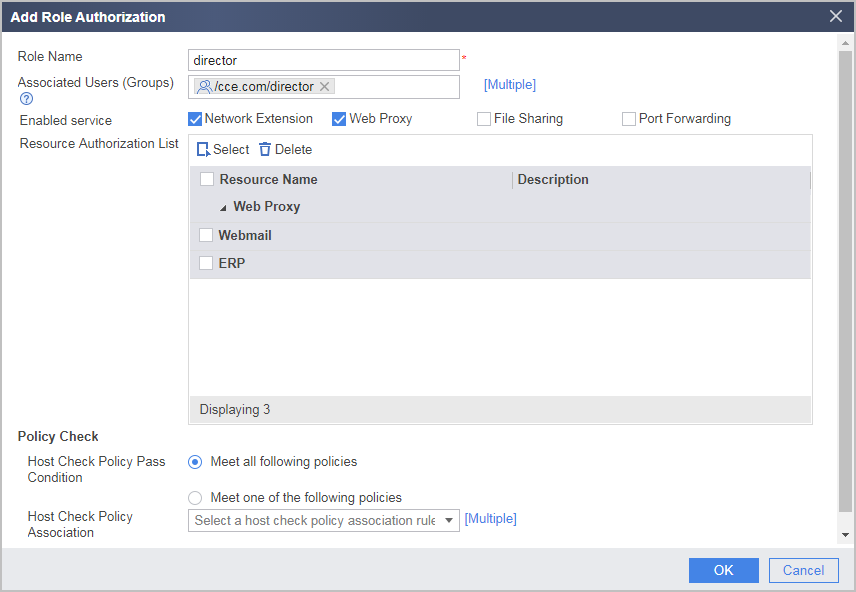
Top executive User name: user0001 Group: /sslvpn/director |
Common employee User name: user0002 Group: /sslvpn/employee |
|
Virtual gateway |
Name: example Interface: GigabitEthernet 0/0/1 Domain name: example.huawei.com Maximum number of users: 150 Maximum number of online users: 100 |
RADIUS server |
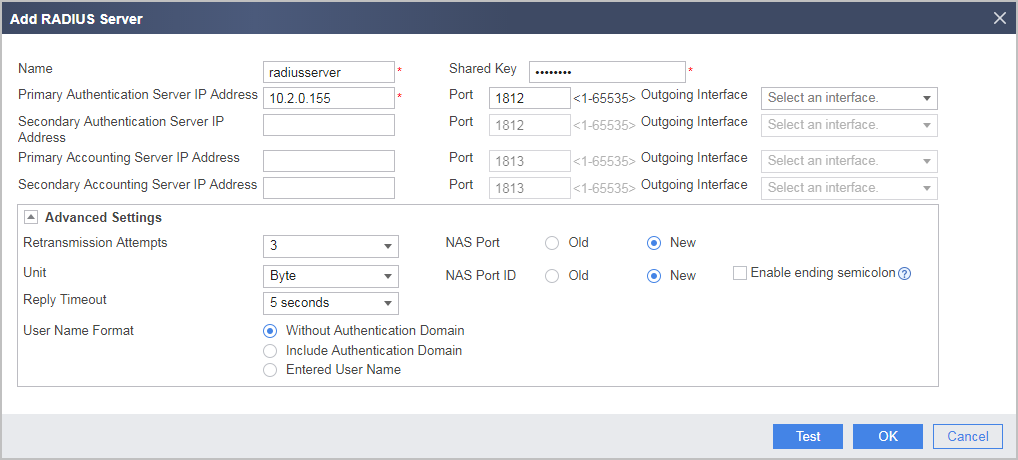
IP address: 10.2.0.155 Port: 1812 Pre-shared key: Admin@1234 NOTE:
The RADIUS pre-shared keys configured on the FW and RADIUS server must be the same. |
Web proxy resource |
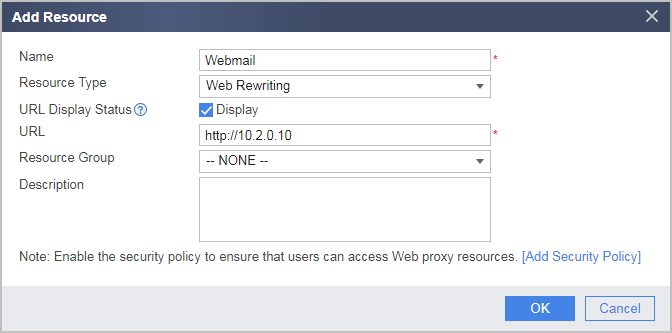
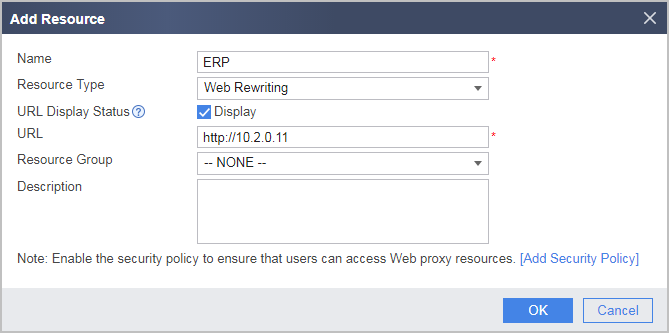
Name: Webmail; link: http://10.2.0.10 Name: ERP; link: http://10.2.0.11 |
Network extension |
Network extension address pool: 172.16.1.1-172.16.1.100 Routing mode: Manual Intranet subnet accessible to network extension users: 10.2.0.0/16 |
Procedure
- Configure interfaces.
- Click
 of GE0/0/1 and set the following parameters:
Zone
untrust
IPv4
IP Address
1.1.1.1/24
Default Gateway
1.1.1.2
- Click
- Configure security policies to allow users to use SSL VPN services.
- Choose and set parameters for interconnection between the FW and RADIUS server.
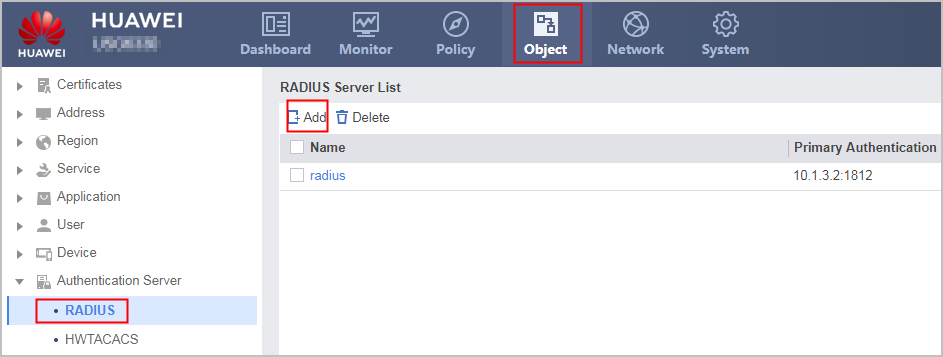

If the RADIUS server does not support user names in Login Name@Authentication Domain format, you cannot select Include Authentication Domain for User Name Format. Otherwise, the authentication fails.
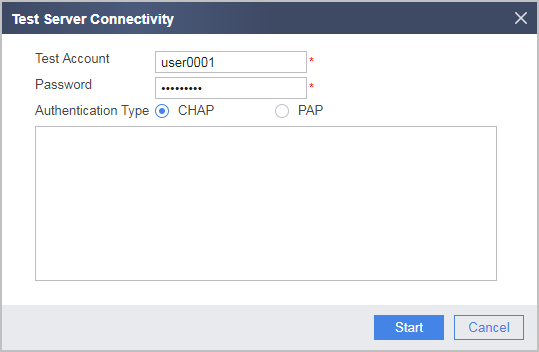
Click Test. In the dialog box that is displayed, click OK and enter the user name and password. Click Start to check the connectivity to the RADIUS server.
The user name and password for testing server connectivity can be different from those specified on the server. The user name can be any user name, and the password cannot contain any space, question mark (?), or double quotation mark (").
- Choose , configure an authentication domain.
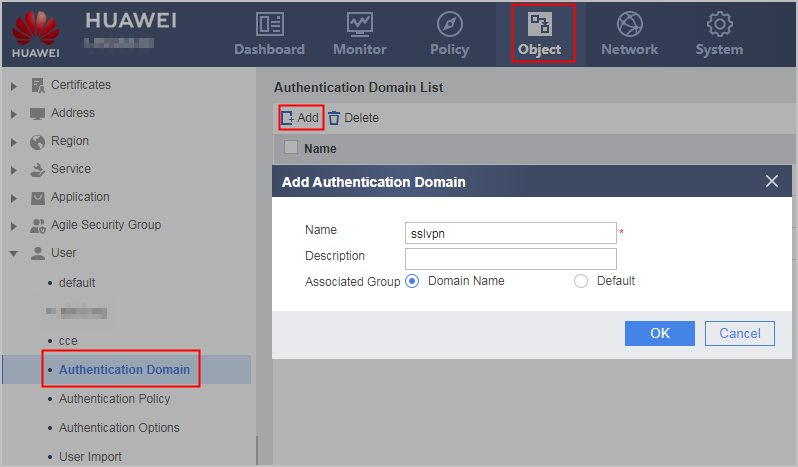
- Import users and user groups from a CSV file.
- In Local Import, click Download CSV Template and download the CSV template to your PC.
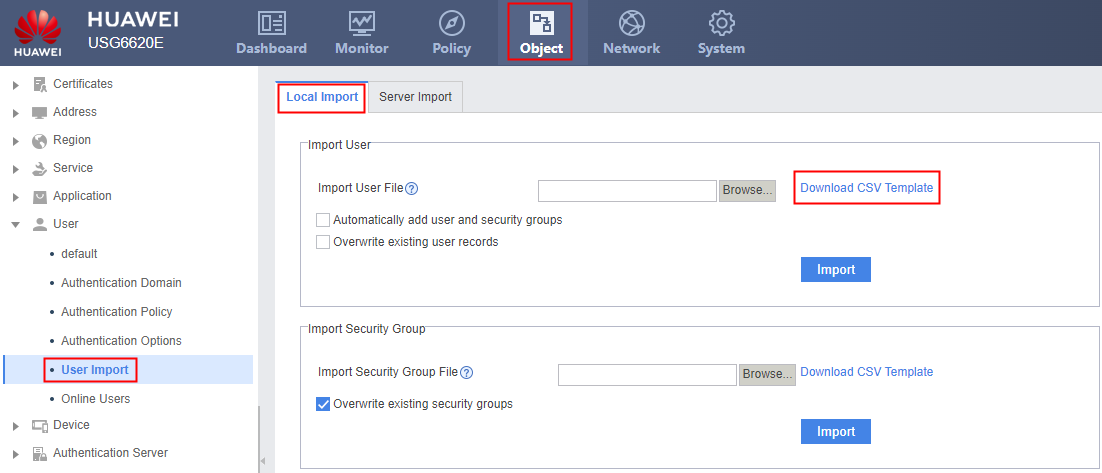
- Write user information on the RADIUS server into a CSV file according to the template.
Read the instructions on the CSV template and fill in user information. The following figure shows a complete CSV file.

The first level of the "group path" in the CSV file is the authentication domain name. Therefore, the "login name" does not contain "@domain-name." In this example, the user name on the RADIUS server is user0002@sslvpn. Therefore, the group path is /sslvpn and the login name is user0002 in the CSV file.
- Click Browse, select the edited CSV file, click Open, and set the following parameters.
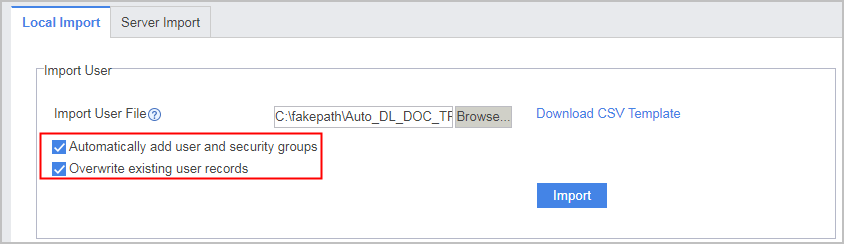
- In Local Import, click Download CSV Template and download the CSV template to your PC.
- Configure an SSL VPN gateway, including the gateway address, user authentication, and maximum number of concurrent users.
- Click the Add, configure an SSL VPN gateway and set the parameters as follows.
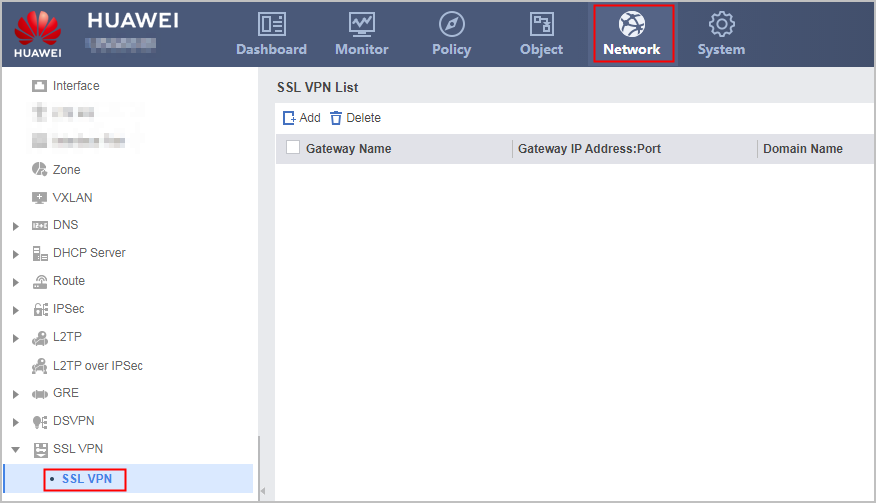
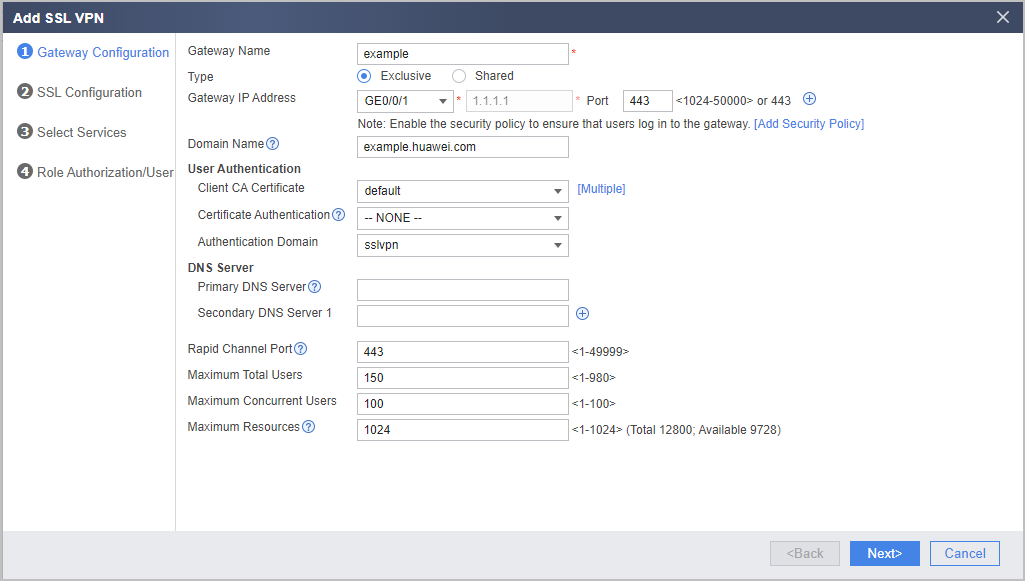
If the virtual gateway is bound to an authentication domain, the user name entered for a login should not carry the authentication domain information. If the user name carries an authentication domain name, the gateway considers the string following the at sign (@) as a part of the user name, not an authentication domain name. For example, if the virtual gateway has been bound to the authentication domain sslvpn, you should enter user0001, not user0001@sslvpn, as the user name.
- Click the Add, configure an SSL VPN gateway and set the parameters as follows.
- Configure the SSL version, SSL encryption suite, and timeout duration and life cycle of SSL sessions on the device. The configuration is optional. You can use the default values.
- Set the following parameters. In the example, use the default algorithms.
- Click Next.
- Select the services to be enabled.
- Select Web Proxy and Network Extension.
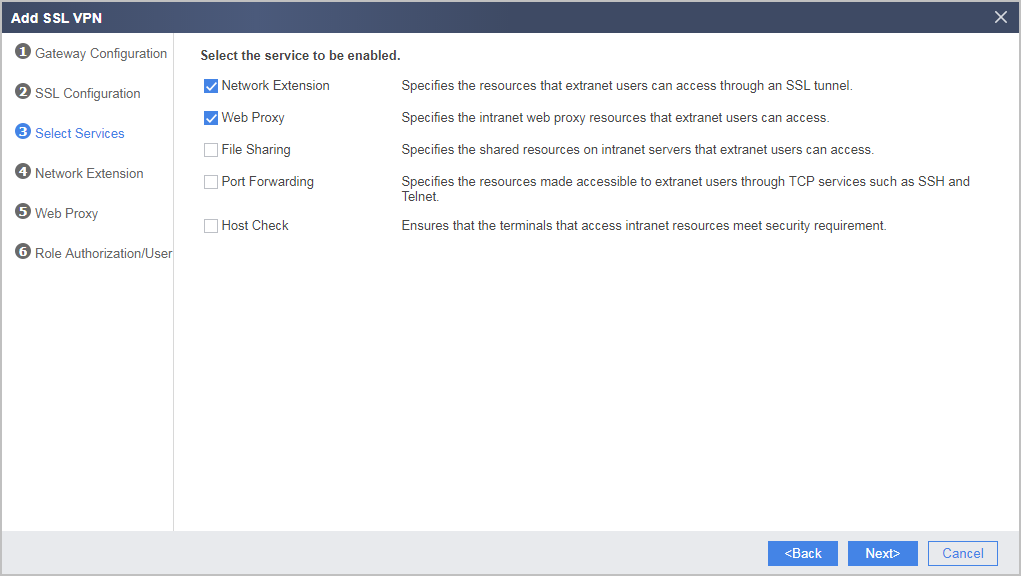
- Select Web Proxy and Network Extension.
- Configure the network extension function.
- Set the Available IP Address Range and Accessible Private Network Segment List to the network extension function as follows:
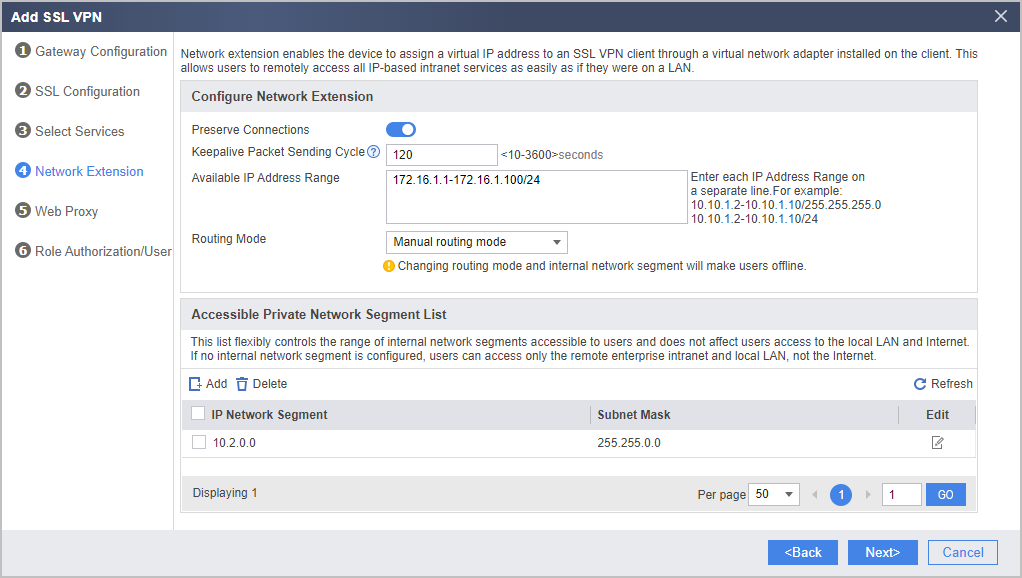
- Set the Available IP Address Range and Accessible Private Network Segment List to the network extension function as follows:
- Configure the web proxy function and add resources Webmail and ERP.
- In Web Proxy Resource List, click Add.
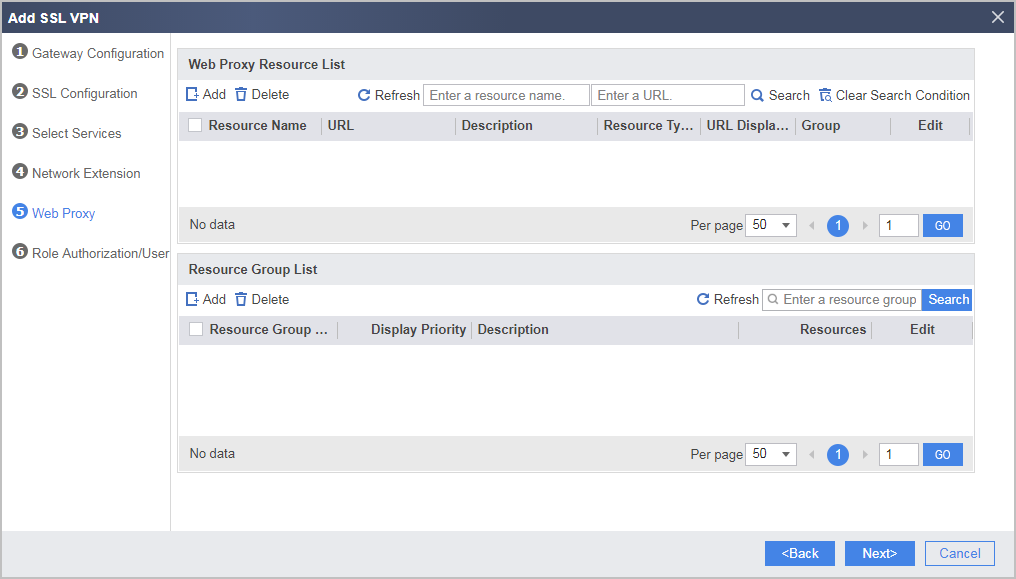
- Add web proxy resource Webmail as follows:
- Repeat the preceding steps to add web proxy resource ERP as follows:
- In Web Proxy Resource List, click Add.
- Configure SSL VPN role authorization/users.
- Under List of Authorized Roles, click Add.
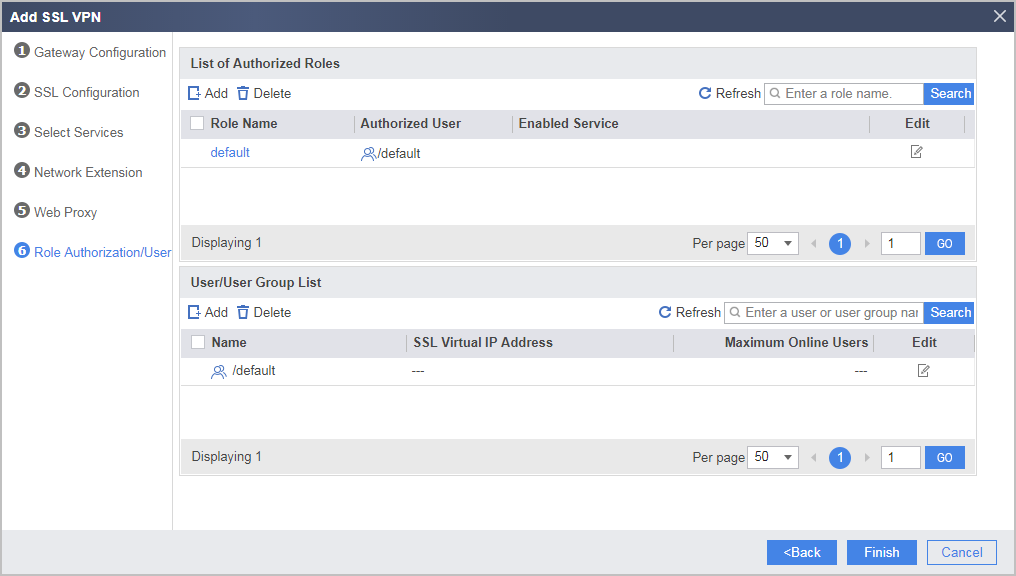
- Add director user group to a role and associate corresponding permissions.
- Add employee user group to a role and associate corresponding permissions.
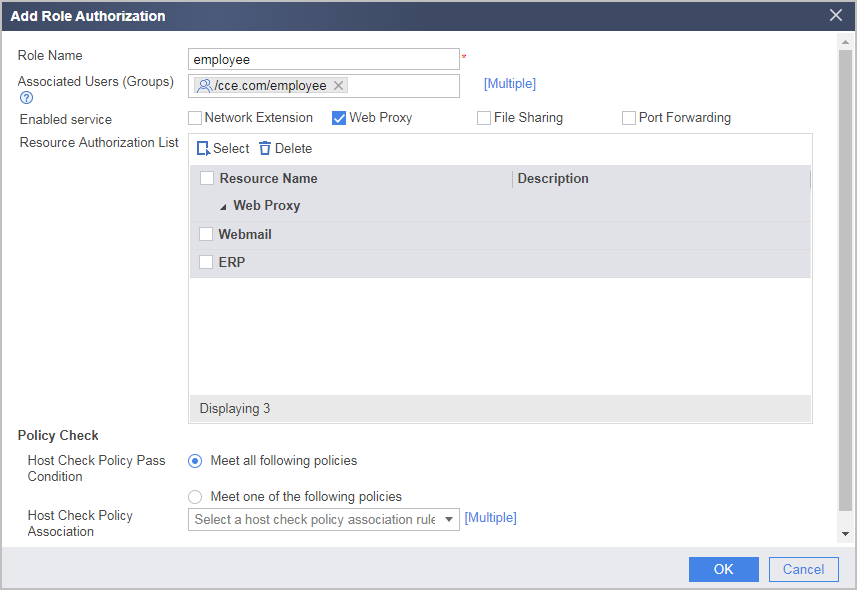
- Under List of Authorized Roles, click Add.
Verifying the Configuration
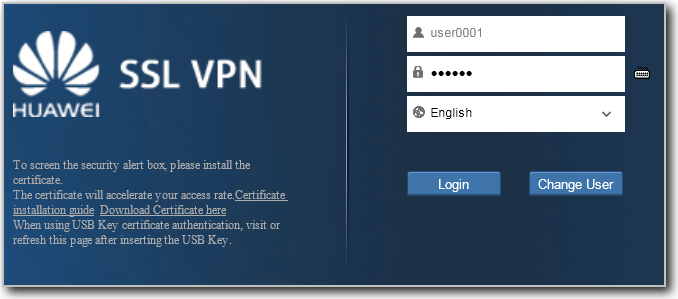
- Enter example.huawei.com or https://1.1.1.1 in the address box of the browser to access the SSL VPN login page using the teleworker account. Upon initial login, install the controls as instructed by the browser.
Virtual gateways of different versions require Active controls of different versions to be installed on the client. When a client is used to access virtual gateways of different versions. Delete the old Active control and install a new one for accessing a new virtual gateway. Otherwise, the browser will be stuck at the control loading page.
If the client is on a PC, run the following command to delete a control:
PC> regsvr32 SVNIEAgt.ocx -u -s
PC> del %systemroot%\SVNIEAgt.ocx /q
PC> del %systemroot%\"Downloaded Program Files"\SVNIEAgt.inf /q
PC> cd %appdata%
PC> rmdir svnclient /q /s
- Enter the user name and PIN code on the login page to log in to the SSL VPN gateway.
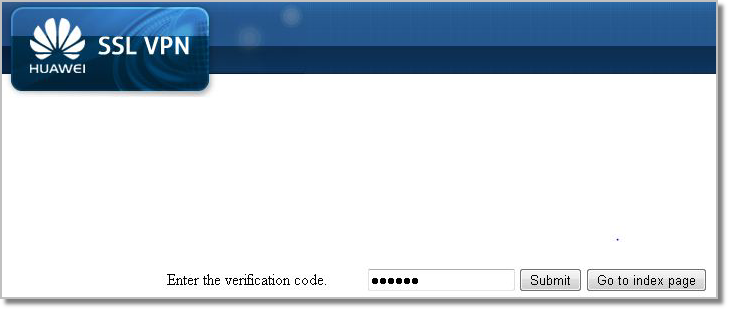
The Enter the Verifying the Configuration code dialog box is displayed if the user name and PIN code pass authentication. Enter the SMS Verifying the Configuration code or token ID and click Submit.
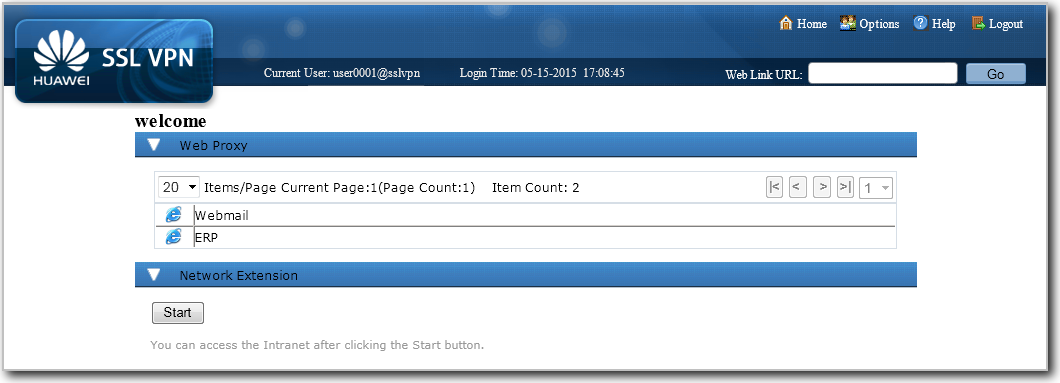
- After logging in to the SSL VPN gateway using the top executive account user0001, you can use the web proxy and network extension service. You can click Webmail and ERP to use corresponding services. Click Start to automatically install the virtual network adapter to obtain a virtual IP address. After that, you can use various services just as you are on a LAN.
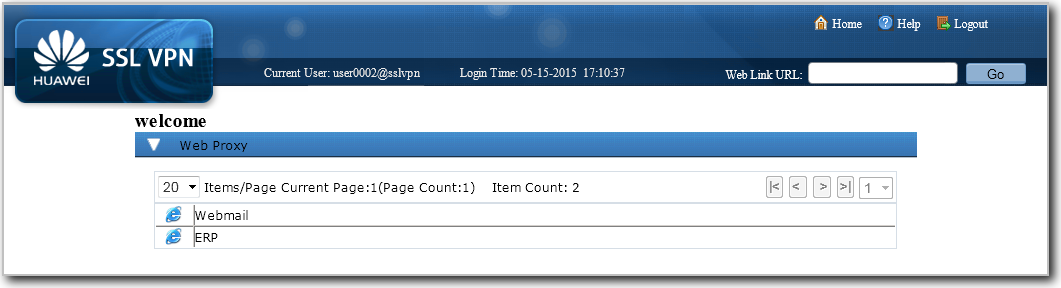
- Use common employee account user0002 to log in to the SSL VPN gateway. You can use only the web proxy service. You can click Webmail and ERP to use corresponding services.
Configuration Scripts
#
radius-server template radiusserver
 radius-server shared-key %$%$73pu<+^]XV9mn=*qd}_,r3*!%$%$
 radius-server authentication 10.2.0.155 1812
#
interface GigabitEthernet0/0/1
 ip address 1.1.1.1 255.255.255.0
#
interface GigabitEthernet0/0/2
 ip address 10.2.0.1 255.255.0.0
#
firewall zone trust
 set priority 85
 add interface GigabitEthernet0/0/2
#
firewall zone untrust
 set priority 5
 add interface GigabitEthernet0/0/1
#
v-gateway example interface GigabitEthernet0/0/1 private example.huawei.com
v-gateway example authentication-domain sslvpn
v-gateway example max-user 150
v-gateway example cur-max-user 100
#
aaa
 authentication-scheme radius
  authentication-mode  radius
 #
 domain sslvpn
  authentication-scheme  radius
  radius-server radiusserver
  service-type access internet-access
  reference user current-domain
#
v-gateway example
 service
  web-proxy enable
  web-proxy web-link enable
  web-proxy proxy-resource Webmail http://10.2.0.10 show-link
  web-proxy proxy-resource ERP http://10.2.0.11 show-link
  network-extension enable
  network-extension keep-alive enable
  network-extension netpool 172.16.1.1 172.16.1.100 255.255.255.0
  network-extension mode manual
  network-extension manual-route 10.2.0.0 255.255.0.0
 role
  role director condition all
  role director network-extension enable
  role director web-proxy enable
  role director web-proxy resource ERP
  role director web-proxy resource Webmail
  role employee condition all
  role employee web-proxy enable
  role employee web-proxy resource ERP
  role employee web-proxy resource Webmail
#
security-policy
 rule name policy_sslvpn_1
  source-zone untrust
  destination-zone local
  destination-address 1.1.1.1 32
  service https
  action permit
 rule name policy_sslvpn_2
  source-zone local
  destination-zone trust
  destination-address 10.2.0.10 32
  destination-address 10.2.0.11 32
  action permit
 rule name policy_sslvpn_3
  source-zone untrust
  destination-zone trust
  source-address range 172.16.1.1 172.16.1.100
  destination-address 10.2.0.0 16
  action permit
 rule name policy_radius_server
  source-zone local
  destination-zone trust
  destination-address 10.2.0.155 32
  action permit

# The following configuration is used to perform a one-time operation and not stored in the configuration profile.
  user-manage user-import demo.csv auto-create-group override
# The following configuration is stored in the database, but not in the configuration profile.
 v-gateway example
  vpndb
   group /sslvpn/director
   group /sslvpn/employee
  role
   role director group /sslvpn/director
   role director group /sslvpn/employee