Introduction to DHCP Messages
This section describes the DHCP message format and types.
DHCP Message Format
The DHCP message format is based on the BOOTP message format. Messages are encapsulated using UDP. Figure 1 shows the format of a DHCP message.
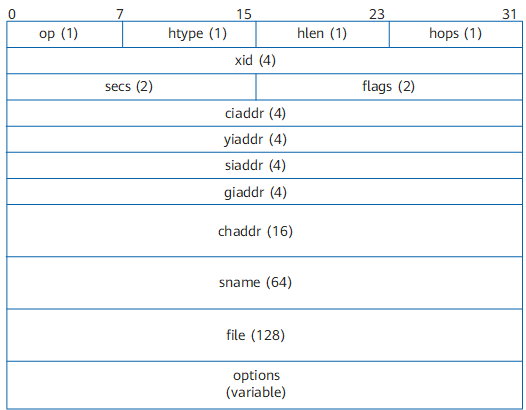
In Figure 1, numbers in the round brackets indicate the field length in bytes. Table 1 shows the description of each field in the DHCP message.
Field |
Length |
Description |
|---|---|---|
op |
1 byte |
Operation Code—indicates the operation types of messages. Types are as follows:
|
htype |
1 byte |
Hardware Type—indicates the type of hardware addresses. It is valid only for Ethernet now. The value is 1. |
hlen |
1 byte |
Hardware Length—indicates the length of hardware addresses, in bytes. It is valid only for Ethernet now. The value is 6. |
hops |
1 byte |
Hops—indicates the number of DHCP relay agents through which a DHCP message passes. This field is set to 0 by a DHCP client. Its value increases by 1 each time the message passes through a DHCP relay agent. This field is used to limit the number of DHCP relay agents that a DHCP message passes.
NOTE:
The number of DHCP relay agents between the server and client cannot exceed 32, namely, the value of hops cannot be greater than 32. Otherwise, DHCP messages are discarded. |
xid |
4 bytes |
Transaction ID—indicates a random number chosen by a DHCP client to exchange messages with a DHCP server. |
secs |
2 bytes |
Seconds—indicates the number of seconds elapsed since a client obtains or renews an IP address, in seconds. |
flags |
2 bytes |
Flags—indicates the flags field. Only the leftmost bit in this field has meaning and the other bits are set to 0. The leftmost bit is the unicast or broadcast response flag bit, specifying whether the DHCP server responds to messages in unicast or broadcast mode. The values are as follows:
|
ciaddr |
4 bytes |
Client IP Address—indicates the IP address of a client. The IP address is either an existing IP address or an IP address assigned by a DHCP server to a DHCP client. During the process of a client acquiring an IP address, the value of this field is 0.0.0.0.
NOTE:
The IP address 0.0.0.0 is an invalid destination address and is only used by a DHCP-enabled device to temporarily communicate with other devices during startup. |
yiaddr |
4 bytes |
Your (Client) IP Address—indicates the IP address assigned by a server to a client. The DHCP server fills this field into a DHCP Offer message. The DHCP server fills the IP address to be assigned to a client into this field when responding to the client's request. |
siaddr |
4 bytes |
Server IP Address—indicates the IP address of a DHCP server. |
giaddr |
4 bytes |
Gateway IP Address—indicates the IP address of the first DHCP relay agent. If a client sends a DHCP request and the server and client are on different network segments:
NOTE:
If a message passes through more than one DHCP relay agent before reaching the DHCP server, the value of this field is the IP address of the first DHCP relay agent and remains unchanged. However, the value of the hops field increases by 1 each time the message passes through a DHCP relay agent. |
chaddr |
16 bytes |
Client Hardware Address—indicates the MAC address of a client. This field must be consistent with the htype and hlen fields. When sending a DHCP request, the client fills its hardware address in this field. For Ethernet, a 6-byte Ethernet MAC address must be filled in this field when the htype and hlen fields are set to 1 and 6, respectively. |
sname |
64 bytes |
Server Host Name—indicates the name of the server from which a client obtains configurations. This field is optional and is filled in by a DHCP server. If this field is filled in, the value must be a character string that ends with 0. |
file |
128 bytes |
Boot File Name—indicates the startup configuration file name of a client. The DHCP server fills this field and delivers it together with the IP address to the client. This field is optional. If this field is filled in, the value must be a character string that ends with 0. |
options |
Variable |
Options—indicates the DHCP Option field, containing at least 312 bytes. This field contains the DHCP message type and configuration parameters allocated by a DHCP server to a client. The configuration parameters include the default gateway IP address, DNS server IP address, NetBIOS server IP address, and IP address lease. For details about the options field, see Format and Functions of the Options Field. |
DHCP Message Types
A DHCP server and a DHCP client communicate by exchanging DHCP messages. DHCP messages are classified into eight types.
Message Name |
Description |
|---|---|
DHCP Discover |
A DHCP Discover message is broadcast by a DHCP client to locate a DHCP server when the client attempts to connect to a network for the first time. |
DHCP Offer |
A DHCP Offer message is sent by a DHCP server to respond to a DHCP Discover message. A DHCP Offer message carries various configuration information. |
DHCP Request |
A DHCP Request message is sent in the following scenarios:
|
DHCP ACK |
A DHCP ACK message is sent by a DHCP server to acknowledge the DHCP Request message from a DHCP client. After receiving a DHCP ACK message, the DHCP client obtains the configuration parameters including the IP address. |
DHCP NAK |
A DHCP NAK message is sent by a DHCP server to reject the DHCP Request message from a DHCP client. For example, if a DHCP server cannot find matching lease records after receiving a DHCP Request message, the DHCP server sends a DHCP NAK message to notify the DHCP client that no IP address is available. |
DHCP Decline |
A DHCP Decline message is sent by a DHCP client to notify the DHCP server that the allocated IP address conflicts with another IP address. The DHCP client then applies to the DHCP server for another IP address. |
DHCP Release |
A DHCP Release message is sent by a DHCP client to release its IP address. After receiving a DHCP Release message, the DHCP server can allocate this IP address to another DHCP client. |
DHCP Inform |
A DHCP Inform message is sent by a DHCP client to obtain other network configuration parameters, such as the gateway address and DNS server address, after the DHCP client has obtained an IP address. |
Format and Functions of the Options Field
Format of the Options Field
Figure 2 shows the format of the Options field.

The Options field consists of Code, Length, and Value, which are described in the following table.
Field |
Length |
Description |
|---|---|---|
Code |
1 byte |
Indicates the option code. It uniquely identifies the following information. |
Length |
1 byte |
Indicates the length of the following information. |
Value |
Variable |
Indicates the message content. The length varies depending on the Length field. |
The value of the Options field ranges from 1 to 255. Table 4 lists well-known DHCP options.
Options No. |
Function |
|---|---|
1 |
Specifies a subnet mask. |
3 |
Specifies a gateway address. |
6 |
Specifies the IP address of a DNS server. |
12 |
Specifies the device name of a DHCP client. |
15 |
Specifies the domain name suffix. |
33 |
Specifies a group of classful static routes. After a DHCP client receives DHCP messages with this option, it adds the classful static routes contained in the option to its routing table. In classful routes, destination address masks are natural masks and cannot be used to divide subnets. If Option 121 is configured, Option 33 is ignored. |
44 |
Specifies a NetBIOS server IP address. |
46 |
Specifies a NetBIOS object type. |
50 |
Specifies a requested IP address. |
51 |
Specifies an IP address lease. |
52 |
Specifies an additional option. |
53 |
Specifies a DHCP message type. Mappings between the values and message types are as follows:
|
54 |
Specifies a server identifier. |
55 |
Specifies the parameter request list. A DHCP client uses this option to request specified configuration parameters. The content of this option is the value of the option requested by the DHCP client. |
56 |
Specifies a message option, which is used to describe the reason why an IP address fails to be allocated. This option is encapsulated into the Option field of the following DHCP messages.
|
58 |
Specifies the lease renewal time (T1), which is 50% of the lease time. |
59 |
Specifies the lease renewal time (T2), which is 87.5% of the lease time. |
60 |
Specifies the vendor category, which identifies the DHCP client type and configuration. |
61 |
Specifies a client identifier. |
66 |
Specifies a TFTP server name allocated to DHCP clients. |
67 |
Specifies a startup file name allocated to DHCP clients. |
77 |
Specifies a user type. |
121 |
Specifies a group of classless routes. This option contains a group of classless static routes. After a DHCP client receives DHCP messages with this option, it adds the classless static routes contained in the option to its routing table. In classless routes, masks of destination addresses can be any value and can be used to divide subnets. |
Functions of the Options Field
The Options field in DHCP messages can be used to carry control information and parameters that are not defined in some common protocols. If the DHCP server is configured with options, the DHCP client obtains configuration information in the Options field through DHCP response messages that are replied by the server when applying for an IP address.
Objects of this field vary with functions of the Options field. For example, Option 77 is used on the DHCP client to identify user types or applications of the DHCP client. The DHCP server selects an address pool to allocate an IP address and configuration parameters to the DHCP client based on the User Class in the Options field. Option 77 is configured on the DHCP client by users, and not on the server using commands.
For more information about well-known DHCP options, see RFC 2132.