CLI:Example for Configuring a Device as a DHCP Server (Based on an Interface Address Pool)
Networking Requirements
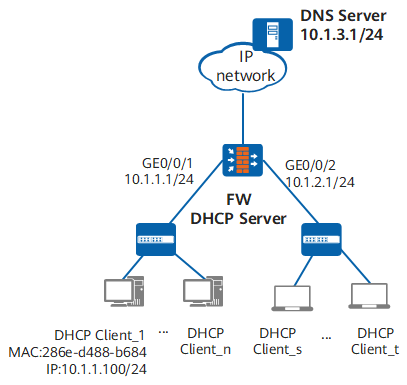
As shown in Figure 1, an enterprise plans two network segments for office terminals: 10.1.1.0/24 for fixed terminals and 10.1.2.0/24 for terminals used by staff on business trips. To facilitate unified management, the enterprise requires that terminals automatically obtain IP addresses and the DNS server IP address (if users access the Internet using domain names, a DNS server must be specified). A PC (DHCP Client_1) requires the fixed IP address 10.1.1.100/24 to meet service requirements.
Configuration Roadmap
The configuration roadmap is as follows:
Configure the FW as a DHCP server to dynamically allocate IP addresses on the two network segments and the DNS server IP address to enterprise terminals. IP addresses on 10.1.1.0/24 are allocated to fixed terminals and have a lease of 30 days. The fixed IP address 10.1.1.100/24 is statically allocated to DHCP Client_1. IP addresses on 10.1.2.0/24 are allocated to terminals used by staff on business trips and have a lease of two days.
Procedure
- Enable the DHCP service.
<FW> system-view
[FW] dhcp enable
- Configure IP addresses for the interfaces and assign the interfaces to security zones.
[FW] interface GigabitEthernet 0/0/1
[FW-GigabitEthernet0/0/1] ip address 10.1.1.1 24
[FW-GigabitEthernet0/0/1] quit
[FW] interface GigabitEthernet 0/0/2
[FW-GigabitEthernet0/0/2] ip address 10.1.2.1 24
[FW-GigabitEthernet0/0/2] quit
[FW] firewall zone trust
[FW-zone-trust] add interface GigabitEthernet 0/0/1
[FW-zone-trust] add interface GigabitEthernet 0/0/2
[FW-zone-trust] quit
- Configure interface address pools.
# Configure the DHCP clients under GigabitEthernet 0/0/1 to obtain the network parameters, such as IP addresses from the interface address pool.
[FW] interface GigabitEthernet 0/0/1
[FW-GigabitEthernet0/0/1] dhcp select interface
[FW-GigabitEthernet0/0/1] dhcp server lease day 30
[FW-GigabitEthernet0/0/1] dhcp server domain-name huawei.com
[FW-GigabitEthernet0/0/1] dhcp server dns-list 10.1.1.2
[FW-GigabitEthernet0/0/1] dhcp server excluded-ip-address 10.1.1.2
[FW-GigabitEthernet0/0/1] dhcp server static-bind ip-address 10.1.1.100 mac-address 286e-d488-b684
[FW-GigabitEthernet0/0/1] quit
# Configure the DHCP clients under GigabitEthernet 0/0/2 to obtain the network parameters, such as IP addresses from the interface interface address pool.
[FW] interface GigabitEthernet 0/0/2
[FW-GigabitEthernet0/0/2] dhcp select interface
[FW-GigabitEthernet0/0/2] dhcp server lease day 2
[FW-GigabitEthernet0/0/2] dhcp server domain-name huawei.com
[FW-GigabitEthernet0/0/2] dhcp server dns-list 10.1.1.2
[FW-GigabitEthernet0/0/2] quit
- Configure security policies.
[FW] security-policy
[FW-policy-security] rule name sec_policy
[FW-policy-security-rule-sec_policy] source-zone trust
[FW-policy-security-rule-sec_policy] source-zone local
[FW-policy-security-rule-sec_policy] destination-zone local
[FW-policy-security-rule-sec_policy] destination-zone trust
[FW-policy-security-rule-sec_policy] action permit
[FW-policy-security-rule-sec_policy] quit
[FW-policy-security] quit
- Verify the configuration.
# On the FW, run the display ip pool command to view IP address allocation in address pools. The Used field displays the number of used IP addresses in an address pool.
[FW] display ip pool interface GigabitEthernet0/0/1
  Pool-name        : GigabitEthernet0/0/1
  Pool-No          : 0
  Lease            : 30 Days 0 Hours 0 Minutes
  Domain-name      : huawei.com
  DNS-server0      : 10.1.1.2
  NBNS-server0     : -
  Netbios-type     : -
  Position         : Interface       Status           : Unlocked
  Gateway-0        : -
  Network          : 10.1.1.0
  Mask             : 255.255.255.0
  Logging          : Disable
  Address Statistic: Total       :254       Used        :1
                     Idle        :252       Expired     :0
                     Conflict    :0         Disable     :1

 -----------------------------------------------------------------------------
  Network section
         Start           End     Total  Used  Idle(Expired)  Conflict  Disabled
 -----------------------------------------------------------------------------
        10.1.1.1      10.1.1.254   254     1        252(0)         0        1
 -----------------------------------------------------------------------------
[FW] display ip pool interface GigabitEthernet0/0/2
  Pool-name        : GigabitEthernet0/0/2
  Pool-No          : 3
  Lease            : 2 Days 0 Hours 0 Minutes
  Domain-name      : huawei.com
  DNS-server0      : 10.1.1.2
  NBNS-server0     : -
  Netbios-type     : -
  Position         : Interface       Status           : Unlocked
  Gateway-0        : -
  Network          : 10.1.2.0
  Mask             : 255.255.255.0
  Logging          : Disable
  Address Statistic: Total       :254       Used        :0
                     Idle        :254       Expired     :0
                     Conflict    :0         Disable     :0

 -----------------------------------------------------------------------------
  Network section
         Start           End     Total  Used  Idle(Expired)  Conflict  Disabled
 -----------------------------------------------------------------------------
      10.1.2.1    10.1.2.254   254     0        254(0)         0        0
 -----------------------------------------------------------------------------
Configuration File
Configuration file of the FW
#
dhcp enable
#
interface GigabitEthernet0/0/1
 ip address 10.1.1.1 255.255.255.0
 dhcp select interface
 dhcp server excluded-ip-address 10.1.1.2
 dhcp server static-bind ip-address 10.1.1.100 mac-address 286e-d488-b684
 dhcp server lease day 30 hour 0 minute 0
 dhcp server dns-list 10.1.1.2
 dhcp server domain-name huawei.com
#
interface GigabitEthernet0/0/2
 ip address 10.1.2.1 255.255.255.0
 dhcp select interface
 dhcp server lease day 2 hour 0 minute 0
 dhcp server dns-list 10.1.1.2
 dhcp server domain-name huawei.com
#
firewall zone trust
 set priority 85
 add interface GigabitEthernet0/0/1
 add interface GigabitEthernet0/0/2
#
security-policy
 rule name sec_policy
  source-zone local
  source-zone trust
  destination-zone local
  destination-zone trust
  action permit
#
return