CLI:Example for Configuring a Device as a DHCP Server (Using Global Address Pool-based Layer-3 Ethernet Interfaces)
This configuration example helps you understand how to use Layer-3 Ethernet interfaces to configure a device as a DHCP server based on a global address pool, and enable the DHCP server to provide dynamic address allocation, static address allocation, egress gateway address, DNS server address, WINS server address, and other services for clients.
Networking Requirements
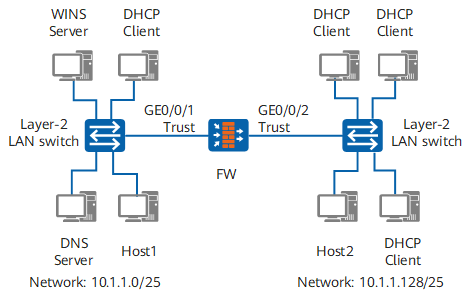
As shown in Figure 1, an enterprise has two offices that are connected to the FW using Layer 2 switches. To save resources, the FW also works as a DHCP server to assign IP addresses, gateways, DNS servers, and WINS servers to hosts in the two offices.
The network topology is as follows:
Fixed IP addresses have been assigned to the four hosts (DNS server, WINS server, and two hosts in the offices). The IP addresses are 10.1.1.2/25, 10.1.1.4/25, 10.1.1.126/25, and 10.1.1.254/25 respectively.
The two hosts require higher access permissions and apply for new fixed IP addresses 10.1.1.5/25 and 10.1.1.253/25.
Office 1 resides on network segment 10.1.1.0/25. Its address lease is 10 days and 12 hours, domain name suffix is example.com, DNS server address is 10.1.1.2/25, WINS server address is 10.1.1.4/25, and egress gateway address is 10.1.1.1/25.
Office 2 resides on network segment 10.1.1.128/25. Its address lease is 5 days, domain name suffix is example.com, DNS server address is 10.1.1.2/25, no WINS server is configured, and egress gateway address is 10.1.1.129/25.
Item |
Data |
Description |
|
|---|---|---|---|
FW |
Interface number: GigabitEthernet 0/0/1 IP address: 10.1.1.1/25 Security zone: Trust |
Interface GigabitEthernet 0/0/1 connected to the network segment 10.1.1.0/25 where office 1 resides |
|
Interface number: GigabitEthernet 0/0/2 IP address: 10.1.1.129/25 Security zone: Trust |
Interface GigabitEthernet 0/0/2 connected to the network segment 10.1.1.128/25 where office 2 resides |
||
WINS server |
IP address: 10.1.1.4/25 |
WINS server specified for DHCP clients on the network segment 10.1.1.0/25 |
|
DNS server |
IP address: 10.1.1.2/25 |
DNS server specified for DHCP clients on network segments 10.1.1.0/25 and 10.1.1.128/25 |
|
Domain name suffix |
example.com |
Domain name suffix specified for DHCP clients on network segments 10.1.1.0/25 and 10.1.1.128/25 |
|
Address lease |
10 days 12 hours |
Address lease specified for DHCP clients on the network segment 10.1.1.0/25 |
|
5 days |
Address lease specified for DHCP clients on the network segment 10.1.1.128/25 |
||
Egress gateway |
IP address: 10.1.1.1/25 |
Egress gateway specified for DHCP clients on the network segment 10.1.1.0/25 |
|
IP address: 10.1.1.129/25 |
Egress gateway specified for DHCP clients on the network segment 10.1.1.128/25 |
||
Host1 |
IP address: 10.1.1.5/25 MAC address: 0021-97cf-2238 |
Host requiring a fixed IP address |
|
Host2 |
IP address: 10.1.1.253/25 MAC address: 00e0-4c86-58eb |
Host requiring a fixed IP address |
|
Configuration Roadmap
The configuration roadmap is as follows:
Enable the DHCP service.
Reserve IP addresses that have been specified (such as DNS server address, WINS server address, and two host addresses) to avoid reassigning them.
Dynamically allocate IP addresses and other network parameters.
On the network, the FW connects to clients using a Layer 2 switch and multiple interfaces are used; therefore, you are advised to assign IP addresses based on global address pools. You can deploy two address pools to simplify the configuration. Address pool 1 (network segment 10.1.1.0/25) and address pool 2 (network segment 10.1.1.128/25) specify unique attributes of each network segment (such as their address ranges, address lease, gateway addresses, and WINS servers).
To meet the requirement of the hosts for using fixed IP addresses, allocate IP addresses statically and configure other network parameters.
- Set Internet Protocol (TCP/IP) Properties to Obtain an IP address automatically and Obtain DNS server address automatically on each DHCP client, enabling the DHCP clients to automatically obtain IP addresses and other network parameters allocated by the DHCP server.

It is recommended to centrally plan and configure important network parameters, such as domain name suffix, DNS server, and egress gateway, for the DHCP clients on the DHCP server, to avoid network access errors caused by incorrect configurations of the DHCP client network parameters.
Procedure
- Enable DHCP service.
<FW> system-view
[FW] dhcp enable
- Configure the global address pool attributes of the DHCP server.
# Configure the attributes of address pool 1 (the IP address range of the address pool, the egress gateway, and the address lease).
[FW] ip pool 1
[FW-ip-pool-1] network 10.1.1.0 mask 255.255.255.128
[FW-ip-pool-1] domain-name example.com
[FW-ip-pool-1] dns-list 10.1.1.2
[FW-ip-pool-1] excluded-ip-address 10.1.1.4
[FW-ip-pool-1] excluded-ip-address 10.1.1.126
[FW-ip-pool-1] gateway-list 10.1.1.1
[FW-ip-pool-1] lease day 10 hour 12
[FW-ip-pool-1] static-bind ip-address 10.1.1.5 mac-address 0021-97cf-2238
[FW-ip-pool-1] reserved ip-address mac
[FW-ip-pool-1] quit
# Configure the attributes of address pool 2 (the IP address range of the address pool, the egress gateway, the WINS server address, and the address lease).
[FW] ip pool 2
[FW-ip-pool-2] network 10.1.1.128 mask 255.255.255.128
[FW-ip-pool-2] domain-name example.com
[FW-ip-pool-2] dns-list 10.1.1.2
[FW-ip-pool-2] excluded-ip-address 10.1.1.254
[FW-ip-pool-2] nbns-list 10.1.1.4
[FW-ip-pool-2] gateway-list 10.1.1.129
[FW-ip-pool-2] lease day 5
[FW-ip-pool-2] static-bind ip-address 10.1.1.253 mac-address 00e0-4c86-58eb
[FW-ip-pool-2] reserved ip-address mac
[FW-ip-pool-2] quit
- Specify the interface IP address, and configure the clients under the interface to obtain IP addresses from global address pools.
# Configure the clients under interface GigabitEthernet 0/0/1 to obtain IP addresses from global address pools.
[FW] interface GigabitEthernet 0/0/1
[FW-GigabitEthernet0/0/1] ip address 10.1.1.1 255.255.255.128
[FW-GigabitEthernet0/0/1] dhcp select global
[FW-GigabitEthernet0/0/1] quit
# Configure the clients under GigabitEthernet 0/0/2 to obtain IP addresses from global address pools.
[FW] interface GigabitEthernet 0/0/2
[FW-GigabitEthernet0/0/2] ip address 10.1.1.129 255.255.255.128
[FW-GigabitEthernet0/0/2] dhcp select global
[FW-GigabitEthernet0/0/2] quit
- Add interfaces to corresponding security zones and configure the security policy.
[FW] firewall zone trust
[FW-zone-trust] add interface GigabitEthernet 0/0/1
[FW-zone-trust] add interface GigabitEthernet 0/0/2
[FW-zone-trust] quit
[FW] security-policy
[FW-policy-security] rule name sec_policy
[FW-policy-security-rule-sec_policy] source-zone trust
[FW-policy-security-rule-sec_policy] source-zone local
[FW-policy-security-rule-sec_policy] destination-zone local
[FW-policy-security-rule-sec_policy] destination-zone trust
[FW-policy-security-rule-sec_policy] action permit
[FW-policy-security-rule-sec_policy] quit
[FW-policy-security] quit
- Configure DHCP clients (using a Windows XP-based PC as an example).
- Right-click Network Neighborhood on the desktop, and choose Attributes > Network Connections.
- Right-click Local Area Connection of the connected network adapter, and choose Properties.
- Select Internet Protocol (TCP/IP) and click Properties. The Internet Protocol (TCP/IP) Properties window is displayed. Select Obtain an IP address automatically and Obtain DNS server address automatically.
Verifying the Configuration
On any PC on the two network segments where office 1 and office 2 reside, run the cmd command to enter the DOS environment. Run the ipconfig /all command to verify whether the client has obtained the network parameters, such as an IP address, default gateway address, WINS server address, and DNS server address. If the configurations are correct, host 1 and host 2 are specified with fixed IP addresses.
If the information obtained by the DHCP client is incomplete (for example, only the IP address is obtained but other network parameters are not), run the ipconfig /release command to lease the dynamic IP address, and then run the ipconfig /renew command to apply for a new IP address and other network parameters.
C:\Documents and Settings\Administrator> ipconfig /all

Windows IP Configuration

        Host Name . . . . . . . . . . . . : example
        Primary Dns Suffix  . . . . . . . : example.com
        Node Type . . . . . . . . . . . . : Hybrid
        IP Routing Enabled. . . . . . . . : No
        WINS Proxy Enabled. . . . . . . . : No
        DNS Suffix Search List. . . . . . : example.com
Ethernet adapter Local Area Connection :

        Connection-specific DNS Suffix  . : example.com
        Description . . . . . . . . . . . : Realtek RTL8139/810x Family Fast Eth
ernet NIC
        Physical Address. . . . . . . . . : 00-1B-B9-7A-7D-61
        Dhcp Enabled. . . . . . . . . . . : Yes
        Autoconfiguration Enabled . . . . : Yes
        IP Address. . . . . . . . . . . . : 10.1.1.3
        Subnet Mask . . . . . . . . . . . : 255.255.255.128
        Default Gateway . . . . . . . . . : 10.1.1.1
        DHCP Server . . . . . . . . . . . : 10.1.1.1
        DNS Servers . . . . . . . . . . . : 10.1.1.2
        Primary WINS Server . . . . . . . : 10.1.1.4
        Lease Obtained. . . . . . . . . . : 2015-5-15 15:56:34
        Lease Expires . . . . . . . . . . : 2015-5-26 03:56:34
On the DHCP server FW, run the display dhcp server statistics command to view the statistics information.
[FW] display dhcp server statistics
DHCP Server Statistics:

 Client Request          :6
  Dhcp Discover          :1
  Dhcp Request           :4
  Dhcp Decline           :0
  Dhcp Release           :1
  Dhcp Inform            :0
 Server Reply            :4
  Dhcp Offer             :1
  Dhcp Ack               :3
  Dhcp Nak               :0
 Bad Messages            :0
Configuration Scripts
Configuration scripts of FW
#
dhcp enable
#
ip pool 1
 gateway-list 10.1.1.1
 network 10.1.1.0 mask 255.255.255.128
 excluded-ip-address 10.1.1.4
 static-bind ip-address 10.1.1.5 mac-address 0021-97cf-2238
 excluded-ip-address 10.1.1.126
 lease day 10 hour 12 minute 0
 dns-list 10.1.1.2
 domain-name example.com
 reserved ip-address mac
#
ip pool 2
 gateway-list 10.1.1.129
 network 10.1.1.128 mask 255.255.255.128
 static-bind ip-address 10.1.1.253 mac-address 00e0-4c86-58eb
 excluded-ip-address 10.1.1.254
 lease day 5 hour 0 minute 0
 dns-list 10.1.1.2
 nbns-list 10.1.1.4
 domain-name example.com
 reserved ip-address mac
#
interface GigabitEthernet0/0/1
 ip address 10.1.1.1 255.255.255.128
 dhcp select global
#
interface GigabitEthernet0/0/2
 ip address 10.1.1.129 255.255.255.128
 dhcp select global
#
firewall zone trust
 set priority 85
 add interface GigabitEthernet0/0/1
 add interface GigabitEthernet0/0/2
#
security-policy
 rule name sec_policy
  source-zone local
  source-zone trust
  destination-zone local
  destination-zone trust
  action permit
#
return