Using an ACL to Establish an IPSec Tunnel-CLI
Pre-configuration Tasks
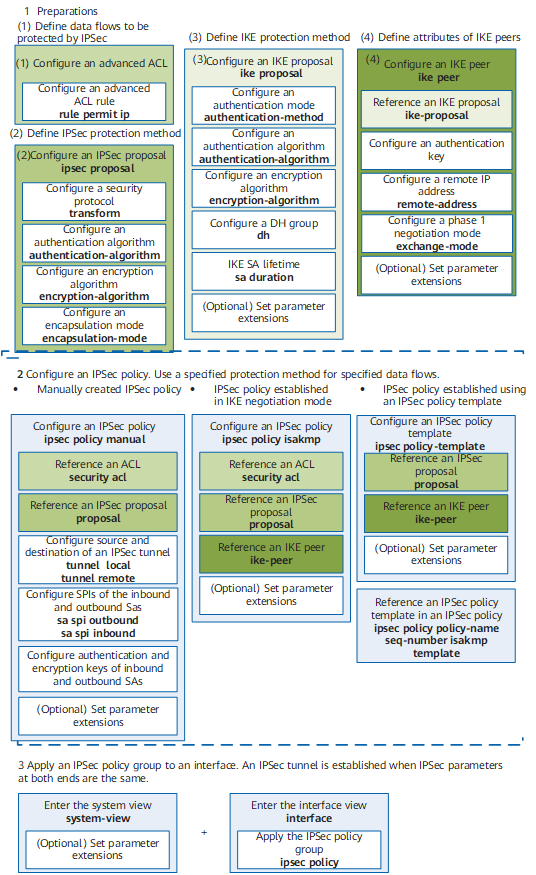
On an IPSec tunnel established in manual or IKE negotiation mode, an ACL defines data flows to be protected. The packets that match the permit clauses in the ACL are protected, and the packets that match the deny clauses are not protected. The ACL can define packet attributes such as the IP address, port number, and protocol type, which help you flexibly define IPSec policies.
Before establishing an IPSec tunnel using an ACL, complete the following tasks:
- Configure a reachable route between source and destination interfaces.
- (Optional) If L2TP over IPSec needs to be configured, perform the following configurations:
- Configure LAC on the branch gateway. If a client on the branch network dials to connect to the headquarters network through the NAS, configure NAS-initiated VPN NAS. If the LAC connects to the headquarters network through automatic dial-up, configure LAC auto-dial.
- Configure LNS on the headquarters gateway.
(Optional) If ACL-based GRE over IPSec needs to be configured, perform the following configurations:
- Create a tunnel interface and set the type of the interface to GRE.
- Configure source and destination IP addresses, and interface IP addresses. The source IP address is the IP address of the outbound interface on the gateway, and the destination IP address is the IP address of the outbound interface on the remote gateway.
- Add tunnel interfaces to a zone.
- (Optional) Configuring Detection of Overlapping IPSec Flows
- The device detects whether the data flows generated by a newly created IPSec tunnel for encryption overlap. If these data flows overlap with existing ones, the newly created IPSec tunnel is removed to prevent IPSec service faults due to overlapping.
- (Optional) Configuring Automatic Restoration of Lost IPSec Flows
- The device automatically restores data flows for encryption that are lost due to device faults.