(Optional) Configuring Route Injection
Context

Only SAs established in IKE negotiation mode support the route injection function. Manually configured SAs do not support the route injection function.
The device does not support route injection function when the IPSec policy group is bound to a Layer 2 interface.
When an enterprise headquarters and its branch establish an IPSec tunnel, a static route to the branch subnet needs to be configured on the headquarters gateway. If there are many branch subnets, a large number of static routes need to be configured on the headquarters gateway. When branch subnets change, the static route configuration needs to be modified on the headquarters gateway, causing a difficulty in network maintenance. Route injection injects routes to branch subnets to the headquarters gateway based on IPSec tunnel information, which reduces manual configuration and improves configuration correctness. If a static route from the branch to the headquarters gateway does not need to be configured manually, configure route injection.
The route injection function enables a device to generate a route based on the destination network segment in the flow information of the IPSec SA established on the device. The next hop of the route is the peer address in the IPSec SA by default.
In Figure 1, an IPSec tunnel is established between the branch gateway and headquarters gateway. The host a1 indicates the branch subnet and the host b1 indicates the headquarters subnet. An ACL rule is configured on the headquarters gateway and branch gateway to enable IPSec to protect data traffic from b1 to a1 and data traffic from a1 to b1 respectively. When the route injection function is disabled, the headquarters gateway needs to ensure that the route to the branch subnet is reachable. After the route injection function is enabled on the headquarters gateway, the gateway automatically generates a routing entry with the destination IP address being the destination network segment in the flow information of the IPSec SA established by the local end and the next hop being the IPSec tunnel local IP address of the branch gateway.
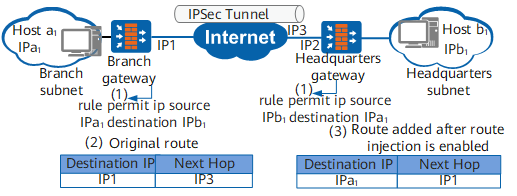
Route injection works in two modes:
- Static mode: The generated route is added to the local device immediately, and is independent of IPSec tunnel status change.
Dynamic mode: If the IPSec tunnel is Up, the generated route can be added to the local device. If the IPSec tunnel is Down, the generated route can be deleted from the local device.
Compared with static route injection, dynamic route injection is relevant to the IPSec tunnel status. Dynamic route injection prevents IPSec peers from sending IPSec packets over the IPSec tunnel in Down state, reducing packet loss.
You can configure a priority for the route generated through route injection. For example, when there is another route to the same destination as the route, specify the same priority for the routes so that traffic can be load balanced. If different priorities are specified for the routes, the routes can back up each other.
Procedure
- Run system-view
The system view is displayed.
- An IPSec policy in IKE negotiation mode or an IPSec policy template is configured.
Run ipsec policy policy-name seq-number isakmp
An IPSec policy is created in IKE negotiation mode and the IPSec policy view is displayed.
Run ipsec policy-template template-name seq-number
An IPSec policy template is created and the IPSec policy template view is displayed.
- Run route inject { static | dynamic } [ preference preference ]
A route injection mode and a priority of a static route generated through route injection are configured.
By default, route injection is disabled.
static is only available in the view of the IPSec policy established in ISAKMP mode.
- Run route inject nexthop { ipv4-address | ipv6-address | auto }
The next hop IP address to the remote device is configured.
The specified next hop IP address will replace the automatically generated next hop IP address.
In some scenarios, you need to run the route inject nexthop command after running the route inject { static | dynamic } command. For example:- In a hot standby scenario, the active and standby devices have different next-hop IP addresses if route injection is used. In this case, you need run the route inject nexthop { ipv4-address | ipv6-address } command to specify the next-hop IP address to the remote end.
If the destination address of an IPSec-protected data flow is the same as the IPSec tunnel remote address, for example, the IPSec-protected data flow from the NMS to the device, you need to run the route inject nexthop { ipv4-address | ipv6-address } command to specify the next-hop address to the remote end. However, if an IPSec interface has multiple next hops, because the route inject nexthop { ipv4-address | ipv6-address } command can specify only one next-hop IP address, you need to manually modify the configuration when the next hop changes. This mode cannot adapt to network changes. In this case, you need run the route inject nexthop auto command to configure the device to search its IP routing table for routes of packets based on packets' destination addresses and specify the next hop of the optimal route as the next-hop IP address to the remote end.
The route inject nexthop auto command applies only to this scenario.
When the IP address version of the IPSec encrypted flow is consistent with that used in IKE negotiation and a next hop is specified using the route inject nexthop command, the generated route is not used for IPSec packet forwarding if the IPSec tunnel remote address is not within the destination network segment of the injected route.
If the IP address version of the IPSec encrypted flow is inconsistent with that used in IKE negotiation, a next-hop address must be specified when the route injection function is enabled, and this address version must be consistent with that of the encrypted flow.
When an IPv6 ACL is used to define IPSec-protected data flows and IPSec encryption needs to be performed on packets initiated by the local device, you need to run the route inject nexthop command to specify the IPv6 address of the next hop directly connected to the outbound interface.