(Optional) Configuring IKEv2 EAP Authentication
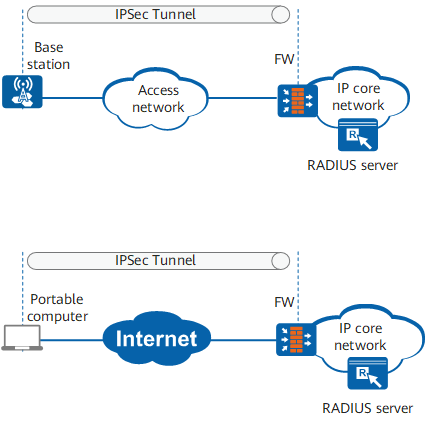
As shown in Figure 1, a wireless device remotely connects to the IP core network through a base station or a portable computer remotely connects to the IP core network through the Internet. The base station or portable computer establishes an IPSec tunnel with the gateway FW of the IP core network to securely transmit data. The base station uses Extensible Authentication Protocol (EAP) to connect to the headquarters gateway, and the EAP authentication server (RADIUS server in this example) is deployed on the IP core network. EAP authentication packets are encapsulated into IKE packets.
IKEv2 and EAP authentication can be used together. IKEv2 provides identity authentication on the negotiation initiator in EAP mode. IKEv2 does not set authentication data in IKE_AUTH exchange message (3) to indicate that EAP authentication is required. During the IKE_AUTH exchange, EAP authentication packets are transmitted to the FW as the authentication payload in IKEv2 packets. The FW extracts the EAP payload from the IKEv2 packets and forwards the EAP authentication packets to the RADIUS server. The RADIUS server performs EAP authentication. After EAP authentication is successful, IKEv2 allows the base station and FW to set up an IPSec tunnel.
Pre-configuration Tasks
Configure the IP address pool to be referenced.
(Optional) Configure the service scheme to be referenced if you want to use the IP address pool referenced by the service scheme.

IPSec IPv6 does not support IKEv2 EAP authentication.
Procedure
- Run system-view
The system view is displayed.
- Run ike peer peer-name
An IKE peer is created and the IKE peer view is displayed.
- Run undo version 1
The IKE version is set to IKEv2.
By default, both IKEv1 and IKEv2 are enabled for IKE peers. - Configure an IP address for IPSec users authenticated by
the device using EAP authentication.
The system preferentially uses the IP address authorized by the AAA server, and then uses the IP address pool authorized by the AAA server. If the AAA server does not authorize an IP address or an IP address pool, the IP address pool in the service scheme specified in the IKE peer view is used to allocate IP addresses to EAP users.
- Run quit
Exit from the IKE peer view.
- (Optional) Run aaa
The AAA view is displayed.
- (Optional) Run access-limit per-user ipsec number
The number of concurrent online IPSec users using EAP authentication is configured.
By default, the system does not limit the number of concurrent online IPSec users using EAP authentication.
- (Optional) Run domain domain-name
A domain is created and the domain view is displayed, or the view of an existing domain is displayed.
By default, the domain named default exists on the device. The domain can be modified but cannot be deleted.
- (Optional) Run eap packet-id minus number
The ID of the EAP authentication packets sent by the AAA server is configured.
If devices on both ends comply with the same standards, this step is not required. When the AAA server complies with a different standard than the device, for example, Third-Generation Partnership Project (3GPP), perform this step to subtract a specified value from the ID of the EAP authentication packets sent from on the AAA server, so that authentication can succeed.