802.1X Authentication
As shown in Figure 1, users' network access needs to be controlled to ensure network security. Only authenticated users are allowed to access network resources authorized by the administrator.
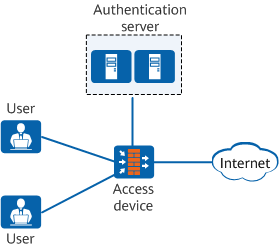
After the 802.1X client software is installed on the user terminal (the 802.1X client is built in the smartphone), the client can initiate an authentication application to the access device. After exchanging information with the user terminal, the access device sends the user information to the authentication server for authentication. If the authentication succeeds, the access device sets the interface connected to the user to the Up state and allows the user to access the network. If the authentication fails, the access device rejects the user's access request.