CLI: Example for Configuring 802.1X Authentication
Networking Requirements
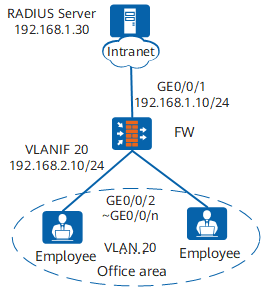
In Figure 1, terminals in a company's offices are connected to the company's intranet through the FW. GE0/0/2 to GE0/0/n on the FW are directly connected to terminals in offices. GE0/0/1 on the FW is connected to the RADIUS server through the intranet.
To meet the company's high security requirements, configure 802.1X authentication, use the RADIUS server to authenticate terminals in offices, and deploy authentication points on GE0/0/2 to GE0/0/n of the FW.
Configuration Roadmap
The configuration roadmap is as follows:
- Configure network interworking.
- Configure AAA on the FW to implement identity authentication on access users through the RADIUS server. The configuration includes configuring a RADIUS server template, an AAA scheme, and an authentication domain, and binding the RADIUS server template and AAA scheme to the authentication domain.
- Configure 802.1X authentication to control network access rights of the employees in offices. The configuration includes:
- Configure an 802.1X access profile.
- Configure an authentication profile.
- Enable 802.1X authentication on an interface.

Before performing the following operations, ensure that there are reachable routes between user terminals and the server.
If the LAN switch exists between the FW and users. To ensure that users can pass 802.1X authentication, you must configure the EAP packet transparent transmission function on the LAN switch. The S5700 is used as an example of the LAN switch. Perform the following operations:
- Run the l2protocol-tunnel user-defined-protocol 802.1X protocol-mac 0180-c200-0003 group-mac 0100-0000-0002 command in the system view of the LAN switch to configure the LAN switch to transparently transmit EAP packets.
- Run the l2protocol-tunnel user-defined-protocol 802.1X enable and bpdu enable commands on the interface connecting to users and the interface connecting to the FW to enable the Layer 2 protocol tunneling function.
Procedure
- Configure network interworking.
# Configure GE0/0/2 to GE0/0/n connecting the FW to users as access interfaces. The following uses the configuration of GE0/0/2 as an example. The configurations of other interfaces are similar to the configuration of GE0/0/2, and are not mentioned here.
<sysname> system-view
[sysname] sysname FW
[FW] vlan batch 20
[FW] interface gigabitethernet 0/0/2
[FW-GigabitEthernet0/0/2] portswitch
[FW-GigabitEthernet0/0/2] port link-type access
[FW-GigabitEthernet0/0/2] port default vlan 20
[FW-GigabitEthernet0/0/2] quit
# Configure VLANIF 20.
[FW] interface vlanif 20
[FW-Vlanif20] ip address 192.168.2.10 24
[FW-Vlanif20] quit
# Configure GE0/0/1 connecting the FW to the RADIUS server as an access interface.
[FW] interface gigabitethernet 0/0/1
[FW-GigabitEthernet0/0/1] ip address 192.168.1.10 24
[FW-GigabitEthernet0/0/1] quit
# Assign the interfaces to security zones.
[FW] firewall zone trust
[FW-zone-trust] add interface vlanif 20
[FW-zone-trust] quit
[FW] firewall zone untrust
[FW-zone-untrust] add interface gigabitethernet 0/0/1
[FW-zone-untrust] quit
# Configure a security policy for allowing clients to access the FW.
[FW] security-policy
[FW-policy-security] rule name policy_sec_01
[FW-policy-security-rule-policy_sec_01] source-zone trust
[FW-policy-security-rule-policy_sec_01] destination-zone local
[FW-policy-security-rule-policy_sec_01] action permit
[FW-policy-security-rule-policy_sec_01] quit
[FW-policy-security] rule name policy_sec_02
[FW-policy-security-rule-policy_sec_02] source-zone local
[FW-policy-security-rule-policy_sec_02] destination-zone trust
[FW-policy-security-rule-policy_sec_02] action permit
[FW-policy-security-rule-policy_sec_02] quit
# Configure a security policy for allowing the FW to access the RADIUS server.
[FW-policy-security] rule name policy_sec_03
[FW-policy-security-rule-policy_sec_03] source-zone local
[FW-policy-security-rule-policy_sec_03] destination-zone untrust
[FW-policy-security-rule-policy_sec_03] destination-address 192.168.1.30 32
[FW-policy-security-rule-policy_sec_03] action permit
[FW-policy-security-rule-policy_sec_03] quit
- Configure AAA.
# Create and configure the RADIUS server template rd1.
[FW] radius-server template rd1
[FW-radius-rd1] radius-server authentication 192.168.1.30 1812
[FW-radius-rd1] radius-server shared-key cipher Huawei@2012
[FW-radius-rd1] quit
# Create the AAA authentication scheme abc and set the authentication mode to RADIUS.
[FW] aaa
[FW-aaa] authentication-scheme abc
[FW-aaa-authen-abc] authentication-mode radius
[FW-aaa-authen-abc] quit
# Create the authentication domain huawei.com, and bind the AAA authentication scheme abc and RADIUS server template rd1 to the domain.
[FW-aaa] domain huawei.com
[FW-aaa-domain-huawei.com] authentication-scheme abc
[FW-aaa-domain-huawei.com] radius-server rd1
[FW-aaa-domain-huawei.com] service-type dot1x
[FW-aaa-domain-huawei.com] quit
[FW-aaa] quit
# Check whether a user can pass RADIUS authentication. (The test user test and password Huawei2012 have been configured on the RADIUS server.)
[FW] test-aaa test Huawei2012 radius-template rd1 Info: Account test succeeded. - Configure 802.1X authentication.# Configure the 802.1X access profile d1.
[FW] dot1x-access-profile name d1
[FW-dot1x-access-profile-d1] dot1x authentication-method eap
[FW-dot1x-access-profile-d1] quit
By default, an 802.1X access profile uses the EAP authentication mode. Ensure that the RADIUS server supports EAP; otherwise, the server cannot process 802.1X authentication request packets.
# Configure the authentication profile p1, bind the 802.1X access profile d1 to the authentication profile, specify the domain huawei.com as the forcible authentication domain in the authentication profile.
[FW] authentication-profile name p1
[FW-authentication-profile-p1] dot1x-access-profile d1
[FW-authentication-profile-p1] access-domain huawei.com force
[FW-authentication-profile-p1] quit
# Bind the authentication profile p1 to GE0/0/2 to GE0/0/n and enable 802.1X authentication. The following uses the configuration of GE0/0/2 as an example. The configurations of other interfaces are similar to the configuration of GE0/0/2, and are not mentioned here.
[FW] interface gigabitethernet 0/0/2
[FW-GigabitEthernet0/0/2] authentication-profile p1
[FW-GigabitEthernet0/0/2] quit
- Verify the configuration.
- A user starts the 802.1X client on a terminal, and enters the user name and password for authentication.
- If the user name and password are correct, an authentication success message is displayed on the client page. The user can access the network.
- After users go online, you can run the display access-user command on the FW to view information about online 802.1X authentication users.
Configuration Files
FW configuration file
#
sysname FW
#
vlan batch 20
#
authentication-profile name p1
 dot1x-access-profile d1
 access-domain huawei.com force
#
radius-server template rd1
 radius-server shared-key cipher %^%#4*SO-2u,Q.\1C~%[eiB77N/^2wME;6t%6U@qAJ9:%^%#
 radius-server authentication 192.168.1.30 1812 weight 80
#
aaa
 authentication-scheme abc
  authentication-mode radius
 domain huawei.com
  service-type dot1x
  authentication-scheme abc
  radius-server rd1
#
interface Vlanif20
 ip address 192.168.2.10 255.255.255.0
#
interface GigabitEthernet0/0/1
 ip address 192.168.1.10 255.255.255.0
#
interface GigabitEthernet0/0/2
 portswitch
 port link-type access
 port default vlan 20
 authentication-profile p1
#
firewall zone trust
 add interface Vlanif20
#
firewall zone untrust
 add interface GigabitEthernet0/0/1
#
dot1x-access-profile name d1
#
security-policy
 rule name policy_sec_01
  source-zone trust
  destination-zone local
  action permit
 rule name policy_sec_02
  source-zone local
  destination-zone trust
  action permit
 rule name policy_sec_03
  source-zone local
  destination-zone untrust
  destination-address 192.168.1.30 24
  action permit
#
return