Verification and Check
Verification
After configuring the AIE, do as follows to check the configuration result:
-
Choose , and check whether the AIE profile name, description, and enabled detection engines displayed in the AIE profile list are correct.
-
Choose , click the name of the security policy to be checked, and check whether the security policy correctly references the AIE profile.
- Optional: Check the AIE whitelist.
Choose , and check whether the configuration of the AIE whitelists displayed in the AIE whitelist list is correct.
Viewing Logs
After the AIE profile is referenced in a security policy, the FW performs advanced threat detection on the traffic that matches the security policy. If an attack is detected, a log is generated.
Choose , click Add Filter, and then choose to view advanced threat logs. The following provides threat logs for malicious C&C flows and malicious encrypted C&C flows.
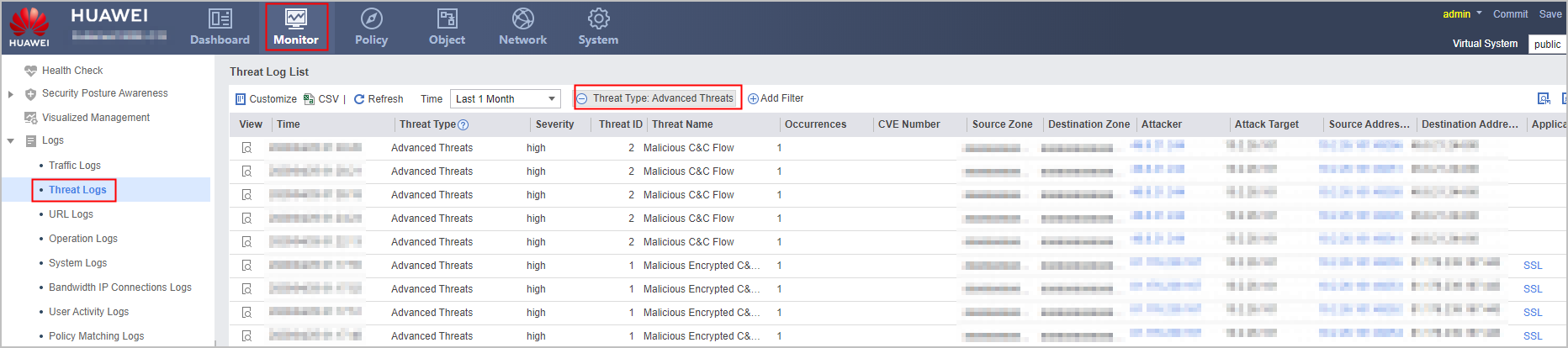
The following table lists the meanings of log fields.
Field |
Description |
|---|---|
View |
Click In View Threat Log Details, click the Security Policy/Application field value. In View Threat Log Details, click the value of Event ID to view evidence details of the event for further analysis. |
Time |
Time when a threat log is generated |
Threat Type |
Threat type and the value is Advanced Threats. |
Severity |
Severity level and the value is high. |
Threat ID |
ID of a threat |
Threat Name |
Name of a threat |
Source Zone |
Source security zone of traffic |
Destination Zone |
Destination security zone of traffic |
Attacker |
IP address/user of an attacker |
Victim |
IP address/user of a victim |
Source Address: Source Port |
Source IP address and port number of traffic |
Destination Address: Destination Port |
Destination IP address and port number of traffic |
Application |
Application type of traffic |
Protocol |
Protocol type of traffic |
Action |
Actions against various threats and the value is Alert |
Security Policy |
Security policy that traffic matches |
Profile |
Security profile that traffic matches |
Source Region |
Source region of the traffic |
Destination Region |
Destination region of the traffic |
Virtual System |
Virtual system that generates the traffic |
