Configuring the User Experience Plan Using the CLI
This section describes how to configure the user experience plan through the CLI.
Prerequisites
The FW is deployed at the border of the intranet as the security gateway. The FW can communicate with sec.huawei.com over the Internet. By configuring the user experience plan function, the FW can send the collected information to the data feedback server, helping Huawei service personnel learn about device operating information, service application information, and actual protection effectiveness. The data feedback server analyzes the information, which helps continuously improve the accuracy of IPS/AV signatures and AIE algorithms, identify network threats, and enhance the device security protection effectiveness.
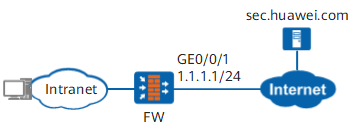
Procedure
- Configure content security-related functions. This step is required only when the feedback information includes Security logs, Attack data, or Passive DNS information. Details are as follows:
- Security logs: Security log data can be fed back only after the IPS, antivirus, attack defense, or URL filtering function is enabled on the FW.
- Attack data: Attack data can be fed back only after IPS, attack evidence collection of antivirus, or AIE function is enabled on the FW.
- Passive DNS information: The passive DNS information can be fed back only when the security service that processes DNS traffic, such as intrusion prevention and DNS filtering, is enabled on the FW.
- Set the IP address and security zone of the interface.
<FW> system-view
[FW] interface GigabitEthernet 0/0/1
[FW-GigabitEthernet0/0/1] ip address 1.1.1.1 24
[FW-GigabitEthernet0/0/1] quit
[FW] firewall zone untrust
[FW-zone-untrust] add interface GigabitEthernet 0/0/1
[FW-zone-untrust] quit
- Configure the DNS server and ensure that the FW can correctly resolve domain name sec.huawei.com.
[FW] dns resolve
[FW] dns server 2.2.2.2
- Configure a security policy to allow the FW to access sec.huawei.com, data feedback server and DNS server.
# Configure a security policy to allow the FW to access sec.huawei.com and data feedback server.
[FW] security-policy
[FW-policy-security] rule name policy_sec_huawei_com
[FW-policy-security-rule-policy_sec_huawei_com] source-zone local
[FW-policy-security-rule-policy_sec_huawei_com] destination-zone untrust
[FW-policy-security-rule-policy_sec_huawei_com] service protocol tcp source-port 0 to 65535 destination-port 80
[FW-policy-security-rule-policy_sec_huawei_com] service protocol tcp source-port 0 to 65535 destination-port 8446
[FW-policy-security-rule-policy_sec_huawei_com] action permit
[FW-policy-security-rule-policy_sec_huawei_com] quit
[FW-policy-security] quit
# Configure a security policy to allow the FW to access DNS server.
[FW] security-policy
[FW-policy-security] rule name policy_dns_server
[FW-policy-security-rule-policy_dns_server] source-zone local
[FW-policy-security-rule-policy_dns_server] destination-address 2.2.2.2 32
[FW-policy-security-rule-policy_dns_server] service dns
[FW-policy-security-rule-policy_dns_server] action permit
[FW-policy-security-rule-policy_dns_server] quit
[FW-policy-security] quit
- Set the country where the FW device resides.
[FW] country CN - Enable the data feedback function for each data type.

To ensure that you can properly use the device, determine whether to enable the user experience improvement plan function. The user experience improvement plan function may send network threat information and service statistics on the device to the data feedback server for analysis so that the threat prevention capability of the device can be improved. This function may involve transferring or processing users' communication contents or personal data. Huawei Technologies Co., Ltd. alone is unable to transfer or process the content of users' communications and personal data. It is suggested that you activate the user data-related functions based on the applicable laws and regulations in terms of purpose and scope of usage. You are obligated to take considerable measures to ensure that the content of users' communications and personal data are fully protected when the content is being transferred and processed.
[FW] feedback type maintain enable         //Enable the data feedback function for device operating information
[FW] feedback type engine-statistics enable      //Enable the data feedback function for engine operating information
[FW] feedback type threat-log enable             //Enable the data feedback function for security log information
[FW] feedback type pdns enable                   //Enable the data feedback function for passive DNS (PDNS) information
[FW] diagnose
[FW-diagnose] feedback file type trafficfile enable   //Enable the data feedback function for attack data
- Optional: Specify the interval for data feedback.
[FW] feedback interval 2                   //Specify the interval for feeding back engine running, security log, or passive DNS information
[FW] feedback interval type maintain 20          //Specify the interval for feeding back device operating information