CLI: Example for Configuring the Flow Probe
This example describes the typical application and configuration method of the flow probe function.
Networking Requirements
On an enterprise campus network, the network administrator needs to use the flow probe function on the FW to collect network-layer and transport-layer information of traffic passing through the FW. It then sends the collected information to the HiSec Insight for analysis and evaluation. In this way, threats and APT attacks on the network can be identified.
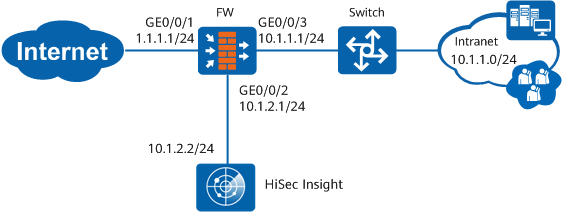
Procedure
- Set interface IP addresses and assign the interfaces to security zones.
- Configure security policies.
- Configure the flow probe.
- Set parameters for interconnection between the FW and HiSec Insight server.
[sysname] flow-probe metadata-collect transfer-method udp
[sysname] flow-probe metadata-collect server ip 10.1.2.2 port 8514
[sysname] flow-probe metadata-collect source ip 10.1.2.1
- Configure flow probe policies.
[sysname] flow-probe-policy
[sysname-policy-probe] rule name policy_probe
[sysname-policy-probe-rule-policy_probe] source-zone trust
[sysname-policy-probe-rule-policy_probe] destination-zone untrust
[sysname-policy-probe-rule-policy_probe] source-address 10.1.1.0 24
[sysname-policy-probe-rule-policy_probe] action probe network-layer

If you want the flow probe to collect SSL-encrypted traffic information, you can use the ECA (Encrypted Communication Analytics,) function. That is, set the action of the flow probe policy to network-layer application-layer or application-layer network-layer. For traffic matching the flow probe policy, the ECA function collects SSL protocol negotiation information, packet statistics information, and DNS and HTTP protocol information of the traffic. Then it sends the information to the HiSec Insight in metadata format. The HiSec Insight analyzes and assesses the information to identify malicious encrypted traffic.
- Set parameters for interconnection between the FW and HiSec Insight server.
- Configure the HiSec Insight.
Configure the third-party data source function on the HiSec Insight. For details, see the HiSec Insight product documentation. If the FW needs to send collected data to the HiSec Insight in SSL mode, you must configure the relevant certificate under the server certificate function node of the HiSec Insight.
Verification
- Run the display flow-probe metadata-collect statistics command to check the statistics information about flow probe data collection. If there are statistics, the flow probe has collected the corresponding traffic information. If no statistics are displayed, the flow probe does not collect information. In this case, check whether the flow probe policy is correctly configured.
- For traffic matching the flow probe policy, choose on the HiSec Insight web UI to search for the source IP address of the traffic. If a result can be found, the HiSec Insight has received data sent from the FW flow probe. If no result is found, the HiSec Insight does not receive data sent from the FW flow probe. In this case, check whether the interconnection configurations between the flow probe and HiSec Insight are correct.
Configuration Scripts
#
interface GigabitEthernet 0/0/1
 undo shutdown
 ip address 1.1.1.1 255.255.255.0
#
interface GigabitEthernet 0/0/2
 undo shutdown
 ip address 10.1.2.1 255.255.255.0
#
interface GigabitEthernet 0/0/3
 undo shutdown
 ip address 10.1.1.1 255.255.255.0
#
firewall zone trust
 set priority 85
 add interface GigabitEthernet 0/0/3
#
firewall zone untrust
 set priority 5
 add interface GigabitEthernet 0/0/1
#
firewall zone dmz
 set priority 50
 add interface GigabitEthernet 0/0/2
#
security-policy
 rule name policy_to_cis
  source-zone local
  destination-zone dmz
  source-address 10.1.2.0 mask 255.255.255.0
  destination-address 10.1.2.0 mask 255.255.255.0
  service udp
  action permit
 rule name policy_to_Internet
  source-zone trust
  destination-zone untrust
  source-address 10.1.1.0 mask 255.255.255.0
  action permit
#
flow-probe metadata-collect server ip 10.1.2.2
flow-probe metadata-collect source ip 10.1.2.1
#
flow-probe-policy
 rule name policy_probe
  source-zone trust
  destination-zone untrust
  source-address 10.1.1.0 mask 255.255.255.0
  action probe network-layer