CLI: Example for Configuring an IPSec Tunnel Between Two Gateways Through IKE Negotiation (Using RSA-Signature Authentication)
Networking Requirements
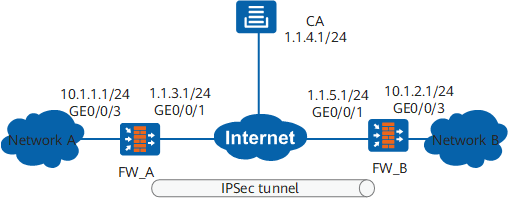
As shown in Figure 1, FW_A connects network A to the Internet and FW_B connects network B to the Internet. The networking requirements are as follows:
Network A (10.1.1.0/24) is connected to GigabitEthernet 0/0/3 of FW_A.
Network B (10.1.2.0/24) is connected to GigabitEthernet 0/0/3 of FW_B.
FW_A and FW_B use RSA signature for authentication. During the authentication, FW_A sends its local certificate to FW_B. FW_B then uses the CA certificate obtained from the CA center to authenticate the local certificate of FW_A. If the authentication is successful, FW_A is legitimate and is allowed to establish an IPSec tunnel with FW_B. IPSec authentication is two-way authentication. FW_A needs also to authenticate FW_B in the same procedure.
Data Plan
Item |
Data |
|---|---|
FW_A |
Interface number: GigabitEthernet 0/0/3 IP address: 10.1.1.1/24 Security zone: Trust |
Interface number: GigabitEthernet 0/0/1 IP address: 1.1.3.1/24 Security zone: Untrust |
|
IPSec configuration Peer IP address: 1.1.5.1 Authentication type: RSA signature Local ID: domain name Peer ID: domain name |
|
FW_B |
Interface number: GigabitEthernet 0/0/1 IP address: 1.1.5.1/24 Security zone: Untrust |
Interface number: GigabitEthernet 0/0/3 IP address: 10.1.2.1/24 Security zone: Trust |
|
IPSec configuration Peer IP address: 1.1.3.1 Authentication type: RSA signature Local ID: domain name Peer ID: domain name |
Configuration Roadmap
The roadmap for configuring FW_A is similar to that for configuring FW_B:
- Set interface IP addresses and add the interfaces to security zones.
- Configure security policies to permit packets between specified subnets.
- Create a static route to the peer end.
- Configure FW_A and FW_B to apply for local and certificate authority (CA) certificates in SCEP mode.
- Configure the IPSec policy, including basic IPSec policy information, data flow to be protected by IPSec, and proposal parameters for security association (SA) negotiation.
During this process, you need to import local and CA certificates.
Procedure
- Perform basic configurations on FW_A, including setting the interface IP addresses, adding interfaces to security zones, and configuring interzone security policies and a static route.
- Configure interzone security policies.
Configure the security policies between the Trust and Untrust zones.
[FW_A] security-policy
[FW_A-policy-security] rule name policy1
[FW_A-policy-security-rule-policy1] source-zone trust
[FW_A-policy-security-rule-policy1] destination-zone untrust
[FW_A-policy-security-rule-policy1] source-address 10.1.1.0 24
[FW_A-policy-security-rule-policy1] destination-address 10.1.2.0 24
[FW_A-policy-security-rule-policy1] action permit
[FW_A-policy-security-rule-policy1] quit
[FW_A-policy-security] rule name policy2
[FW_A-policy-security-rule-policy2] source-zone untrust
[FW_A-policy-security-rule-policy2] destination-zone trust
[FW_A-policy-security-rule-policy2] source-address 10.1.2.0 24
[FW_A-policy-security-rule-policy2] destination-address 10.1.1.0 24
[FW_A-policy-security-rule-policy2] action permit
[FW_A-policy-security-rule-policy2] quit
Configure the security policies between the Local and Untrust zones.

The Local-Untrust interzone policy controls whether IKE negotiation packets can pass through the FW. This policy can use the source and destination addresses, protocol, or port as the matching condition. In this example, the source and destination addresses are used as the matching condition. To use the protocol or port as the matching condition, you need to enable ESP and port 500 for UDP (port 4500 also in NAT traversal scenarios).
Configure the security policies between the Local and Untrust zones to permit the interzone traffic for the negotiation between the tunnel endpoints.
[FW_A-policy-security] rule name policy3
[FW_A-policy-security-rule-policy3] source-zone local
[FW_A-policy-security-rule-policy3] destination-zone untrust
[FW_A-policy-security-rule-policy3] source-address 1.1.3.1 32
[FW_A-policy-security-rule-policy3] destination-address 1.1.5.1 32
[FW_A-policy-security-rule-policy3] destination-address 1.1.4.1 32
[FW_A-policy-security-rule-policy3] action permit
[FW_A-policy-security-rule-policy3] quit
[FW_A-policy-security] rule name policy4
[FW_A-policy-security-rule-policy4] source-zone untrust
[FW_A-policy-security-rule-policy4] destination-zone local
[FW_A-policy-security-rule-policy4] source-address 1.1.5.1 32
[FW_A-policy-security-rule-policy4] source-address 1.1.4.1 32
[FW_A-policy-security-rule-policy4] destination-address 1.1.3.1 32
[FW_A-policy-security-rule-policy4] action permit
[FW_A-policy-security-rule-policy4] quit
[FW_A-policy-security] quit
- Configure interzone security policies.
- Use Simple Certificate Enrollment Protocol (SCEP) to apply for certificates online for FW_A.
Create a 2048-bit RSA key pair rsa_scep and make it exportable from the device.
[FW_A] pki rsa local-key-pair create rsa_scep exportable
 Info: The name of the new key-pair will be: rsa_scep
 The size of the public key ranges from 2048 to 4096.
 Input the bits in the modules:2048
 Generating key-pairs...
..................+++
.+++
-
[FW_A] pki entity user01
[FW_A-pki-entity-user01] common-name devicea
[FW_A-pki-entity-user01] country cn
[FW_A-pki-entity-user01] email test@user.com
[FW_A-pki-entity-user01] fqdn test.abc.com
[FW_A-pki-entity-user01] ip-address 1.1.3.1
[FW_A-pki-entity-user01] state beijing
[FW_A-pki-entity-user01] organization huawei
[FW_A-pki-entity-user01] organization-unit dev
[FW_A-pki-entity-user01] quit
Use SCEP to apply for and update certificates online.
The fingerprint of the CA certificate is obtained from the CA server. In this example, the CA server runs on Windows Server 2008, and the CA server uses the challenge password to process certificate requests and the challenge password is 6AE73F21E6D3571D. The URL for obtaining the challenge password and fingerprint is http://10.136.7.196:8080/certsrv/mscep_admin. Assume that the fingerprint of the CA certificate is 6330974fb2fe3c52d16bdac40140918b4bcd3ec7 in sha1 mode, and the URL for applying for the certificate is http://10.136.7.196:8080/certsrv/mscep/mscep.dll.
[FW_A] pki realm abc
# Configure the trusted CA.
[FW_A-pki-realm-abc] ca id ca_root
# Bind the entity.
[FW_A-pki-realm-abc] entity user01
# Configure the fingerprint of the CA certificate. The following uses 6330974fb2fe3c52d16bdac40140918b4bcd3ec7 as the fingerprint.
[FW_A-pki-realm-abc] fingerprint sha1 6330974fb2fe3c52d16bdac40140918b4bcd3ec7
# Specify the URL of the CA for certificate application.
[FW_A-pki-realm-abc] enrollment-url http://10.136.7.196:8080/certsrv/mscep/mscep.dll ra
# Specify the RSA key pair for certificate application.
[FW_A-pki-realm-abc] rsa local-key-pair rsa_scep
#.Specify the challenge password. The following uses 6AE73F21E6D3571D as the challenge password.
[FW_A-pki-realm-abc] password cipher 6AE73F21E6D3571D
[FW_A-pki-realm-abc] quit
# Obtain the CA certificate.
[FW_A] pki get-certificate ca realm abc
The CA certificate is saved in the device storage with the name abc_ca.cer.
# Import the CA certificate to memory.
[FW_A] pki import-certificate ca filename abc_ca.cer
 The CA's Subject is /CN=ca_root
 The CA's fingerprint is:
   MD5  fingerprint:1135 25D8 96D3 5936 C382 35EA 2CEE 80EB
   SHA1 fingerprint:6330 974F B2FE 3C52 D16B DAC4 0140 918B 4BCD 3EC7
 Is the fingerprint correct?(Y/N):y
 Info: Succeeded in importing file.
# Enable automatic certificate enrollment and update: the PKI entity updates the certificate and RSA key pair when 60% of the certificate validity period has passed.
[FW_A] pki realm abc
[FW_A-pki-realm-abc] auto-enroll 60 regenerate 2048
[FW_A-pki-realm-abc] quit
The device automatically obtains the local certificate abc_local.cer and installs it on the device.
Configure a default certificate attribute access control policy.
[FW_A] pki certificate access-control-policy default permit
- Configure an IPSec policy on FW_A and apply the policy to the corresponding interface.
- Perform basic configurations on FW_B, including setting the interface IP addresses, adding interfaces to security zones, and configuring interzone security policies and a static route.
- Configure interzone security policies.
Configure the security policies between the Trust and Untrust zones.
[FW_B] security-policy
[FW_B-policy-security] rule name policy1
[FW_B-policy-security-rule-policy1] source-zone trust
[FW_B-policy-security-rule-policy1] destination-zone untrust
[FW_B-policy-security-rule-policy1] source-address 10.1.2.0 24
[FW_B-policy-security-rule-policy1] destination-address 10.1.1.0 24
[FW_B-policy-security-rule-policy1] action permit
[FW_B-policy-security-rule-policy1] quit
[FW_B-policy-security] rule name policy2
[FW_B-policy-security-rule-policy2] source-zone untrust
[FW_B-policy-security-rule-policy2] destination-zone trust
[FW_B-policy-security-rule-policy2] source-address 10.1.1.0 24
[FW_B-policy-security-rule-policy2] destination-address 10.1.2.0 24
[FW_B-policy-security-rule-policy2] action permit
[FW_B-policy-security-rule-policy2] quit
Configure the security policies between the Local and Untrust zones.
The Local-Untrust interzone policy controls whether IKE negotiation packets can pass through the FW. This policy can use the source and destination addresses, protocol, or port as the matching condition. In this example, the source and destination addresses are used as the matching condition. To use the protocol or port as the matching condition, you need to enable ESP and port 500 for UDP (port 4500 also in NAT traversal scenarios).
Configure the security policies between the Local and Untrust zones to permit the interzone traffic for the negotiation between the tunnel endpoints.
[FW_B-policy-security] rule name policy3
[FW_B-policy-security-rule-policy3] source-zone local
[FW_B-policy-security-rule-policy3] destination-zone untrust
[FW_B-policy-security-rule-policy3] source-address 1.1.5.1 32
[FW_B-policy-security-rule-policy3] destination-address 1.1.3.1 32
[FW_B-policy-security-rule-policy3] destination-address 1.1.4.1 32
[FW_B-policy-security-rule-policy3] action permit
[FW_B-policy-security-rule-policy3] quit
[FW_B-policy-security] rule name policy4
[FW_B-policy-security-rule-policy4] source-zone untrust
[FW_B-policy-security-rule-policy4] destination-zone local
[FW_B-policy-security-rule-policy4] source-address 1.1.3.1 32
[FW_B-policy-security-rule-policy4] source-address 1.1.4.1 32
[FW_B-policy-security-rule-policy4] destination-address 1.1.5.1 32
[FW_B-policy-security-rule-policy4] action permit
[FW_B-policy-security-rule-policy4] quit
[FW_B-policy-security] quit
- Configure interzone security policies.
- Use SCEP to apply for certificates online for FW_B.
Create a 2048-bit RSA key pair rsa_scep_b and make it exportable from the device.
[FW_B] pki rsa local-key-pair create rsa_scep_b exportable
 Info: The name of the new key-pair will be: rsa_scep_b
 The size of the public key ranges from 2048 to 4096.
 Input the bits in the modules:2048
 Generating key-pairs...
..................+++
.+++
-
[FW_B] pki entity user02
[FW_B-pki-entity-user02] common-name deviceb
[FW_B-pki-entity-user02] country cn
[FW_B-pki-entity-user02] email test2@user.com
[FW_B-pki-entity-user02] fqdn test2.abc.com
[FW_B-pki-entity-user02] ip-address 1.1.5.1
[FW_B-pki-entity-user02] state beijing
[FW_B-pki-entity-user02] organization huawei
[FW_B-pki-entity-user02] organization-unit dev
[FW_B-pki-entity-user02] quit
Use SCEP to apply for and update certificates online.
The fingerprint of the CA certificate is obtained from the CA server. In this example, the CA server runs on Windows Server 2008, and the CA server uses the challenge password to process certificate requests and the challenge password is 6AD83F21E6D3571D. The URL for obtaining the challenge password and fingerprint is http://1.1.4.1:80/certsrv/mscep_admin. Assume that the fingerprint of the CA certificate is 6330974fb2fe3c52d16bdac40140918b4bcd3ec7 in sha1 mode, and the URL for applying for the certificate is http://10.136.7.196:8080/certsrv/mscep/mscep.dll.
[FW_B] pki realm b
# Configure the trusted CA.
[FW_B-pki-realm-b] ca id ca_root
# Bind the entity.
[FW_B-pki-realm-b] entity user02
# Configure the fingerprint of the CA certificate. The following uses 6330974fb2fe3c52d16bdac40140918b4bcd3ec7 as the fingerprint.
[FW_B-pki-realm-b] fingerprint sha1 6330974fb2fe3c52d16bdac40140918b4bcd3ec7
# Specify the URL of the CA for certificate application.
[FW_B-pki-realm-b] enrollment-url http://10.136.7.196:8080/certsrv/mscep/mscep.dll ra
# Specify the RSA key pair for certificate application.
[FW_B-pki-realm-b] rsa local-key-pair rsa_scep_b
#.Specify the challenge password. The following uses 6AE73F21E6D3571D as the challenge password.
[FW_B-pki-realm-b] password cipher 6AE73F21E6D3571D
[FW_B-pki-realm-b] quit
# Obtain the CA certificate.
FW_B] pki get-certificate ca realm b
The CA certificate is saved in the device storage with the name b_ca.cer.
# Import the CA certificate to memory.
[FW_B] pki import-certificate ca filename b_ca.cer
 The CA's Subject is /CN=ca_root
 The CA's fingerprint is:
   MD5  fingerprint:1135 25D8 96D3 5936 C382 35EA 2CEE 80EB
   SHA1 fingerprint:6330 974F B2FE 3C52 D16B DAC4 0140 918B 4BCD 3EC7
 Is the fingerprint correct?(Y/N):y
 Info: Succeeded in importing file.
# Enable automatic certificate enrollment and update: the PKI entity updates the certificate and RSA key pair when 60% of the certificate validity period has passed.
[FW_B] pki realm b
[FW_B-pki-realm-b] auto-enroll 60 regenerate 2048
[FW_B-pki-realm-b] quit
The device automatically obtains the local certificate b_local.cer and installs it on the device.
Configure a default certificate attribute access control policy.
[FW_B] pki certificate access-control-policy default permit
- Configure an IPSec policy and apply the policy to the corresponding interface on FW_B.
Verification
After the configuration is complete, run the ping command on PC1 to trigger IKE negotiation.
If the IKE negotiation is successful, a tunnel is established and PC2 can be pinged from PC1. If the IKE negotiation fails, no tunnel is established and PC2 cannot be pinged from PC1.
Run the display ike sa and display ipsec sa commands on both FW_A and FW_B to check SA establishment.
Take FW_B for example. If the following information is displayed, the IKE SA and IPSec SA are successfully established.
<FW_B> display ike sa IE SA information : Conn-ID Peer VPN Flag(s) Phase RemoteType RemoteID ----------------------------------------------------------------------------- 16777239 1.1.3.1:500 RD|ST|A v2:2 DN /C=CN/ST=beijing/O=huawei/OU=dev/CN=devicea 16777232 1.1.3.1:500 RD|ST|A v2:1 DN /C=CN/ST=beijing/O=huawei/OU=dev/CN=devicea Number of IKE SA : 2 ------------------------------------------------------------------------------- Flag Description: RD--READY ST--STAYALIVE RL--REPLACED FD--FADING TO--TIMEOUT HRT--HEARTBEAT LKG--LAST KNOWN GOOD SEQ NO. BCK--BACKED UP M--ACTIVE S--STANDBY A--ALONE NEG--NEGOTIATING<FW_B> display ipsec sa ipsec sa information: =============================== Interface: GigabitEthernet0/0/1 =============================== ----------------------------- IPsec policy name: "map1" Sequence number : 10 Acl group : 3000 Acl rule : 5 Mode: :ISAKMP ----------------------------- Connection ID : 16794025 Encapsulation mode: Tunnel Tunnel local : 1.1.5.1 Tunnel remote : 1.1.3.1 Flow source : 10.1.2.0-10.1.2.255 0-65535 0 Flow destination : 10.1.1.0-10.1.1.255 0-65535 0 [Outbound ESP SAs] SPI: 5365969 (0x51e0d1) Proposal: ESP-ENCRYPT-AES-256 SHA2-256-128 SA remaining key duration (kilobytes/sec): 1843200/3587 Max sent sequence-number: 1 UDP encapsulation used for NAT traversal: N SA encrypted packets (number/kilobytes): 4/0 [Inbound ESP SAs] SPI: 7519344 (0x72bc70) Proposal: ESP-ENCRYPT-AES-256 SHA2-256-128 SA remaining key duration (kilobytes/sec): 1843200/3587 Max received sequence-number: 1 UDP encapsulation used for NAT traversal: N SA decrypted packets (number/kilobytes): 4/0 Anti-replay : Disable
Configuration Files
-
#
 sysname FW_A
#
acl number 3000
 rule 5 permit ip source 10.1.1.0 0.0.0.255 destination 10.1.2.0 0.0.0.255
#
ipsec proposal tran1
 esp authentication-algorithm sha2-256
 esp encryption-algorithm aes-256
#
ike proposal 10
 authentication-method rsa-signature
 encryption-algorithm aes-256
 dh group14
 authentication-algorithm sha2-256
 integrity-algorithm hmac-sha2-256
 prf hmac-sha2-256
#
ike peer b
 ike-proposal 10
 local-id-type dn
 remote-id-type dn
 remote-id /C=CN/ST=beijing/O=huawei/OU=dev/CN=deviceb
 remote-address 1.1.5.1
 certificate local-filename abc_local.cer
#
ipsec policy map1 10 isakmp
 security acl 3000
 ike-peer b
 proposal tran1
#
pki entity user01
 country CN
 state beijing
 organization huawei
 organization-unit dev
 common-name devicea
 fqdn test.abc.com
 ip-address 1.1.3.1
 email test@user.com
#
pki realm abc
 ca id ca_root
 enrollment-url http://10.136.7.196:8080/certsrv/mscep/mscep.dll ra
 entity user01
 fingerprint sha1 6330974fb2fe3c52d16bdac40140918b4bcd3ec7
 rsa local-key-pair rsa_scep
 password cipher %$%$r1OA2scco3r5w.A\:(18v%+z%$%$
 auto-enroll 60 regenerate
#
interface GigabitEthernet0/0/3
 undo shutdown
 ip address 10.1.1.1 255.255.255.0
#
interface GigabitEthernet0/0/1
 undo shutdown
 ip address 1.1.3.1 255.255.255.0
 ipsec policy map1
#
firewall zone trust
 set priority 85
 add interface GigabitEthernet0/0/3
#
firewall zone untrust
 set priority 5
 add interface GigabitEthernet0/0/1
#
ip route-static 1.1.4.0 255.255.255.0 1.1.3.2
ip route-static 1.1.5.0 255.255.255.0 1.1.3.2
ip route-static 10.1.2.0 255.255.255.0 1.1.3.2
#
security-policy
  rule name policy1
    source-zone trust
    destination-zone untrust
    source-address 10.1.1.0 24
    destination-address 10.1.2.0 24
    action permit
  rule name policy2
    source-zone untrust
    destination-zone trust
    source-address 10.1.2.0 24
    destination-address 10.1.1.0 24
    action permit
  rule name policy3
    source-zone local
    destination-zone untrust
    source-address 1.1.3.1 32
    destination-address 1.1.5.1 32
    destination-address 1.1.4.1 32
    action permit
  rule name policy4
    source-zone untrust
    destination-zone local
    source-address 1.1.5.1 32
    source-address 1.1.4.1 32
    destination-address 1.1.3.1 32
    action permit
#
return
-
#
 sysname FW_B
#
acl number 3000
 rule 5 permit ip source 10.1.2.0 0.0.0.255 destination 10.1.1.0 0.0.0.255
#
ipsec proposal tran1
 esp authentication-algorithm sha2-256
 esp encryption-algorithm aes-256
#
ike proposal 10
  authentication-method rsa-signature
  encryption-algorithm aes-256
  dh group14
  authentication-algorithm sha2-256
  integrity-algorithm hmac-sha2-256
  prf hmac-sha2-256
#
ike peer a
 ike-proposal 10
 local-id-type dn
 remote-id-type dn
 remote-id /C=CN/ST=beijing/O=huawei/OU=dev/CN=devicea
 remote-address 1.1.3.1
 certificate local-filename b_local.cer
#
ipsec policy map1 10 isakmp
 security acl 3000
 ike-peer a
 proposal tran1
#
pki entity user02
 country CN
 state beijing
 organization huawei
 organization-unit dev
 common-name deviceb
 fqdn test2.abc.com
 ip-address 1.1.5.1
 email test2@user.com
#
pki realm b
 ca id ca_root
 enrollment-url http://10.136.7.196:8080/certsrv/mscep/mscep.dll ra
 entity user02
 fingerprint sha1 6330974fb2fe3c52d16bdac40140918b4bcd3ec7
 rsa local-key-pair rsa_scep_b
 password cipher %$%$)1-t59$1m6<K3<Cx:eS6vyr=%$%$
 auto-enroll 60 regenerate
 #
interface GigabitEthernet0/0/3
 undo shutdown
 ip address 10.1.2.1 255.255.255.0
#
interface GigabitEthernet0/0/1
 undo shutdown
 ip address 1.1.5.1 255.255.255.0
 ipsec policy map1
#
firewall zone trust
 set priority 85
 add interface GigabitEthernet0/0/3
#
firewall zone untrust
 set priority 5
 add interface GigabitEthernet0/0/1
#
ip route-static 1.1.3.0 255.255.255.0 1.1.5.2
ip route-static 1.1.4.0 255.255.255.0 1.1.5.2
ip route-static 10.1.1.0 255.255.255.0 1.1.5.2
#
security-policy
  rule name policy1
    source-zone trust
    destination-zone untrust
    source-address 10.1.2.0 24
    destination-address 10.1.1.0 24
    action permit
  rule name policy2
    source-zone untrust
    destination-zone trust
    source-address 10.1.1.0 24
    destination-address 10.1.2.0 24
    action permit
  rule name policy3
    source-zone local
    destination-zone untrust
    source-address 1.1.5.1 32
    destination-address 1.1.3.1 32
    destination-address 1.1.4.1 32
    action permit
  rule name policy4
    source-zone untrust
    destination-zone local
    source-address 1.1.3.1 32
    source-address 1.1.4.1 32
    destination-address 1.1.5.1 32
    action permit
#
return