< Home

CLI: Example for Configuring an IPSec Tunnel Between Two Gateways Manually

Networking Requirements

As shown in Figure 1, network A and network B connect to the Internet through FW_A and FW_B respectively. The network environment is as follows:
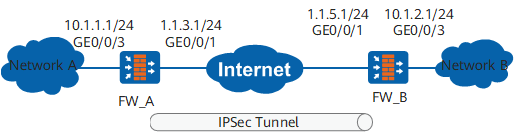
  • Network A (10.1.1.0/24) connects to FW_A through GigabitEthernet 0/0/3.

  • Network B (10.1.2.0/24) connects to FW_B through GigabitEthernet 0/0/3.

  • FW_A and FW_B are reachable to each other.

Figure 1 Configuring an IPSec tunnel manually

Configuration Roadmap

The configuration roadmap is as follows:

  1. Configure IP addresses for interfaces, and add the interfaces to corresponding security zones.

  2. Configure an ACL to define data flows that need to be protected.

  3. Configure interzone security policies.

  4. Configure IPSec proposals.

  5. Configure IPSec policies.

  6. Apply IPSec policies.

Data Plan

To complete the configuration, you need the following data:

  • IP addresses of interfaces on the FW

    Figure 1 shows the interfaces and IP addresses of this example.

  • Security protocols, and encryption and authentication algorithms adopted by security protocols

    In this example, ESP is adopted as the security protocol. The encryption algorithm and authentication algorithm adopted by ESP are AES-256 and SHA2-256 respectively.

  • Inbound and outbound Security Parameter Indexes (SPIs)

    In this example, the SPIs of the inbound and outbound SAs adopted by FW_A are 12345678 and 87654321 respectively. The SPIs of the inbound and outbound SAs adopted by FW_B are 87654321 and 12345678 respectively.

  • ESP authentication key

    In this example, the inbound and outbound authentication keys of ESP adopted by FW_A are abcdefg and gfedcba respectively. The inbound and outbound authentication keys of ESP adopted by FW_B are gfedcba and abcdefg respectively.

Procedure

  • Configure FW_A.
    1. Configure the IP address.

      1. Configure the IP address of GigabitEthernet 0/0/3.

        <sysname> system-view
        [sysname] sysname FW_A
        [FW_A] interface GigabitEthernet 0/0/3
        [FW_A-GigabitEthernet0/0/3] ip address 10.1.1.1 24
        [FW_A-GigabitEthernet0/0/3] quit
      2. Configure the IP address of GigabitEthernet 0/0/1.

        [FW_A] interface GigabitEthernet 0/0/1
        [FW_A-GigabitEthernet0/0/1] ip address 1.1.3.1 24
        [FW_A-GigabitEthernet0/0/1] quit

    2. Add interfaces to corresponding security zones.

      1. Add GigabitEthernet 0/0/3 to the Trust zone.

        [FW_A] firewall zone trust
        [FW_A-zone-trust] add interface GigabitEthernet 0/0/3
        [FW_A-zone-trust] quit
      2. Add GigabitEthernet 0/0/1 to the Untrust zone.

        [FW_A] firewall zone untrust
        [FW_A-zone-untrust] add interface GigabitEthernet 0/0/1
        [FW_A-zone-untrust] quit

    3. Configure interzone security policies.

      1. Configure the security policies between the Trust and Untrust zones.

        [FW_A] security-policy
        [FW_A-policy-security] rule name policy1
        [FW_A-policy-security-rule-policy1] source-zone trust
        [FW_A-policy-security-rule-policy1] destination-zone untrust
        [FW_A-policy-security-rule-policy1] source-address 10.1.1.0 24
        [FW_A-policy-security-rule-policy1] destination-address 10.1.2.0 24
        [FW_A-policy-security-rule-policy1] action permit
        [FW_A-policy-security-rule-policy1] quit
        [FW_A-policy-security] rule name policy2
        [FW_A-policy-security-rule-policy2] source-zone untrust
        [FW_A-policy-security-rule-policy2] destination-zone trust
        [FW_A-policy-security-rule-policy2] source-address 10.1.2.0 24
        [FW_A-policy-security-rule-policy2] destination-address 10.1.1.0 24
        [FW_A-policy-security-rule-policy2] action permit
        [FW_A-policy-security-rule-policy2] quit
      2. Configure the security policies between the Local and Untrust zones.

        [FW_A-policy-security] rule name policy3
        [FW_A-policy-security-rule-policy3] source-zone local
        [FW_A-policy-security-rule-policy3] destination-zone untrust
        [FW_A-policy-security-rule-policy3] source-address 1.1.3.1 32
        [FW_A-policy-security-rule-policy3] destination-address 1.1.5.1 32
        [FW_A-policy-security-rule-policy3] action permit
        [FW_A-policy-security-rule-policy3] quit
        [FW_A-policy-security] rule name policy4
        [FW_A-policy-security-rule-policy4] source-zone untrust
        [FW_A-policy-security-rule-policy4] destination-zone local
        [FW_A-policy-security-rule-policy4] source-address 1.1.5.1 32
        [FW_A-policy-security-rule-policy4] destination-address 1.1.3.1 32
        [FW_A-policy-security-rule-policy4] action permit
        [FW_A-policy-security-rule-policy4] quit
        [FW_A-policy-security] quit

    4. Configure a static route to network B. Assume that the next hop of the route is 1.1.3.2.

      [FW_A] ip route-static 10.1.2.0 255.255.255.0 1.1.3.2
      [FW_A] ip route-static 1.1.5.0 255.255.255.0 1.1.3.2

    5. Configure advanced ACL 3000 to permit the users on network segment 10.1.1.0/24 to access network segment 10.1.2.0/24.

      [FW_A] acl 3000
      [FW_A-acl-adv-3000] rule 5 permit ip source 10.1.1.0 0.0.0.255 destination 10.1.2.0 0.0.0.255
      [FW_A-acl-adv-3000] quit

    6. Configure IPSec proposal tran1.

      [FW_A] ipsec proposal tran1
      [FW_A-ipsec-proposal-tran1] encapsulation-mode tunnel
      [FW_A-ipsec-proposal-tran1] transform esp
      [FW_A-ipsec-proposal-tran1] esp authentication-algorithm sha2-256
      [FW_A-ipsec-proposal-tran1] esp encryption-algorithm aes-256
      [FW_A-ipsec-proposal-tran1] quit

    7. Configure an IPSec policy with the name map1 and number 10.

      [FW_A] ipsec policy map1 10 manual
      [FW_A-ipsec-policy-manual-map1-10] security acl 3000
      [FW_A-ipsec-policy-manual-map1-10] proposal tran1
      [FW_A-ipsec-policy-manual-map1-10] tunnel remote 1.1.5.1
      [FW_A-ipsec-policy-manual-map1-10] tunnel local 1.1.3.1
      [FW_A-ipsec-policy-manual-map1-10] sa spi inbound esp 12345678
      [FW_A-ipsec-policy-manual-map1-10] sa spi outbound esp 87654321
      [FW_A-ipsec-policy-manual-map1-10] sa string-key inbound esp abcdefg
      [FW_A-ipsec-policy-manual-map1-10] sa string-key outbound esp gfedcba
      [FW_A-ipsec-policy-manual-map1-10] quit

    8. Apply security policy map1 to GigabitEthernet 0/0/1.

      [FW_A] interface GigabitEthernet 0/0/1
      [FW_A-GigabitEthernet0/0/1] ipsec policy map1
      [FW_A-GigabitEthernet0/0/1] quit

  • Configure FW_B.
    1. Set interface IP addresses.

      1. Configure the IP address of GigabitEthernet 0/0/3.

        <sysname> system-view
        [sysname] sysname FW_B
        [FW_B] interface GigabitEthernet 0/0/3
        [FW_B-GigabitEthernet0/0/3] ip address 10.1.2.1 24
        [FW_B-GigabitEthernet0/0/3] quit
      2. Configure the IP address of GigabitEthernet 0/0/1.

        [FW_B] interface GigabitEthernet 0/0/1
        [FW_B-GigabitEthernet0/0/1] ip address 1.1.5.1 24
        [FW_B-GigabitEthernet0/0/1] quit

    2. Add interfaces to corresponding security zones.

      1. Add GigabitEthernet 0/0/3 to the Trust zone.

        [FW_B] firewall zone trust
        [FW_B-zone-trust] add interface GigabitEthernet 0/0/3
        [FW_B-zone-trust] quit
      2. Add GigabitEthernet 0/0/1 to the Untrust zone.

        [FW_B] firewall zone untrust
        [FW_B-zone-untrust] add interface GigabitEthernet 0/0/1
        [FW_B-zone-untrust] quit

    3. Configure interzone security policies.

      1. Configure the security policies between the Trust and Untrust zones.

        [FW_B] security-policy
        [FW_B-policy-security] rule name policy1
        [FW_B-policy-security-rule-policy1] source-zone trust
        [FW_B-policy-security-rule-policy1] destination-zone untrust
        [FW_B-policy-security-rule-policy1] source-address 10.1.2.0 24
        [FW_B-policy-security-rule-policy1] destination-address 10.1.1.0 24
        [FW_B-policy-security-rule-policy1] action permit
        [FW_B-policy-security-rule-policy1] quit
        [FW_B-policy-security] rule name policy2
        [FW_B-policy-security-rule-policy2] source-zone untrust
        [FW_B-policy-security-rule-policy2] destination-zone trust
        [FW_B-policy-security-rule-policy2] source-address 10.1.1.0 24
        [FW_B-policy-security-rule-policy2] destination-address 10.1.2.0 24
        [FW_B-policy-security-rule-policy2] action permit
        [FW_B-policy-security-rule-policy2] quit
      2. Configure the security policies between the Local and Untrust zones.

        [FW_B-policy-security] rule name policy3
        [FW_B-policy-security-rule-policy3] source-zone local
        [FW_B-policy-security-rule-policy3] destination-zone untrust
        [FW_B-policy-security-rule-policy3] source-address 1.1.5.1 32
        [FW_B-policy-security-rule-policy3] destination-address 1.1.3.1 32
        [FW_B-policy-security-rule-policy3] action permit
        [FW_B-policy-security-rule-policy3] quit
        [FW_B-policy-security] rule name policy4
        [FW_B-policy-security-rule-policy4] source-zone untrust
        [FW_B-policy-security-rule-policy4] destination-zone local
        [FW_B-policy-security-rule-policy4] source-address 1.1.3.1 32
        [FW_B-policy-security-rule-policy4] destination-address 1.1.5.1 32
        [FW_B-policy-security-rule-policy4] action permit
        [FW_B-policy-security-rule-policy4] quit
        [FW_B-policy-security] quit

    4. Configure a static route to network A. Assume that the next hop of the route is 1.1.5.2.

      [FW_B] ip route-static 10.1.1.0 255.255.255.0 1.1.5.2
      [FW_B] ip route-static 1.1.3.0 255.255.255.0 1.1.5.2

    5. Configure advanced ACL 3000 to permit the users on network segment 10.1.2.0/24 to access network segment 10.1.1.0/24.

      [FW_B] acl 3000
      [FW_B-acl-adv-3000] rule 5 permit ip source 10.1.2.0 0.0.0.255 destination 10.1.1.0 0.0.0.255
      [FW_B-acl-adv-3000] quit

    6. Configure IPSec proposal tran1.

      [FW_B] ipsec proposal tran1
      [FW_B-ipsec-proposal-tran1] encapsulation-mode tunnel
      [FW_B-ipsec-proposal-tran1] transform esp
      [FW_B-ipsec-proposal-tran1] esp authentication-algorithm sha2-256
      [FW_B-ipsec-proposal-tran1] esp encryption-algorithm aes-256
      [FW_B-ipsec-proposal-tran1] quit

    7. Configure an IPSec policy with the name map1 and number 10.

      [FW_B] ipsec policy map1 10 manual
      [FW_B-ipsec-policy-manual-map1-10] security acl 3000
      [FW_B-ipsec-policy-manual-map1-10] proposal tran1
      [FW_B-ipsec-policy-manual-map1-10] tunnel remote 1.1.3.1
      [FW_B-ipsec-policy-manual-map1-10] tunnel local 1.1.5.1
      [FW_B-ipsec-policy-manual-map1-10] sa spi inbound esp 87654321
      [FW_B-ipsec-policy-manual-map1-10] sa spi outbound esp 12345678
      [FW_B-ipsec-policy-manual-map1-10] sa string-key inbound esp gfedcba
      [FW_B-ipsec-policy-manual-map1-10] sa string-key outbound esp abcdefg
      [FW_B-ipsec-policy-manual-map1-10] quit

    8. Apply IPSec policy map1 to GigabitEthernet 0/0/1.

      [FW_B] interface GigabitEthernet 0/0/1
      [FW_B-GigabitEthernet0/0/1] ipsec policy map1
      [FW_B-GigabitEthernet0/0/1] quit

Verification

  • On FW_A and FW_B, run the display ipsec sa command to check whether SAs are established. Take FW_B as an example. If the following information is displayed, the IKE SA and IPSec SA are successfully established.
    <FW_B> display ipsec sa
                                                                                    
    ipsec sa information:                                                           
                                                                                    
    ===============================                                                 
    Interface: GigabitEthernet0/0/1                                                 
    ===============================                                                 
                                                                                    
      -----------------------------                                                 
      IPSec policy name: "map1"                                                     
      Sequence number  : 10                                                         
      Acl group        : 3000                                                       
      Acl rule         : -                                                          
      Mode             : Manual                                                     
      -----------------------------                                                 
        Encapsulation mode: Tunnel                                                  
        Tunnel local      : 1.1.5.1                                                 
        Tunnel remote     : 1.1.3.1                                                 
                                                                                    
        [Outbound ESP SAs]                                                          
          SPI: 12345678 (0xbc614e)                                                  
          Proposal: ESP-ENCRYPT-AES-256 SHA2-256-128                                
          SA encrypted packets (number/bytes): 0/0                                  
          No duration limit for this SA                                             
                                                                                    
        [Inbound ESP SAs]                                                           
          SPI: 87654321 (0x5397fb1)                                                 
          Proposal: ESP-ENCRYPT-AES-256 SHA2-256-128                                
          SA decrypted packets (number/bytes): 0/0                                  
          No duration limit for this SA                                             
          Anti-replay : Disable 
  • If the configurations are correct, network A can ping network B, and you can check the encrypted data using the display ipsec statistics command.
    <FW_B> display ipsec statistics
     IPSec statistics information:                                           
     the security packet statistics:                                                
       input/output security packets: 20/20                             
       input/output security bytes: 2000/2000                         
       input/output dropped security packets: 0/0                          
       the encrypt packet statistics:                                               
         send chip: 63, recv chip: 63, send err: 0                          
         local cpu: 63, other cpu: 0, recv other cpu: 0                         
         intact packet: 63, first slice: 0, after slice: 0                      
       the decrypt packet statistics:                                               
         send chip: 244, recv chip: 244, send err: 0                 
         local cpu: 244, other cpu: 0, recv other cpu: 0                     
         reass  first slice: 0, after slice: 0                     
       dropped security packet detail:                                              
         can't find SA: 0, wrong SA: 0                                     
         authentication: 0, replay: 0                                              
         front recheck: 0, after recheck: 0                                        
         change cpu enc: 0, dec change cpu: 0                                       
         fib search: 0, output l3: 0                                                
         flow err: 0, slice err: 0, byte limit: 0                                
      negotiate about packet statistics:                                            
        IKE fwd packet ok: 93, err: 0                                           
        IKE ctrl packet inbound ok: 92, outbound ok: 58                     
        SoftExpr: 0, HardExpr: 0, DPDOper: 0                                       
        trigger ok: 0, switch sa: 35684, sync sa: 0                                 
        recv IKE nat keepalive: 114731, IKE input: 0  

Configuration Files

  • FW_A configuration file

    #
     sysname FW_A
    #
    acl number 3000
     rule 5 permit ip source 10.1.1.0 0.0.0.255 destination 10.1.2.0 0.0.0.255
    #                                                                               
    ipsec proposal tran1                                                            
     esp authentication-algorithm sha2-256                                          
     esp encryption-algorithm aes-256
    #
    ipsec policy map1 10 manual
     security acl 3000                                                              
     proposal tran1                                                                 
     tunnel local 1.1.3.1                                                           
     tunnel remote 1.1.5.1                                                          
     sa spi inbound esp 12345678                                                    
     sa string-key inbound esp %@%@PI\K*_pjr==.uM$HIkP#Vt8(%@%@                     
     sa spi outbound esp 87654321                                                   
     sa string-key outbound esp %@%@2Lbc"4d3cNnt"LWd5I=#\P1t%@%@ 
    #
    interface GigabitEthernet0/0/3
     undo shutdown
     ip address 10.1.1.1 255.255.255.0
    #
    interface GigabitEthernet0/0/1
     undo shutdown
     ip address 1.1.3.1 255.255.255.0
     ipsec policy map1
    #
    firewall zone trust
     set priority 85
     add interface GigabitEthernet0/0/3
    #
    firewall zone untrust 
     set priority 5 
     add interface GigabitEthernet0/0/1
    #
    ip route-static 1.1.5.0 255.255.255.0 1.1.3.2
    ip route-static 10.1.2.0 255.255.255.0 1.1.3.2
    #
    security-policy
     rule name policy1
      source-zone trust
      destination-zone untrust
      source-address 10.1.1.0 mask 255.255.255.0
      destination-address 10.1.2.0 mask 255.255.255.0
      action permit
     rule name policy2
      source-zone untrust
      destination-zone trust
      source-address 10.1.2.0 mask 255.255.255.0
      destination-address 10.1.1.0 mask 255.255.255.0
      action permit
     rule name policy3
      source-zone local
      destination-zone untrust
      source-address 1.1.3.1 mask 255.255.255.255
      destination-address 1.1.5.1 mask 255.255.255.255
      action permit
     rule name policy4
      source-zone untrust
      destination-zone local
      source-address 1.1.5.1 mask 255.255.255.255
      destination-address 1.1.3.1 mask 255.255.255.255
      action permit
    #
    return
  • FW_B configuration file

    #
     sysname FW_B
    #
    acl number 3000
     rule 5 permit ip source 10.1.2.0 0.0.0.255 destination 10.1.1.0 0.0.0.255
    #                                                                               
    ipsec proposal tran1                                                            
     esp authentication-algorithm sha2-256                                          
     esp encryption-algorithm aes-256   
    #
    ipsec policy map1 10 manual
     security acl 3000                                                              
     proposal tran1                                                                 
     tunnel local 1.1.5.1                                                           
     tunnel remote 1.1.3.1                                                          
     sa spi inbound esp 87654321                                                    
     sa string-key inbound esp %@%@>#!MN;yT<0M|RK7`Wu3K-cTy%@%@                     
     sa spi outbound esp 12345678                                                   
     sa string-key outbound esp %@%@};BD7G!>+.=sRN(/)Ab>-]Yl%@%@
    #
    interface GigabitEthernet0/0/3
     undo shutdown
     ip address 10.1.2.1 255.255.255.0
    #
    interface GigabitEthernet0/0/1
     undo shutdown
     ip address 1.1.5.1 255.255.255.0
     ipsec policy map1
    #
    firewall zone trust
     set priority 85
     add interface GigabitEthernet0/0/3
    #
    firewall zone untrust 
     set priority 5 
     add interface GigabitEthernet0/0/1
    #
    ip route-static 1.1.3.0 255.255.255.0 1.1.5.2
    ip route-static 10.1.1.0 255.255.255.0 1.1.5.2
    #
    security-policy
     rule name policy1
      source-zone trust
      destination-zone untrust
      source-address 10.1.2.0 mask 255.255.255.0
      destination-address 10.1.1.0 mask 255.255.255.0
      action permit
     rule name policy2
      source-zone untrust
      destination-zone trust
      source-address 10.1.1.0 mask 255.255.255.0
      destination-address 10.1.2.0 mask 255.255.255.0
      action permit
     rule name policy3
      source-zone local
      destination-zone untrust
      source-address 1.1.5.1 mask 255.255.255.255
      destination-address 1.1.3.1 mask 255.255.255.255
      action permit
     rule name policy4
      source-zone untrust
      destination-zone local
      source-address 1.1.3.1 mask 255.255.255.255
      destination-address 1.1.5.1 mask 255.255.255.255
      action permit
    #
    return
Copyright © Huawei Technologies Co., Ltd.
< Previous topic Next topic >