CLI: Example for Configuring Route-based GRE over IPSec VPN Using IPSec Profile
Networking Requirements
As shown in Figure 1, network A and network B connect to the Internet through FW_A and FW_B respectively. Users on network A need to access resources on network B through a GRE tunnel. The network environment is as follows:
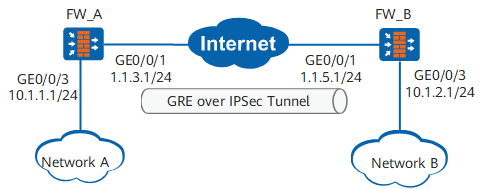
Data Plan
Item |
Data |
|---|---|
FW_A |
Interface number: GigabitEthernet 0/0/3 IP address: 10.1.1.1/24 Security zone: Trust |
Interface number: GigabitEthernet 0/0/1 IP address: 1.1.3.1/24 Security zone: Untrust |
|
GRE tunnel interface configuration Source IP address: 1.1.3.1 Destination IP address: 1.1.5.1 IP address: any address that does not conflict with other IP addresses |
|
IPSec profile configuration Authentication type: Pre-shared key Pre-shared key: Test!1234 Local ID type: IP address Peer ID type: any |
|
FW_B |
Interface number: GigabitEthernet 0/0/1 IP address: 1.1.5.1/24 Security zone: Untrust |
Interface number: GigabitEthernet 0/0/3 IP address: 10.1.2.1/24 Security zone: Trust |
|
GRE tunnel interface configuration Source IP address: 1.1.5.1 Destination IP address: 1.1.3.1 IP address: any address that does not conflict with other IP addresses |
|
IPSec profile configuration Authentication type: Pre-shared key Pre-shared key: Test!1234 Local ID type: IP address Peer ID type: any |
Configuration Roadmap
The procedure and roadmap for configuring FW_A and FW_B are the same. The configuration roadmap is as follows:
- Configure interfaces.
- Configure security policies to allow specific subnets to communicate.
- Create a static route to the remote intranet.
- Configure GRE tunnel interfaces and routes to these interfaces.
- Configure an IPSec profile, including basic IPSec profile information and IPSec proposal negotiation parameters.
Procedure
- Perform basic configurations on FW_A, including setting the interface IP addresses, adding interfaces to security zones, and configuring interzone security policies and static route.
- Configure interzone security policies.
Configure the security policies between the Trust and Untrust zones.
[FW_A] security-policy
[FW_A-policy-security] rule name policy1
[FW_A-policy-security-rule-policy1] source-zone trust
[FW_A-policy-security-rule-policy1] destination-zone untrust
[FW_A-policy-security-rule-policy1] source-address 10.1.1.0 24
[FW_A-policy-security-rule-policy1] destination-address 10.1.2.0 24
[FW_A-policy-security-rule-policy1] action permit
[FW_A-policy-security-rule-policy1] quit
[FW_A-policy-security] rule name policy2
[FW_A-policy-security-rule-policy2] source-zone untrust
[FW_A-policy-security-rule-policy2] destination-zone trust
[FW_A-policy-security-rule-policy2] source-address 10.1.2.0 24
[FW_A-policy-security-rule-policy2] destination-address 10.1.1.0 24
[FW_A-policy-security-rule-policy2] action permit
[FW_A-policy-security-rule-policy2] quit
Configure the security policies between the Local and Untrust zones.

The Local-Untrust interzone policy controls whether IKE negotiation packets can pass through the FW. This policy can use the source and destination addresses, protocol, or port as the matching condition. In this example, the source and destination addresses are used as the matching condition. To use the protocol or port as the matching condition, you need to enable ESP and port 500 for UDP (port 4500 also in NAT traversal scenarios).
The security policies for the Local-Untrust interzone enable the devices at two ends to negotiate an IPSec tunnel.
[FW_A-policy-security] rule name policy3
[FW_A-policy-security-rule-policy3] source-zone local
[FW_A-policy-security-rule-policy3] destination-zone untrust
[FW_A-policy-security-rule-policy3] source-address 1.1.3.1 32
[FW_A-policy-security-rule-policy3] destination-address 1.1.5.1 32
[FW_A-policy-security-rule-policy3] action permit
[FW_A-policy-security-rule-policy3] quit
[FW_A-policy-security] rule name policy4
[FW_A-policy-security-rule-policy4] source-zone untrust
[FW_A-policy-security-rule-policy4] destination-zone local
[FW_A-policy-security-rule-policy4] source-address 1.1.5.1 32
[FW_A-policy-security-rule-policy4] destination-address 1.1.3.1 32
[FW_A-policy-security-rule-policy4] action permit
[FW_A-policy-security-rule-policy4] quit
[FW_A-policy-security] quit
- Configure interzone security policies.
- Configure GRE over IPSec on FW_A.
- Set the interface IP addresses, add interfaces to security zones, and configure interzone security policy and static route on FW_B.
- Configure interzone security policies.
Configure the security policies between the Trust and Untrust zones.
[FW_B] security-policy
[FW_B-policy-security] rule name policy1
[FW_B-policy-security-rule-policy1] source-zone trust
[FW_B-policy-security-rule-policy1] destination-zone untrust
[FW_B-policy-security-rule-policy1] source-address 10.1.2.0 24
[FW_B-policy-security-rule-policy1] destination-address 10.1.1.0 24
[FW_B-policy-security-rule-policy1] action permit
[FW_B-policy-security-rule-policy1] quit
[FW_B-policy-security] rule name policy2
[FW_B-policy-security-rule-policy2] source-zone untrust
[FW_B-policy-security-rule-policy2] destination-zone trust
[FW_B-policy-security-rule-policy2] source-address 10.1.1.0 24
[FW_B-policy-security-rule-policy2] destination-address 10.1.2.0 24
[FW_B-policy-security-rule-policy2] action permit
[FW_B-policy-security-rule-policy2] quit
Configure the security policies between the Local and Untrust zones.
The Local-Untrust interzone policy controls whether IKE negotiation packets can pass through the FW. This policy can use the source and destination addresses, protocol, or port as the matching condition. In this example, the source and destination addresses are used as the matching condition. To use the protocol or port as the matching condition, you need to enable ESP and port 500 for UDP (port 4500 also in NAT traversal scenarios).
The security policies for the Local-Untrust interzone enable the devices at two ends to negotiate an IPSec tunnel.
[FW_B-policy-security] rule name policy3
[FW_B-policy-security-rule-policy3] source-zone local
[FW_B-policy-security-rule-policy3] destination-zone untrust
[FW_B-policy-security-rule-policy3] source-address 1.1.5.1 32
[FW_B-policy-security-rule-policy3] destination-address 1.1.3.1 32
[FW_B-policy-security-rule-policy3] action permit
[FW_B-policy-security-rule-policy3] quit
[FW_B-policy-security] rule name policy4
[FW_B-policy-security-rule-policy4] source-zone untrust
[FW_B-policy-security-rule-policy4] destination-zone local
[FW_B-policy-security-rule-policy4] source-address 1.1.3.1 32
[FW_B-policy-security-rule-policy4] destination-address 1.1.5.1 32
[FW_B-policy-security-rule-policy4] action permit
[FW_B-policy-security-rule-policy4] quit
[FW_B-policy-security] quit
- Configure interzone security policies.
- Configure GRE over IPSec on FW_B.
Configuration Files
-
#
 sysname FW_A
#
ipsec proposal tran1
 esp authentication-algorithm sha2-256
 esp encryption-algorithm aes-256
#
ike proposal 10
  encryption-algorithm aes-256
  dh group14
  authentication-algorithm sha2-256
  authentication-method pre-share
  integrity-algorithm hmac-sha2-256
  prf hmac-sha2-256
#
ike peer b
  pre-shared-key %^%#{j1P([P@.*0kW\B_5t3=L(0Y%^%#
  ike-proposal 10
#
ipsec profile pro1
 ike-peer b
 proposal tran1
#
interface GigabitEthernet0/0/3
 undo shutdown
 ip address 10.1.1.1 255.255.255.0
#
interface GigabitEthernet0/0/1
 undo shutdown
 ip address 1.1.3.1 255.255.255.0
#
interface Tunnel1
 tunnel-protocol gre
 source 1.1.3.1
 destination 1.1.5.1
 ip address 172.16.2.1 255.255.255.0
 ipsec profile pro1
#
firewall zone trust
 set priority 85
 add interface GigabitEthernet0/0/3
#
firewall zone untrust
 set priority 5
 add interface GigabitEthernet0/0/1
 add interface tunnel1
#
 ip route-static 1.1.5.0 255.255.255.0 1.1.3.2
 ip route-static 10.1.2.0 255.255.255.0 Tunnel1
#
security-policy
  rule name policy1
    source-zone trust
    destination-zone untrust
    source-address 10.1.1.0 mask 255.255.255.0
    destination-address 10.1.2.0 mask 255.255.255.0
    action permit
  rule name policy2
    source-zone untrust
    destination-zone trust
    source-address 10.1.2.0 mask 255.255.255.0
    destination-address 10.1.1.0 mask 255.255.255.0
    action permit
  rule name policy3
    source-zone local
    destination-zone untrust
    source-address 1.1.3.1 mask 255.255.255.255
    destination-address 1.1.5.1 mask 255.255.255.255
    action permit
  rule name policy4
    source-zone untrust
    destination-zone local
    source-address 1.1.5.1 mask 255.255.255.255
    destination-address 1.1.3.1 mask 255.255.255.255
    action permit
#
return
-
#
 sysname FW_B
#
ipsec proposal tran1
 esp authentication-algorithm sha2-256
 esp encryption-algorithm aes-256
#
ike proposal 10
  encryption-algorithm aes-256
  dh group14
  authentication-algorithm sha2-256
  authentication-method pre-share
  integrity-algorithm hmac-sha2-256
  prf hmac-sha2-256
#
ike peer a
 pre-shared-key %^%#wtV"Og}Iy>%[Sq5h(*KIcA(M%^%#
 ike-proposal 10
#
ipsec profile pro1
 ike-peer a
 proposal tran1
#
interface GigabitEthernet0/0/3
 undo shutdown
 ip address 10.1.2.1 255.255.255.0
#
interface GigabitEthernet0/0/1
 undo shutdown
 ip address 1.1.5.1 255.255.255.0
#
interface Tunnel1
 tunnel-protocol gre
 source 1.1.5.1
 destination 1.1.3.1
 ip address 172.16.2.2 255.255.255.0
 ipsec profile pro1
#
firewall zone trust
 set priority 85
 add interface GigabitEthernet0/0/3
#
firewall zone untrust
 set priority 5
 add interface GigabitEthernet0/0/1
 add interface Tunnel1
#
 ip route-static 1.1.3.0 255.255.255.0 1.1.5.2
 ip route-static 10.1.1.0 255.255.255.0 Tunnel1
#
security-policy
  rule name policy1
    source-zone trust
    destination-zone untrust
    source-address 10.1.2.0 mask 255.255.255.0
    destination-address 10.1.1.0 mask 255.255.255.0
    action permit
  rule name policy2
    source-zone untrust
    destination-zone trust
    source-address 10.1.1.0 mask 255.255.255.0
    destination-address 10.1.2.0 mask 255.255.255.0
    action permit
  rule name policy3
    source-zone local
    destination-zone untrust
    source-address 1.1.5.1 mask 255.255.255.255
    destination-address 1.1.3.1 mask 255.255.255.255
    action permit
  rule name policy4
    source-zone untrust
    destination-zone local
    source-address 1.1.3.1 mask 255.255.255.255
    destination-address 1.1.5.1 mask 255.255.255.255
    action permit
#
return