CLI: Example for Configuring a Base Station to Obtain a Private Network Address Using DHCP over IPSec
Network Requirements
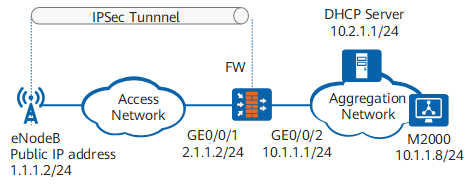
As shown in Figure 1, FW is the gateway of the aggregation network, where the DHCP server and M2000 server are located. eNodeB is located on an insecure access network.
The customer requires that eNodeB can obtain a private network address from the DHCP server on the aggregation network to access the M2000 server. The customer also requires that DHCP packets transmitted over the access network be encrypted to prevent packet eavesdropping or modification, improving transmission security. DHCP over IPSec can be configured to meet these requirements.
Configuration Roadmap
The configuration roadmap is as follows:
- Configure interface IP addresses and static routes to ensure reachability between the devices.
- Configure IPSec to encrypt DHCP packets, improving transmission security.

For details about the configurations of eNodeB, DHCP server, and M2000 server, see related product documents.
When configuring IPSec, confirm IPSec parameters supported by eNodeB. For example, eNodeB supports FQDN authentication, ESP, and tunnel mode, but does not support MD5 and 3DES algorithms.
Procedure
- Configure interface IP addresses and static routes.
<sysname> system-view
[sysname] sysname FW
[FW] interface GigabitEthernet 0/0/1
[FW-GigabitEthernet0/0/1] ip address 2.1.1.2 24
[FW-GigabitEthernet0/0/1] quit
[FW] interface GigabitEthernet 0/0/2
[FW-GigabitEthernet0/0/2] ip address 10.1.1.1 24
[FW-GigabitEthernet0/0/2] quit
[FW] ip route-static 1.1.1.0 255.255.255.0 2.1.1.1
[FW] ip route-static 10.2.1.0 255.255.255.0 10.1.1.2
- Add interfaces to trust zones and configure inter-zone security policies.
# Add interfaces to trust zones.
[FW] firewall zone untrust
[FW-zone-untrust] add interface GigabitEthernet 0/0/1
[FW-zone-untrust] quit
[FW] firewall zone trust
[FW-zone-trust] add interface GigabitEthernet 0/0/2
[FW-zone-trust] quit
# Configure inter-zone security policies.
The Local-Untrust interzone policy controls whether IKE negotiation packets can pass through the FW. This policy can use the source and destination addresses, protocol, or port as the matching condition. In this example, the source and destination addresses are used as the matching condition. To use the protocol or port as the matching condition, you need to enable ESP and port 500 for UDP (port 4500 also in NAT traversal scenarios).
The Local-Untrust interzone policy controls whether IKE negotiation packets can pass through the FW. This policy can use the source and destination addresses, protocol, or port as the matching condition. In this example, the source and destination addresses are used as the matching condition. To use the protocol or port as the matching condition, you need to enable ESP and port 500 for UDP (port 4500 also in NAT traversal scenarios).
[FW] security-policy
[FW-policy-security] rule name policy1
[FW-policy-security-rule-policy1] source-zone local
[FW-policy-security-rule-policy1] destination-zone untrust
[FW-policy-security-rule-policy1] source-address 2.1.1.2 32
[FW-policy-security-rule-policy1] action permit
[FW-policy-security-rule-policy1] quit
[FW-policy-security] rule name policy2
[FW-policy-security-rule-policy2] source-zone untrust
[FW-policy-security-rule-policy2] destination-zone local
[FW-policy-security-rule-policy2] destination-address 2.1.1.2 32
[FW-policy-security-rule-policy2] action permit
[FW-policy-security-rule-policy2] quit
[FW-policy-security] rule name policy3
[FW-policy-security-rule-policy3] source-zone trust
[FW-policy-security-rule-policy3] destination-zone untrust
[FW-policy-security-rule-policy3] source-address 10.2.1.0 24
[FW-policy-security-rule-policy3] destination-address 1.1.1.0 24
[FW-policy-security-rule-policy3] action permit
[FW-policy-security-rule-policy3] quit
[FW-policy-security] rule name policy4
[FW-policy-security-rule-policy4] source-zone untrust
[FW-policy-security-rule-policy4] destination-zone trust
[FW-policy-security-rule-policy4] source-address 1.1.1.0 24
[FW-policy-security-rule-policy4] destination-address 10.2.1.0 24
[FW-policy-security-rule-policy4] action permit
[FW-policy-security-rule-policy4] quit
[FW-policy-security] quit
- Configure IPSec.
# Configure an IPSec proposal.
[FW] ipsec proposal prop1
[FW-ipsec-proposal-prop1] esp authentication-algorithm sha2-256
[FW-ipsec-proposal-prop1] esp encryption-algorithm aes-256
[FW-ipsec-proposal-prop1] quit
# Configure an IKE proposal.
[FW] ike proposal 10
[FW-ike-proposal-10] encryption-algorithm aes-128
[FW-ike-proposal-10] dh group14
[FW-ike-proposal-10] authentication-method pre-share
[FW-ike-proposal-10] integrity-algorithm hmac-sha2-256
[FW-ike-proposal-10] prf hmac-sha2-256
[FW-ike-proposal-10] quit
# Configure an IKE peer.
[FW] ike peer rut
[FW-ike-peer-rut] pre-shared-key huawei@1234
[FW-ike-peer-rut] ike-proposal 10
[FW-ike-peer-rut] local-id-type fqdn
[FW-ike-peer-rut] local-id segw
[FW-ike-peer-rut] quit
# Configure an IPSec policy template.
[FW] ipsec policy-template tp 10
[FW-ipsec-policy-templet-tp-10] ike-peer rut
[FW-ipsec-policy-templet-tp-10] proposal prop1
[FW-ipsec-policy-templet-tp-10] alias dhcpoipsec
[FW-ipsec-policy-templet-tp-10] dhcp-server-ip 10.2.1.1
[FW-ipsec-policy-templet-tp-10] quit
[FW] ipsec policy test 10 isakmp template tp
# Apply the IPSec policy group to the interface.
[FW] interface GigabitEthernet 0/0/1
[FW-GigabitEthernet0/0/1] ipsec policy test
[FW-GigabitEthernet0/0/1] quit
- Verify the configuration.
# After the configuration is complete, run the display ike sa command on the FW and check the Flag(s) parameter. The command output shows that an SA is established successfully.
[FW] display ike sa remote 1.1.1.2

    Conn-ID       Peer            VPN   Flag(s)                Phase
  --------------------------------------------------------------------
    117477244     1.1.1.2               RD|M                   v2:2
    117477242     1.1.1.2               RD|M                   v2:1

  Number of SA entries  : 2

  Flag Description:
  RD--READY   ST--STAYALIVE   RL--REPLACED   FD--FADING   TO--TIMEOUT
  HRT--HEARTBEAT   LKG--LAST KNOWN GOOD SEQ NO.   BCK--BACKED UP
  M--ACTIVE   S--STANDBY   A--ALONE
The eNodeB interface has successfully obtained a private IP address 10.2.1.254 from the DHCP server, and can access the M2000 server.
FW Configuration File
#
sysname FW
#
dhcp enable
#
ipsec proposal prop1
 esp authentication-algorithm sha2-256
 esp encryption-algorithm aes-256
#
ike proposal 10
 encryption-algorithm aes-128
 dh group14
 authentication-algorithm sha2-256
 authentication-method pre-share
 integrity-algorithm hmac-sha2-256
 prf hmac-sha2-256
 ike proposal 15
#
ike peer rut
 pre-shared-key %@%@Om<^'3"rD&0ZHDOREtiI\EC+%@%@
 ike-proposal 10
 local-id-type fqdn
 local-id segw
#
ipsec policy-template tp 10
 ike-peer rut
 proposal prop1
 alias dhcpoipsec
 dhcp-server-ip 10.2.1.1
#
ipsec policy test 10 isakmp template tp
#
interface GigabitEthernet0/0/1
 undo shutdown
 ip address 2.1.1.2 255.255.255.0
 ipsec policy test
#
interface GigabitEthernet0/0/2
 undo shutdown
 ip address 10.1.1.1 255.255.255.0
#
firewall zone trust
 set priority 85
 add interface GigabitEthernet0/0/2
#
firewall zone untrust
 set priority 5
 add interface GigabitEthernet0/0/1
#
ip route-static 1.1.1.0 255.255.255.0 2.1.1.1
ip route-static 10.2.1.0 255.255.255.0 10.1.1.2
#
security-policy
 rule name policy1
  source-zone local
  destination-zone untrust
  source-address 2.1.1.2 32
  action permit
 rule name policy2
  source-zone untrust
  destination-zone local
  destination-address 2.1.1.2 32
  action permit
 rule name policy3
  source-zone trust
  destination-zone untrust
  source-address 10.2.1.0 24
  destination-address 1.1.1.0 24
  action permit
 rule name policy4
  source-zone untrust
  destination-zone trust
  source-address 1.1.1.0 24
  destination-address 10.2.1.0 24
  action permit
#
return