Web: Example for Configuring Intrusion Prevention to Protect Servers on the Intranet
The intrusion prevention function protects the users and web servers on an enterprise intranet from attacks on the Internet.
Networking Requirements
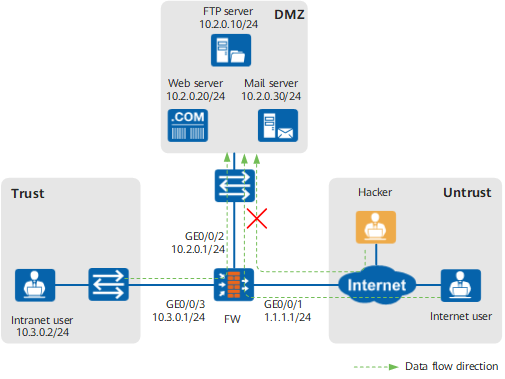
An enterprise deploys a FW as the security gateway at the network border, as shown in Figure 1.
- Users on the intranet can access the FTP server, web server, and mail server on the intranet.
- Users on the Internet can access the web server on the intranet.
The enterprise needs to configure the intrusion prevention function on the FW to defend against worm, Trojan horse, and botnet attacks targeting at the FTP server, mail server, and web server on the intranet initiated by Internet or intranet users.
Data Planning
Based on the enterprise requirements, intrusion prevention must be configured as follows:
Set the severity of worms, Trojan horses, and botnets in signatures to High.
Protect the FTP server, web server, and mail server on the intranet.
- Create two security policies to respectively filter traffic from the Internet to the intranet servers and from the intranet to the intranet servers.
- All these attacks target at servers. Therefore, configure the signature filters based on the protocols used by the services running on the servers and the operating system types.
Table 1 shows the data planning for protecting the servers on the intranet.
Table 1 Data planning for protecting the servers on the intranet Item
Description
Intranet servers
Intrusion prevention profiles
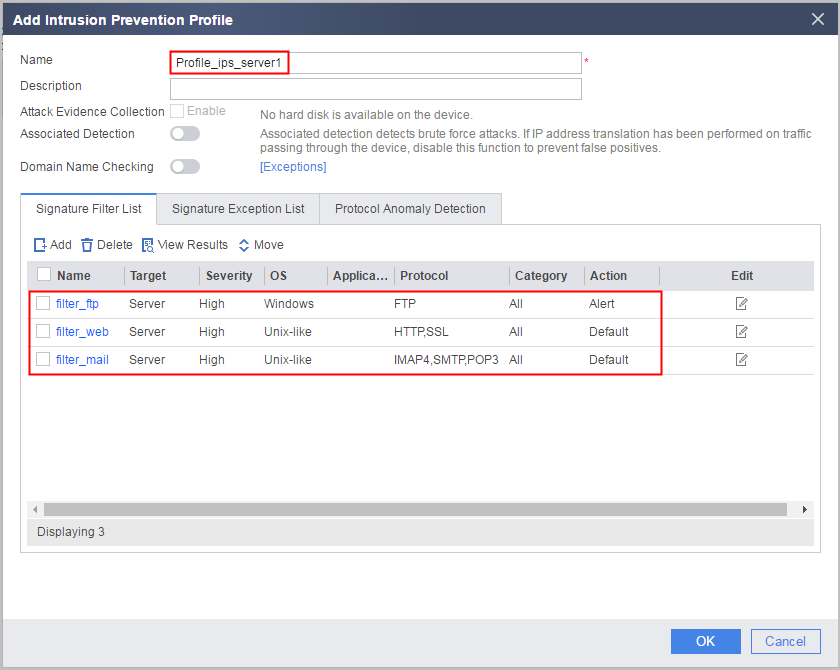
- Name: Profile_ips_server1
- Signature filter filter_ftp:
- Name: filter_ftp
- Object: Server
- Severity: High
- Operating system: Windows
- Protocol: FTP
- Action: Alert
- Signature filter filter_web:
- Name: filter_web
- Object: Server
- Severity: High
- Operating system: Unix-like
- Protocol: HTTP and SSL
- Action: Default
- Signature filter filter_mail:
- Name: filter_mail
- Object: Server
- Severity: High
- Operating system: Unix-like
- Protocol: SMTP, IMAP4, and POP3
- Action: Default
- Signature filter filter_ftp:
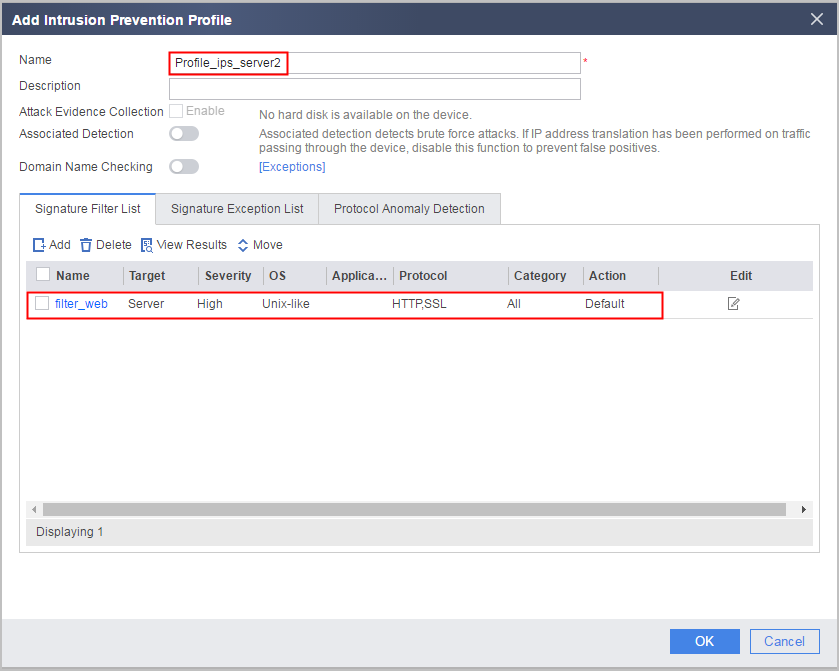
- Name: Profile_ips_server2
- Signature filter filter_web:
- Name: filter_web
- Object: Server
- Severity: High
- Operating system: Unix-like
- Protocol: HTTP and SSL
- Action: Default
- Signature filter filter_web:
Security policies
- Name: policy_sec_1
- Source security zone: Trust
- Destination security zone: DMZ
- Source address/region: 10.3.0.0/24
- Destination address/region: 10.2.0.0/24
- Service: FTP, HTTP, SSL, SMTP, IMAP4, and POP3
- Action: Permit
- Content security: Profile_ips_server1
- Name: policy_sec_2
- Source security zone: Untrust
- Destination security zone: DMZ
- Destination address/region: 10.2.0.0/24
- Service: HTTP and SSL
- Action: Permit
- Content security: Profile_ips_server2
Configuration Roadmap
- Configure scheduled IPS signature database update.
- Set interface IP addresses and assign the interfaces to security zones.
- Configure intrusion prevention profiles Profile_ips_server1 and Profile_ips_server2 and configure signature filters differently based on servers to satisfy security requirements.
- Create security policies policy_sec_1 that references profile Profile_ips_server1 and policy_sec_2 that references profile Profile_ips_server2 to protect intranet servers from intranet and Internet attacks.
Procedure
- Configure scheduled IPS signature database update.
Configuring scheduled IPS signature database update can minimize false positives and false negatives. For configuration details, see Scheduled Update.
- Set interface IP addresses and assign the interfaces to security zones.
- Click
 of GE0/0/1 and set the parameters as follows.
Security zone
untrust
IPv4
IP address
1.1.1.1/24
- Click
- Create intrusion prevention profiles and configure signature filters.
- Choose .
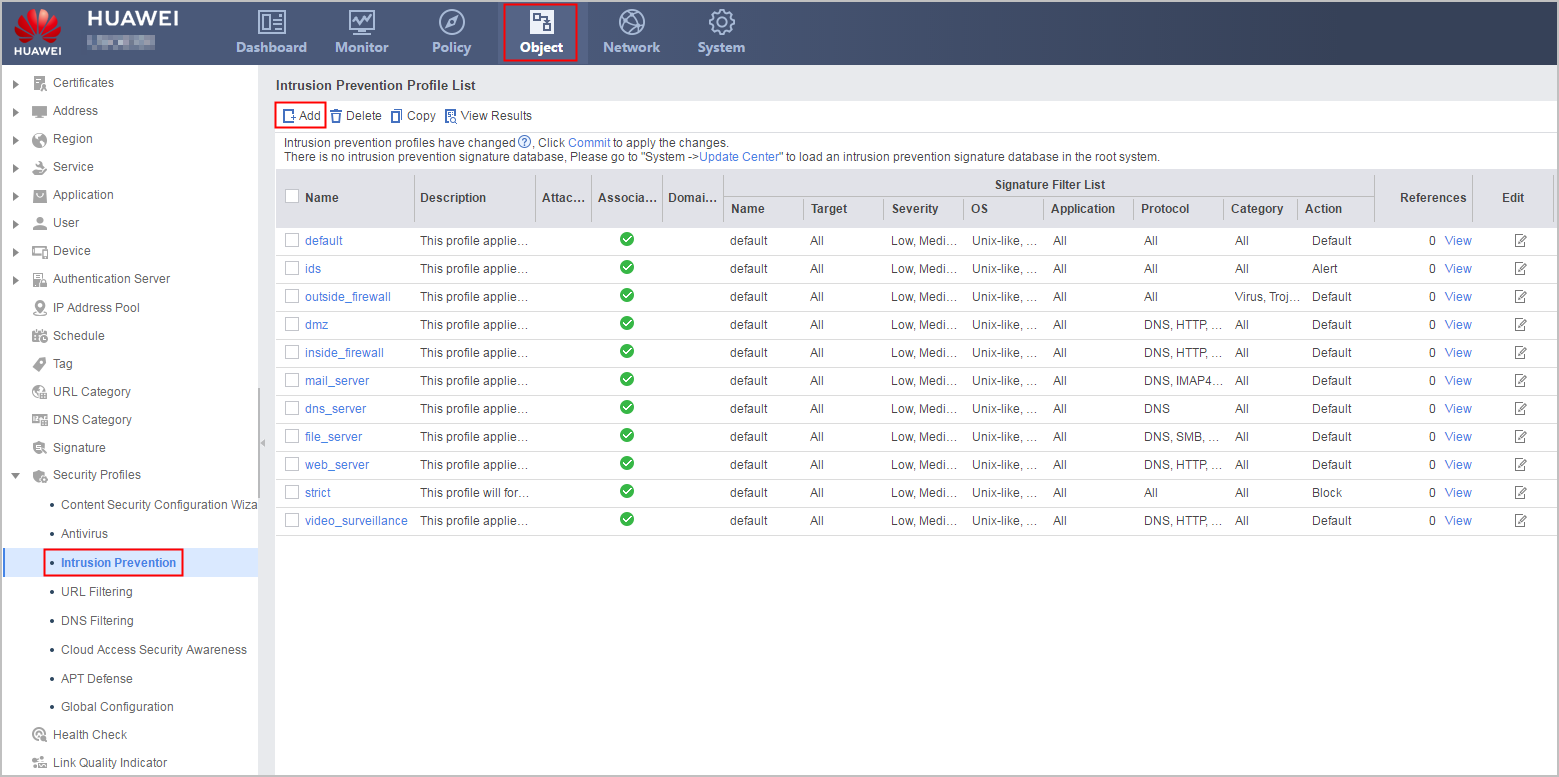
- In Intrusion Prevention Profile List, click Add and create Profile_ips_server1 to be referenced by the security policy for the Trust -> DMZ interzone and Profile_ips_server2 to be referenced by the security policy for the Untrust -> DMZ interzone. Click OK to complete the configuration of the intrusion prevention profiles.

According to service requirements, you can set the actions of the signature filters to alert or default. Setting all actions to block is not recommended.
- Choose .
- Click Commit on the upper right and then click OK in the dialog box displayed.
- Configure security policies and apply the intrusion prevention profiles to the security policies.
- Click save on the upper right and then click OK in the dialog box displayed.
Result
After the intrusion prevention function is configured, an administrator who is familiar with the current network is in need to periodically check and adjust configurations so that intrusion behaviors can be detected and blocked without affecting services. When intranet servers are attacked, corresponding threat logs are generated. However, a large number of false positives may exist. To adjust configurations based on threat logs, perform the following steps:
Several examples are provided for your reference:
- Choose .
Determine whether an event is an attack based on the behavior of the threat source.
Example 1:
When viewing threat logs, you can find that an IP address from the Untrust zone continuously initiates intrusion attacks to multiple IP addresses in the destination security zone.
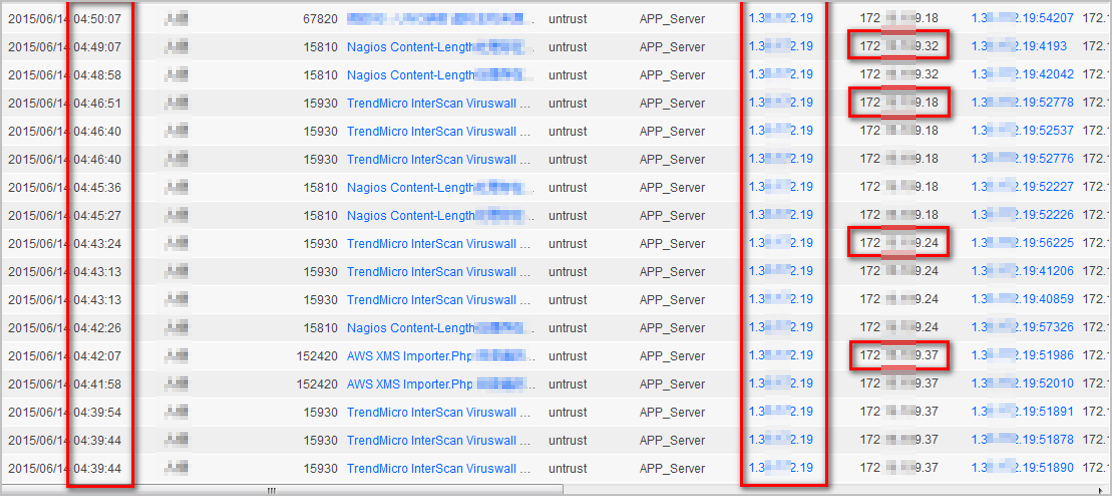
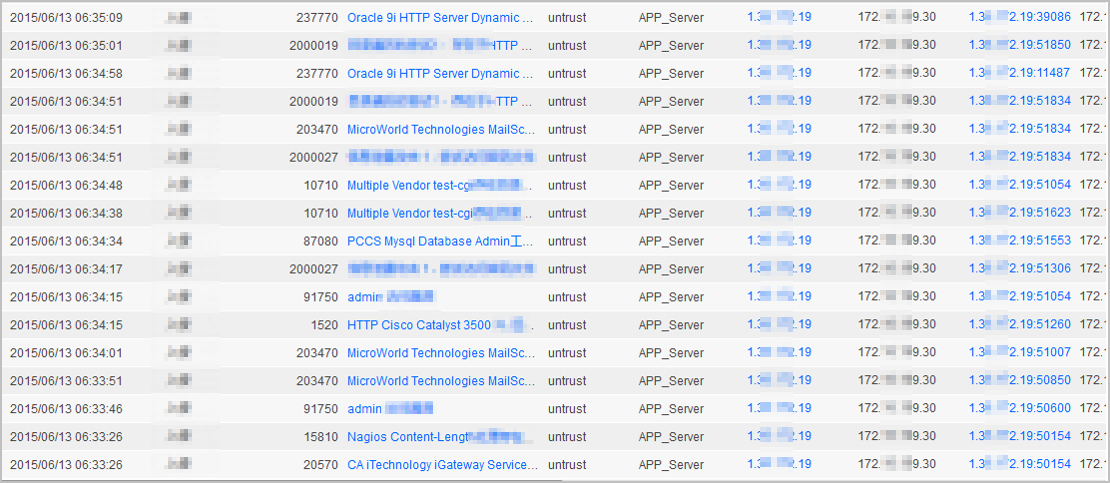
Enter the time range and IP address of the attack source in the search conditions to query the attack.
The search result shows that the attacker continuously initiates multiple types of intrusion attacks in a certain period of time. It can be confirmed that the attack source is initiating a malicious attack. In this case, configure the security policy to block traffic from this IP address to block the attack.
Based on the information about the threat event, check whether the event is an attack.
Certain attacks last for a short period of time, occur at a low frequency, and have only a few attack sources. This makes it difficult to identify the attack behavior based on the association between logs. In this case, you need to determine whether an event is an attack based on the information about the event.
Example 2:
When viewing threat logs, you can view several threat logs of the intrusion type, with a low occurrence frequency and only a few attack sources. In this case, you need to determine whether the event is an attack based on the information about the event.
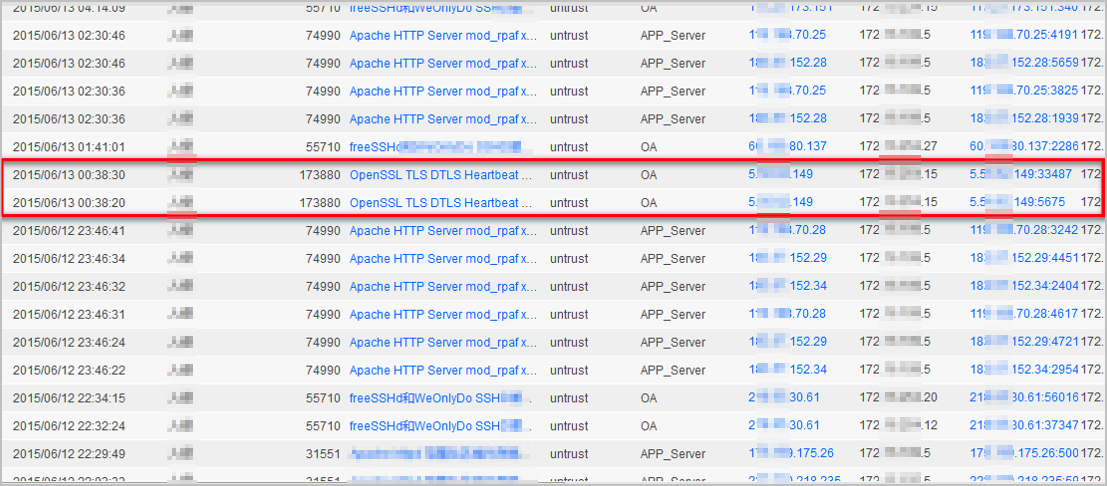
Choose and enter the threat ID recorded in the threat log in the search box. In the search result, click this signature to view details.
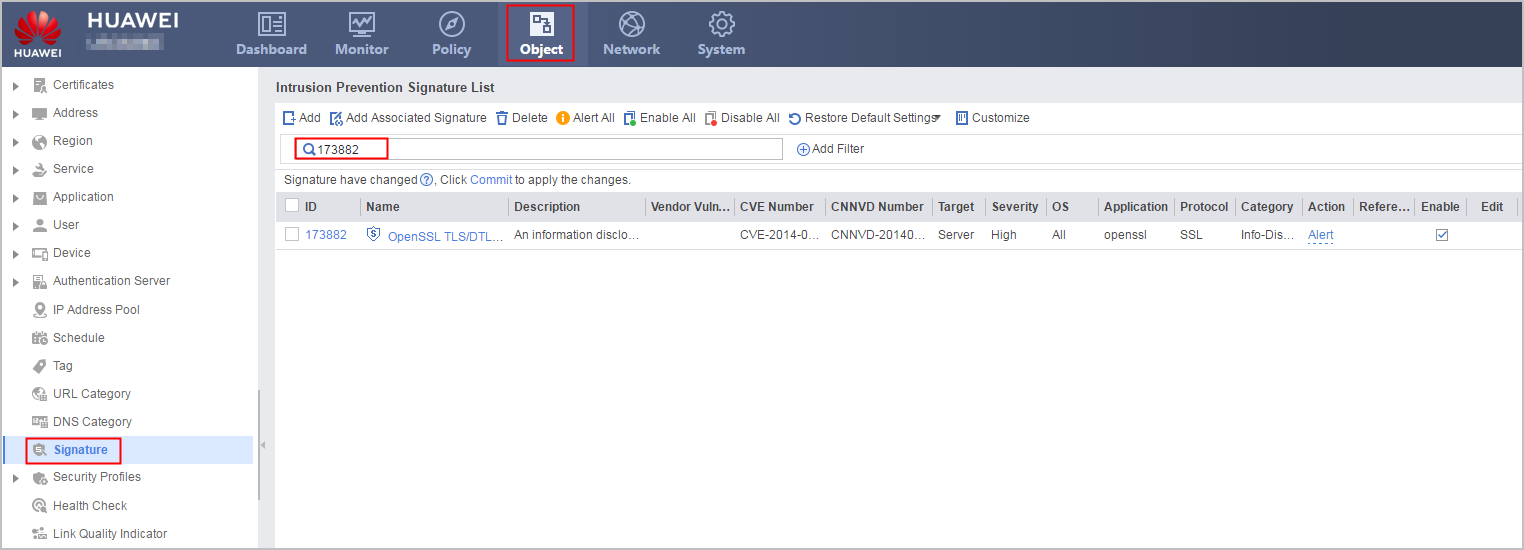
This vulnerability is a major OpenSSL vulnerability found at the end of 2014. It will cause information leaks and affect all software programs or services that use OpenSSL and is therefore graded as a high-risk vulnerability whose CVSS score is 10. This type of threat needs to be taken seriously, even if it occurs only once. You can block the threat or perform operations according to the countermeasure in the details.
-
You need to adjust existing configurations based on the acquired information about the attack. For example:
An attack may pose a threat in some scenarios, but may not in other scenarios, or even some special services may also have the threat feature. In this case, you need to identify whether the blocked threat is an attack in the existing network environment. If no, configure an exception signature and set the action to alert.
- In a scenario where security has a higher priority, if certain alarms are triggered by abnormal services and the behaviors comply with attack behaviors, you can configure them as exception signatures and set the actions to block.
- If a source IP address is identified as one with intrusion behaviors, you can blacklist it, or add it to the security policy rule and set the action to block.
Configuration Scripts
#
interface GigabitEthernet0/0/1
 undo shutdown
 ip address 1.1.1.1 255.255.255.0
#
interface GigabitEthernet0/0/2
 undo shutdown
 ip address 10.2.0.1 255.255.255.0
#
interface GigabitEthernet0/0/3
 undo shutdown
 ip address 10.3.0.1 255.255.255.0
#
firewall zone trust
 set priority 85
 add interface GigabitEthernet0/0/3
#
firewall zone untrust
 set priority 5
 add interface GigabitEthernet0/0/1
#
firewall zone dmz
 set priority 50
 add interface GigabitEthernet0/0/2
#
profile type ips name Profile_ips_server1
 signature-set name filter_ftp
  action alert
  os windows
  target server
  severity high
  protocol FTP
  category all
 #
 signature-set name filter_web
  os unix-like
  target server
  severity high
  protocol HTTP SSL
  category all
 #
 signature-set name filter_mail
  os unix-like
  target server
  severity high
  protocol IMAP4 SMTP POP3
  category all
 profile type ips name Profile_ips_server2
 signature-set name filter_web
  os unix-like
  target server
  severity high
  protocol HTTP SSL
  category all
 #
security-policy
 rule name policy_sec_1
  source-zone trust
  destination-zone dmz
  source-address 10.3.0.0 mask 255.255.255.0
  destination-address 10.2.0.0 mask 255.255.255.0
  service http
  service ftp
  service smtp
  service ssl
  service imap
  service pop3
  profile ips Profile_ips_server1
  action permit
 rule name policy_sec_2
  source-zone untrust
  destination-zone dmz
  destination-address 10.2.0.0 mask 255.255.255.0
  service http
  service ssl
  profile ips Profile_ips_server2
  action permit