Web: Example for Using URL Categories to Control Website Access
This section provides an example for configuring URL category-based URL filtering to control the access to URL of a specific category. The URL category can be either a predefined category of the FW or a user-defined category.
Networking Requirements
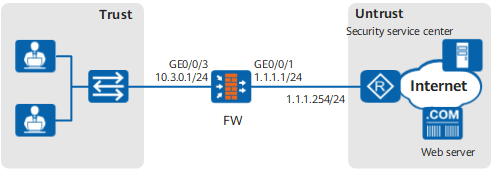
As shown in Figure 1, the FW is deployed at the network border as the enterprise's gateway to implement URL filtering on HTTP requests.
The enterprise has R&D and marketing employees. The specific networking requirements are as follows:
- The R&D employees can access only URLs in the Education/Science and Search Engines/Portals categories from 09:00 to 17:00 every day.
- The marketing employees can access only Education/Science, Search Engines/Portals, and Social Focus websites, www.example.com/news, and www.example.net from 09:00 to 17:00 every day.
Configuration Roadmap
- Set the IP address and security zone of the interface.
- Configure the remote query server to obtain the mappings between URLs and predefined categories. In this example, Education/Science, Search Engines/Portals, and Social Focus are all predefined categories. To use the remote query function, you must perform the following configuration:
- Activate the license and ensure that the license is within the validity period.
- Load the remote URL query component package.
- Configure the DNS server and ensure that the FW can correctly resolve domain name sec.huawei.com.
- Set the parameters related to the remote query server, including the query mode, country name, and timeout period.
To ensure that remote query is available, configure a security policy and reference user-defined services in the security policy to allow the FW to access the scheduling center sec.huawei.com. The user-defined services include:
- TCP: The destination port number is 443 (for interaction with scheduling center sec.huawei.com).
- TCP: The destination port number is 12612 (for interaction with a dispatch server).
- UDP: The destination port number is 12600 (for interaction with a query server).
- Configure user-defined category url_userdefine_category, and add www.example.com/news to the user-defined URL and www.example.net to the user-defined domain name.
- Configure two URL filtering profiles, profile_url_research for the R&D personnel and profile_url_marketing for the marketing personnel. Specify control actions for user-defined and predefined categories.
- Configure two security policies to reference schedules, user groups, and URL filtering profiles.
Procedure
- Set the IP address and security zone of the interface.
- Configure the remote query server to obtain the mappings between URLs and predefined categories.
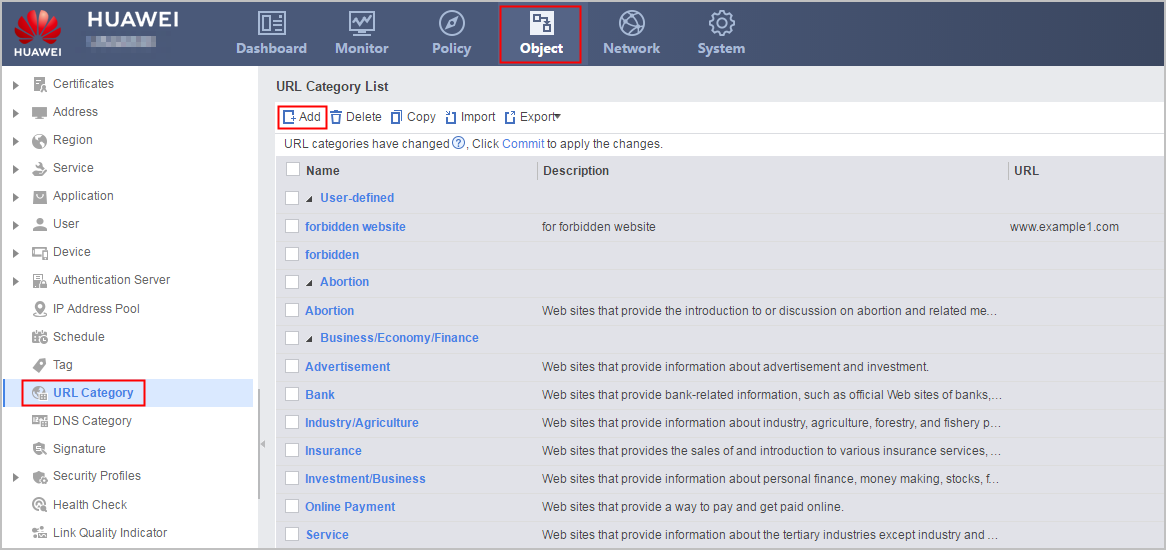
- Configure user-defined URL categories.
- Configure URL filtering profiles.
- Choose .
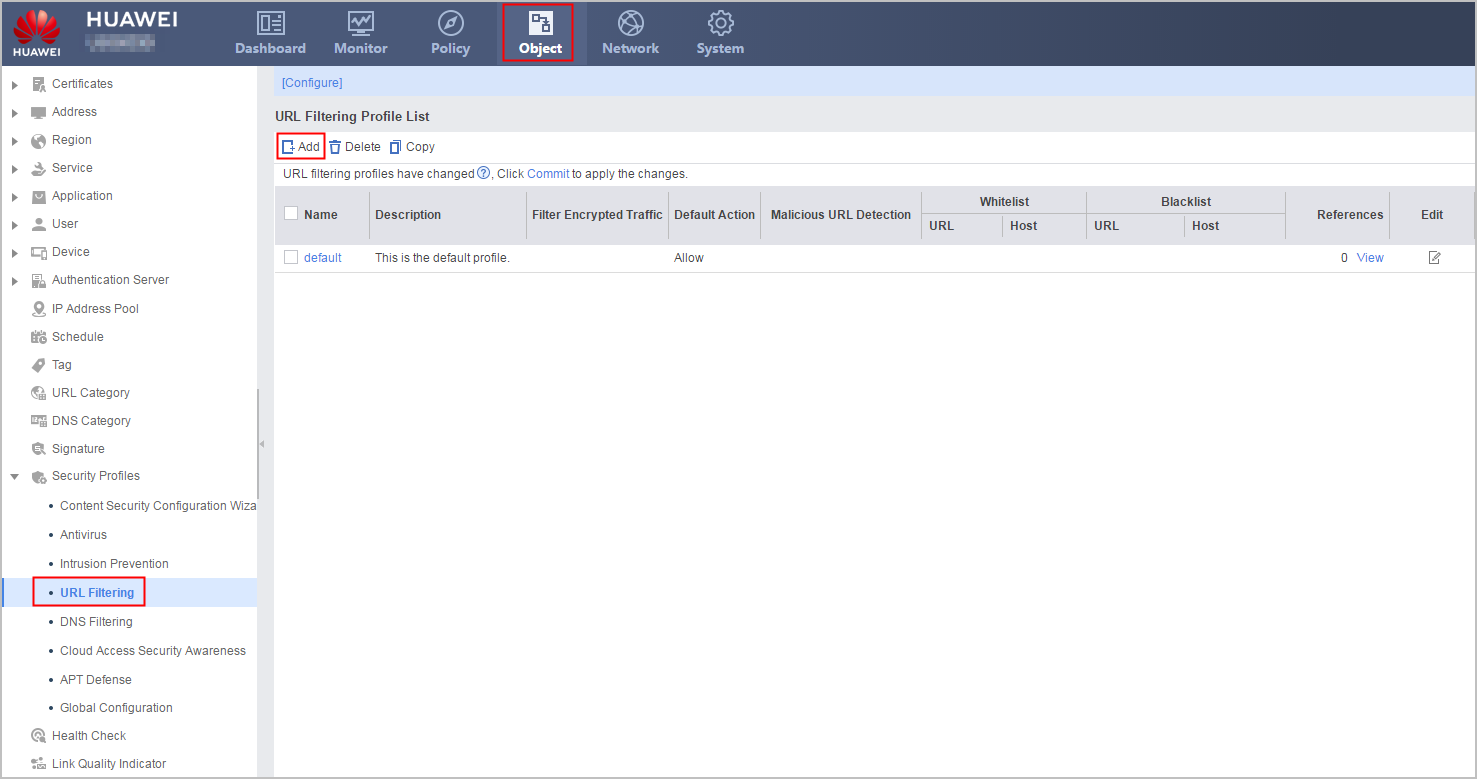
In URL Filtering Profile, click Add and set the parameters as follows:
Name
profile_url_research
Description
URL filter profile of web access control for research.
Default Action
Allow
URL Filtering Level
Select Custom, and set the action for predefined categories Education/Science and Search Engines/Portals to Allow and the action for other predefined categories to Block.
NOTE:To simplify configuration, you can also perform the following operations:
After you select Custom, select Block to the right of Name in the first row. The action for all user-defined categories and predefined categories becomes Block. You can then set the action for the two predefined categories to Allow.
- Click OK.
In URL Filtering Profile, click Add and set the parameters as follows:
Name
profile_url_marketing
Description
URL filter profile of web access control for marketing.
Default Action
Allow
URL Filtering Level
Select Custom, and set the action for predefined categories Education/Science, Search Engines/Portals, and Social Focus and user-defined category url_userdefine_category to Allow and the action for other predefined categories to Block.
NOTE:To simplify configuration, you can also perform the following operations:
After you select Custom, select Block to the right of Name in the first row. The action for all user-defined categories and predefined categories becomes Block. Then you can set the action for the three predefined categories and the user-defined category to Allow.
- Click OK.
- Choose .
- Configure schedules.
- Choose .
- Click Add to create schedule time_range. Set the parameters as follows:
Name
time_range
Type
Periodical Schedule
Start Time
09:00:00
End Time
17:00:00
Weekly Validity Time
Monday, Tuesday, Wednesday, Thursday, Friday, Saturday, Sunday
- Click OK.
- Reference URL filtering profiles in security policies.

In this example, user groups research (R&D personnel) and marketing (marketing personnel) to be referenced have been created.
- Choose .
Click Add Security Policy and set the parameters as follows:
Name
policy_sec_research
Description
Security policy of web access protect for research.
Source Zone
trust
Destination Zone
untrust
Source Address/Region
10.3.0.0/24
Destination Address/Region
any
User
/default/research
Schedule
time_range
Action
permit
Content Security
URL Filtering
profile_url_research
- Click OK.
Click Add Security Policy and set the parameters as follows:
Name
policy_sec_marketing
Description
Security policy of web access protect for marketing.
Source Zone
trust
Destination Zone
untrust
Source Address/Region
10.3.0.0/24
Destination Address/Region
any
User
/default/marketing
Schedule
time_range
Action
permit
Content Security
URL Filtering
profile_url_marketing
- Click OK.
- Click Save on the upper right of the web page, and click OK in the dialog box that is displayed.
- Click Commit on the upper right of the web page, and click OK in the dialog box that is displayed.

Verification
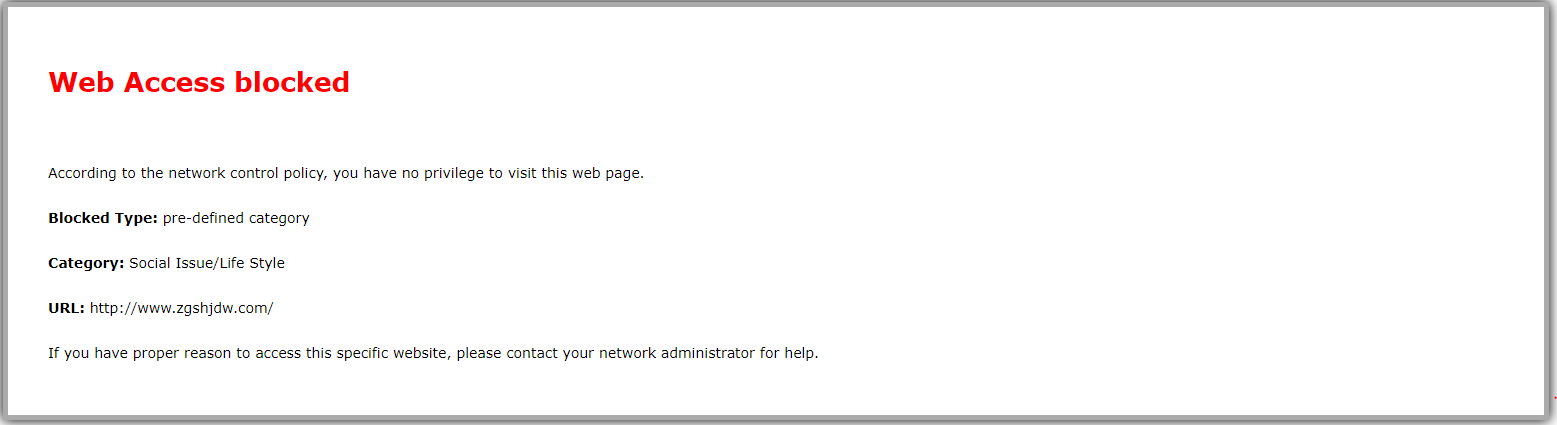
Employees in the R&D department can access only websites in the Education/Science and Search Engines/Portals categories and are blocked when attempting to access other websites, such as social focus and forum websites from 09:00 to 17:00 every day, and a message is displayed accordingly. For example:
Choose to view URL logs. You can see that the access requests from R&D department employees to social focus and forum websites matched the URL filtering policy whose filtering type is Pre-defined and action is Block. For example:

Marketing employees are allowed to access only Education/Science, Search Engines/Portals, and Social Focus websites, www.example.com/news, and www.example.net and are blocked when attempting to access other websites, such as forum websites from 09:00 to 17:00 every day, and a message is displayed accordingly. For example:
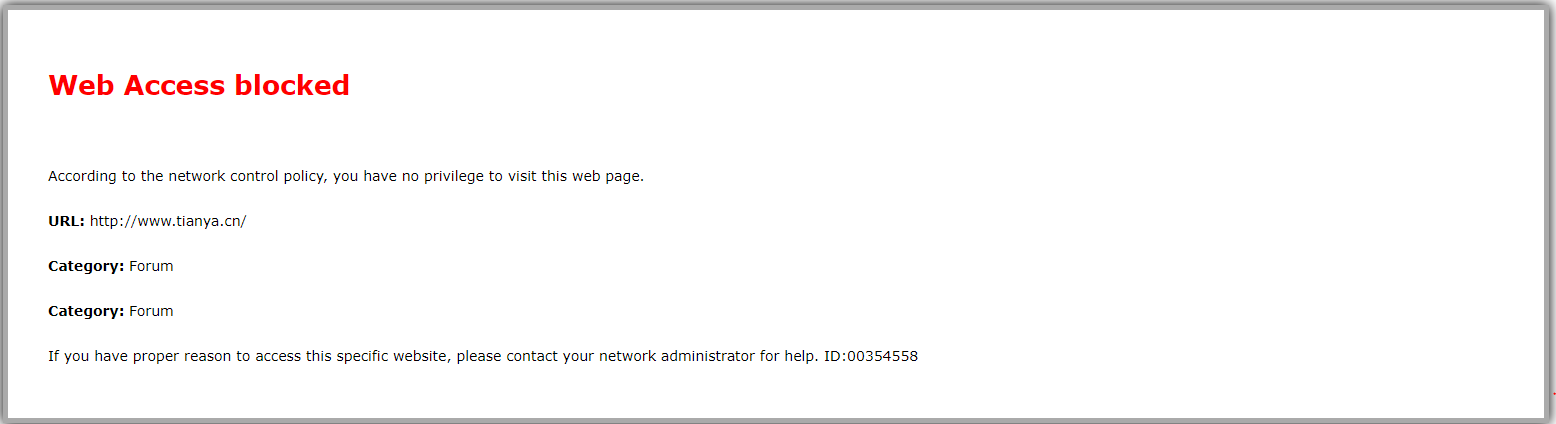
Choose to view URL logs. You can see that the access requests from marketing department employees to forum websites matched the URL filtering policy whose filtering type is Pre-defined and action is Block. For example:

Configuration Scripts
#
 dns resolve
 dns server 10.2.0.70
#
ip service-set service_sec_huawei_com type object
 service 0 protocol tcp source-port 0 to 65535 destination-port 443
 service 1 protocol tcp source-port 0 to 65535 destination-port 12612
 service 2 protocol udp source-port 0 to 65535 destination-port 12600
#
 country CN
#
 time-range time_range
  period-range 09:00:00 to 17:00:00 daily
#
interface GigabitEthernet0/0/1
 undo shutdown
 ip address 1.1.1.1 255.255.255.0
#
interface GigabitEthernet0/0/3
 undo shutdown
 ip address 10.3.0.1 255.255.255.0
#
firewall zone trust
 set priority 85
 add interface GigabitEthernet0/0/3
#
firewall zone untrust
 set priority 5
 add interface GigabitEthernet0/0/1
#
url-filter category user-defined name url_userdefine_category
 description url userdefine category of access control for marketing.
 add url www.example.com/news
 add  host www.example.net
profile type url-filter name profile_url_research
 description URL filter profile of web access control for research.
 category pre-defined subcategory-id 101 action block
 category pre-defined subcategory-id 102 action block
 category pre-defined subcategory-id 162 action block
 category pre-defined subcategory-id 163 action block
 category pre-defined subcategory-id 164 action block
 category pre-defined subcategory-id 165 action block
 category pre-defined subcategory-id 103 action block
 category pre-defined subcategory-id 166 action block
 category pre-defined subcategory-id 167 action block
 category pre-defined subcategory-id 168 action block
 category pre-defined subcategory-id 104 action block
 category pre-defined subcategory-id 169 action block
 category pre-defined subcategory-id 170 action block
 category pre-defined subcategory-id 105 action block
 category pre-defined subcategory-id 171 action block
 category pre-defined subcategory-id 172 action block
 category pre-defined subcategory-id 173 action block
 category pre-defined subcategory-id 174 action block
 category pre-defined subcategory-id 106 action block
 category pre-defined subcategory-id 108 action block
 category pre-defined subcategory-id 177 action block
 category pre-defined subcategory-id 251 action block
 category pre-defined subcategory-id 109 action block
 category pre-defined subcategory-id 110 action block
 category pre-defined subcategory-id 111 action block
 category pre-defined subcategory-id 112 action block
 category pre-defined subcategory-id 114 action block
 category pre-defined subcategory-id 115 action block
 category pre-defined subcategory-id 117 action block
 category pre-defined subcategory-id 178 action block
 category pre-defined subcategory-id 179 action block
 category pre-defined subcategory-id 180 action block
 category pre-defined subcategory-id 181 action block
 category pre-defined subcategory-id 248 action block
 category pre-defined subcategory-id 118 action block
 category pre-defined subcategory-id 119 action block
 category pre-defined subcategory-id 122 action block
 category pre-defined subcategory-id 182 action block
 category pre-defined subcategory-id 183 action block
 category pre-defined subcategory-id 184 action block
 category pre-defined subcategory-id 123 action block
 category pre-defined subcategory-id 124 action block
 category pre-defined subcategory-id 186 action block
 category pre-defined subcategory-id 187 action block
 category pre-defined subcategory-id 188 action block
 category pre-defined subcategory-id 189 action block
 category pre-defined subcategory-id 125 action block
 category pre-defined subcategory-id 127 action block
 category pre-defined subcategory-id 128 action block
 category pre-defined subcategory-id 130 action block
 category pre-defined subcategory-id 131 action block
 category pre-defined subcategory-id 132 action block
 category pre-defined subcategory-id 197 action block
 category pre-defined subcategory-id 198 action block
 category pre-defined subcategory-id 199 action block
 category pre-defined subcategory-id 200 action block
 category pre-defined subcategory-id 227 action block
 category pre-defined subcategory-id 228 action block
 category pre-defined subcategory-id 133 action block
 category pre-defined subcategory-id 201 action block
 category pre-defined subcategory-id 202 action block
 category pre-defined subcategory-id 204 action block
 category pre-defined subcategory-id 205 action block
 category pre-defined subcategory-id 134 action block
 category pre-defined subcategory-id 135 action block
 category pre-defined subcategory-id 136 action block
 category pre-defined subcategory-id 137 action block
 category pre-defined subcategory-id 138 action block
 category pre-defined subcategory-id 139 action block
 category pre-defined subcategory-id 140 action block
 category pre-defined subcategory-id 141 action block
 category pre-defined subcategory-id 206 action block
 category pre-defined subcategory-id 207 action block
 category pre-defined subcategory-id 208 action block
 category pre-defined subcategory-id 209 action block
 category pre-defined subcategory-id 210 action block
 category pre-defined subcategory-id 229 action block
 category pre-defined subcategory-id 142 action block
 category pre-defined subcategory-id 143 action block
 category pre-defined subcategory-id 144 action block
 category pre-defined subcategory-id 145 action block
 category pre-defined subcategory-id 146 action block
 category pre-defined subcategory-id 147 action block
 category pre-defined subcategory-id 211 action block
 category pre-defined subcategory-id 212 action block
 category pre-defined subcategory-id 213 action block
 category pre-defined subcategory-id 240 action block
 category pre-defined subcategory-id 253 action block
 category pre-defined subcategory-id 149 action block
 category pre-defined subcategory-id 150 action block
 category pre-defined subcategory-id 214 action block
 category pre-defined subcategory-id 215 action block
 category pre-defined subcategory-id 216 action block
 category pre-defined subcategory-id 217 action block
 category pre-defined subcategory-id 151 action block
 category pre-defined subcategory-id 218 action block
 category pre-defined subcategory-id 219 action block
 category pre-defined subcategory-id 220 action block
 category pre-defined subcategory-id 221 action block
 category pre-defined subcategory-id 222 action block
 category pre-defined subcategory-id 223 action block
 category pre-defined subcategory-id 230 action block
 category pre-defined subcategory-id 252 action block
 category pre-defined subcategory-id 152 action block
 category pre-defined subcategory-id 153 action block
 category pre-defined subcategory-id 238 action block
 category pre-defined subcategory-id 154 action block
 category pre-defined subcategory-id 155 action block
 category pre-defined subcategory-id 224 action block
 category pre-defined subcategory-id 225 action block
 category pre-defined subcategory-id 156 action block
 category pre-defined subcategory-id 157 action block
 category pre-defined subcategory-id 158 action block
 category pre-defined subcategory-id 231 action block
 category pre-defined subcategory-id 232 action block
 category pre-defined subcategory-id 159 action block
 category pre-defined subcategory-id 254 action block
 category pre-defined subcategory-id 160 action block
 category pre-defined subcategory-id 161 action block
 category pre-defined subcategory-id 176 action block
 category pre-defined subcategory-id 226 action block
 category pre-defined subcategory-id 234 action block
 category pre-defined subcategory-id 235 action block
 category pre-defined subcategory-id 236 action block
 category pre-defined subcategory-id 237 action block
 category pre-defined subcategory-id 239 action block
 category pre-defined subcategory-id 241 action block
 category pre-defined subcategory-id 233 action block
 category user-defined name url_userdefine_category action block
profile type url-filter name profile_url_marketing
 description URL filter profile of web access control for marketing.
 category pre-defined subcategory-id 101 action block
 category pre-defined subcategory-id 102 action block
 category pre-defined subcategory-id 162 action block
 category pre-defined subcategory-id 163 action block
 category pre-defined subcategory-id 164 action block
 category pre-defined subcategory-id 165 action block
 category pre-defined subcategory-id 103 action block
 category pre-defined subcategory-id 166 action block
 category pre-defined subcategory-id 167 action block
 category pre-defined subcategory-id 168 action block
 category pre-defined subcategory-id 104 action block
 category pre-defined subcategory-id 169 action block
 category pre-defined subcategory-id 170 action block
 category pre-defined subcategory-id 106 action block
 category pre-defined subcategory-id 108 action block
 category pre-defined subcategory-id 177 action block
 category pre-defined subcategory-id 251 action block
 category pre-defined subcategory-id 109 action block
 category pre-defined subcategory-id 110 action block
 category pre-defined subcategory-id 111 action block
 category pre-defined subcategory-id 112 action block
 category pre-defined subcategory-id 114 action block
 category pre-defined subcategory-id 115 action block
 category pre-defined subcategory-id 117 action block
 category pre-defined subcategory-id 178 action block
 category pre-defined subcategory-id 179 action block
 category pre-defined subcategory-id 180 action block
 category pre-defined subcategory-id 181 action block
 category pre-defined subcategory-id 248 action block
 category pre-defined subcategory-id 118 action block
 category pre-defined subcategory-id 119 action block
 category pre-defined subcategory-id 122 action block
 category pre-defined subcategory-id 182 action block
 category pre-defined subcategory-id 183 action block
 category pre-defined subcategory-id 184 action block
 category pre-defined subcategory-id 123 action block
 category pre-defined subcategory-id 124 action block
 category pre-defined subcategory-id 186 action block
 category pre-defined subcategory-id 187 action block
 category pre-defined subcategory-id 188 action block
 category pre-defined subcategory-id 189 action block
 category pre-defined subcategory-id 125 action block
 category pre-defined subcategory-id 127 action block
 category pre-defined subcategory-id 128 action block
 category pre-defined subcategory-id 130 action block
 category pre-defined subcategory-id 131 action block
 category pre-defined subcategory-id 132 action block
 category pre-defined subcategory-id 197 action block
 category pre-defined subcategory-id 198 action block
 category pre-defined subcategory-id 199 action block
 category pre-defined subcategory-id 200 action block
 category pre-defined subcategory-id 227 action block
 category pre-defined subcategory-id 228 action block
 category pre-defined subcategory-id 133 action block
 category pre-defined subcategory-id 201 action block
 category pre-defined subcategory-id 202 action block
 category pre-defined subcategory-id 204 action block
 category pre-defined subcategory-id 205 action block
 category pre-defined subcategory-id 134 action block
 category pre-defined subcategory-id 135 action block
 category pre-defined subcategory-id 136 action block
 category pre-defined subcategory-id 137 action block
 category pre-defined subcategory-id 138 action block
 category pre-defined subcategory-id 139 action block
 category pre-defined subcategory-id 140 action block
 category pre-defined subcategory-id 141 action block
 category pre-defined subcategory-id 206 action block
 category pre-defined subcategory-id 207 action block
 category pre-defined subcategory-id 208 action block
 category pre-defined subcategory-id 209 action block
 category pre-defined subcategory-id 210 action block
 category pre-defined subcategory-id 229 action block
 category pre-defined subcategory-id 142 action block
 category pre-defined subcategory-id 143 action block
 category pre-defined subcategory-id 144 action block
 category pre-defined subcategory-id 145 action block
 category pre-defined subcategory-id 146 action block
 category pre-defined subcategory-id 147 action block
 category pre-defined subcategory-id 211 action block
 category pre-defined subcategory-id 212 action block
 category pre-defined subcategory-id 213 action block
 category pre-defined subcategory-id 240 action block
 category pre-defined subcategory-id 253 action block
 category pre-defined subcategory-id 149 action block
 category pre-defined subcategory-id 150 action block
 category pre-defined subcategory-id 214 action block
 category pre-defined subcategory-id 215 action block
 category pre-defined subcategory-id 216 action block
 category pre-defined subcategory-id 217 action block
 category pre-defined subcategory-id 151 action block
 category pre-defined subcategory-id 218 action block
 category pre-defined subcategory-id 219 action block
 category pre-defined subcategory-id 220 action block
 category pre-defined subcategory-id 221 action block
 category pre-defined subcategory-id 222 action block
 category pre-defined subcategory-id 223 action block
 category pre-defined subcategory-id 230 action block
 category pre-defined subcategory-id 252 action block
 category pre-defined subcategory-id 152 action block
 category pre-defined subcategory-id 153 action block
 category pre-defined subcategory-id 238 action block
 category pre-defined subcategory-id 154 action block
 category pre-defined subcategory-id 155 action block
 category pre-defined subcategory-id 224 action block
 category pre-defined subcategory-id 225 action block
 category pre-defined subcategory-id 156 action block
 category pre-defined subcategory-id 157 action block
 category pre-defined subcategory-id 158 action block
 category pre-defined subcategory-id 231 action block
 category pre-defined subcategory-id 232 action block
 category pre-defined subcategory-id 159 action block
 category pre-defined subcategory-id 254 action block
 category pre-defined subcategory-id 160 action block
 category pre-defined subcategory-id 161 action block
 category pre-defined subcategory-id 176 action block
 category pre-defined subcategory-id 226 action block
 category pre-defined subcategory-id 234 action block
 category pre-defined subcategory-id 235 action block
 category pre-defined subcategory-id 236 action block
 category pre-defined subcategory-id 237 action block
 category pre-defined subcategory-id 239 action block
 category pre-defined subcategory-id 241 action block
 category pre-defined subcategory-id 233 action block
#
security-policy
 rule name policy_sec_huawei_com
  source-zone local
  destination-zone untrust
  service service_sec_huawei_com
  action permit
 rule name policy_sec_research
  description Security policy of web access protect for research.
  source-zone trust
  destination-zone untrust
  source-address 10.3.0.0 mask 255.255.255.0
  user user-group /default/research
  time-range time_range
  profile url-filter profile_url_research
  action permit
 rule name policy_sec_marketing
  description Security policy of web access protect for marketing.
  source-zone trust
  destination-zone untrust
  source-address 10.3.0.0 mask 255.255.255.0
  user user-group /default/marketing
  time-range time_range
  profile url-filter profile_url_marketing
  action permit