Understanding Audit Policy
The audit function is implemented through audit profile reference in the audit policy to log matched behavior.
Audit Policy
The audit policy determines the traffic to be audited based on traffic attributes.
Each audit policy consists of a set of conditions and an action. If the traffic matches all the conditions defined in a policy, the FW performs the defined action on the traffic.
Audit Profile
The audit profile logs the following behavior of specified users:

-
- URL access behavior, including the URL, URL category, and web page title.
- HTTP-based file transfer behavior, including the URL, file transfer direction (upload or download), file name (including the file name extension), and file size.
- BBS posting behavior, including the BBS URL and post content.
- Microblog posting behavior, including the microblog URL and blog content. Currently, only Sina and Tencent microblogs can be audited.
- HTTP search behavior, including the URL and searched keyword. Currently, the following search engines are supported: Google, Yahoo, Baidu, 360 Haosou, and Bing. Both mobile and PC clients of the search engines are supported.
- Abnormal HTTP access behavior: audit of abnormal HTTP access behavior. Currently, only HTTP status codes except 200 OK can be audited.
-
- Audit of executed commands, including commands and parameters.
- Audit of transferred files, including the file transfer direction (upload or download), file name (including the file name extension), and file size.
Mail behavior audit, including the mail transfer direction (sent or received), including the sender address, recipient address, mail subject, attachment name (including the file name extension), and number of attachments.
IM behavior includes QQ login/logoff and IM file transfer.
Currently, audit on the QQ PC client in the Windows system and mobile client (including the Android and iOS systems) is supported.
Currently, the device can audit the behavior of transferring QQ, web-page WeChat, and DingTalk files.
-
This function applies to the Postal Savings Bank of China.
This function can be configured only on the CLI.
Audit Processing Flow
Figure 1 shows the audit processing flow.
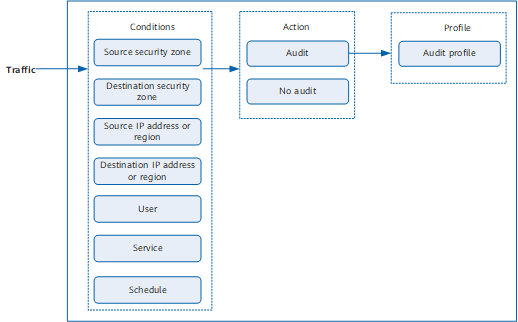
The FW processes passing traffic as follows:
- The FW analyzes traffic and retrieves attributes, including the user (including the user group and security group), source security zone, destination security zone, source IP address, source region, destination IP address, destination region, service (source port, destination port, and protocol type), and schedule.
- Then the FW compares the attributes with the conditions defined in the audit policy. If all the conditions are met, the traffic matches the audit policy. If one or more conditions are not met, the device compares the traffic attributes using the conditions in the next policy. If no audit policy is matched, the traffic is not to be audited.
- If the traffic matches an audit policy, the FW performs the defined action on the traffic. If the action is no audit, the traffic is not audited. If the action is audit, the FW logs the user behavior according to the audit profile referenced in the audit policy.
The Internet access behavior of users is logged after the FW audits the corresponding traffic. You can use various reports, audit logs, and user activity logs to audit and analyze the Internet access behavior of users and identify the users and user behavior that compromises network security. You can also use this information to fine-tune security policies in the future.