Understanding Antivirus
This section describes the mechanism and procedure of antivirus.
The FW employs the advanced Intelligent Awareness Engine (IAE) and constantly updated virus signature database to detect and remove viruses. Figure 1 shows the antivirus mechanism.
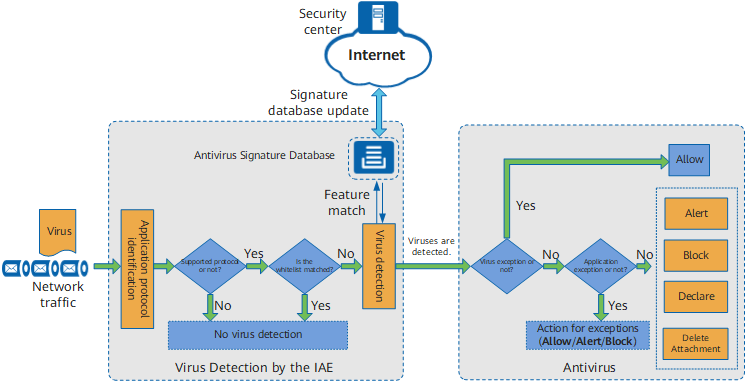
Virus Detection by the IAE
The FW uses the IAE to perform virus detection. After traffic enters the IAE, the IAE:
Analyzes the traffic and identifies its protocol type and file transfer direction.
Checks whether antivirus applies to this protocol type and file transfer direction.
The antivirus function of the FW applies to the following protocols:
- File Transfer Protocol (FTP)
- Hypertext Transfer Protocol (HTTP)
- Post Office Protocol - Version 3 (POP3)
- Simple Mail Transfer Protocol (SMTP)
- Internet Message Access Protocol (IMAP)
- Network File System (NFS)
- Server Message Block (SMB)
The FW supports antivirus in upload and download direction:
- Upload: Indicates file transfer from a client to a server.
- Download: Indicates file transfer from a server to a client.

Connection requests are initiated by clients. Therefore, when configuring security policies, set the security zone where the client resides as the source zone and that where the server resides as the destination zone.
Example 1: A user in the trust zone needs to download files from the FTP server in the untrust zone. In this case, set the trust zone as the source security zone and the untrust zone as the destination security zone on the security policy configuration page and set the FTP inspection direction to Download on the antivirus configuration page.
Example 2: A user in the trust zone needs to upload email to the SMTP server in the dmz. In this case, set the trust zone as the source security zone and the dmz as the destination security zone on the security policy configuration page and set the SMTP inspection direction to Upload on the antivirus configuration page.
Checks whether the whitelist is matched.
The FW does not perform virus detection on whitelisted files.
The whitelist can be configured only on the CLI.
A whitelist comprises whitelist rules. You can configure whitelist rules for trusted domain names, URLs, IP addresses, and IP address ranges to improve virus detection ratio. A whitelist rule applies only to the corresponding antivirus profile because each antivirus profile has its own whitelist.
For domain names and URLs, the whitelist rules have the following matching modes:
Prefix match: When host-text or url-text is set to the example* format, the whitelist rule is matched as long as the prefix of the domain or URL is example.
Suffix match: When host-text or url-text is set to the *example format, the whitelist rule is matched as long as the suffix of the domain or URL is example.
Keyword match: When host-text or url-text is set to the *example* format, the whitelist rule is matched as long as the domain or URL contains example.
Exact match: The domain name or URL must be the same as host-text or url-text to match the whitelist rule.
-
The IAE extracts signatures of applicable files and compares the extracted features with virus signatures in the virus signature database. If a match is found, the file is considered infected and processed according to the action specified in the profile. If no match is found, the file is permitted.
Huawei analyzes and summarizes common virus signatures to construct the virus signature database. This database defines common virus signatures and assigns a unique virus ID to each signature. After the database is loaded, the device can identify viruses that match the signatures defined in the database. To identify new viruses, the virus signature database must be constantly updated from the update center.
Signature database update requires a license.
In addition, in full scan mode, the device can send detected virus files to the cloud sandbox for further analysis and source tracing. This function is controlled by a command and is disabled by default.
Antivirus Process
After viruses are identified in a file in transfer, the FW:
Checks whether this virus is an exception. If yes, the file is permitted.
To prevent file transfer failures resulting from false positives, virus exception IDs that users identify as false positives. If the detected virus matches a virus exception, the response action on the file is permit.
If the virus does not match any virus exception, check whether it matches an application exception. If it matches an application exception, it is processed according to actions (permit, alert, or block) for application exceptions.
The action of an application exception can be different from that for the protocol used by the application. Multiple applications may use a same protocol. For example, traffic of 163.com and yahoo.com is transmitted over HTTP.
Actions for applications and protocols have different priorities:
- If the action for a protocol is defined but no action is defined for any application, the action for the protocol applies to all applications that use the protocol.
- If the action for a protocol is defined and the action for an application that uses the protocol is defined, the action for the application takes precedence over that for the protocol.
For example, traffic of 163.com and yahoo.com is transmitted over HTTP.
- If the response action for HTTP is Block, response actions for 163.com and yahoo.com are also Block.
- If you have added 163.com to Application Exception List and set its response action to Alert, yahoo.com still inherits the response action of HTTP, which is Block, whereas 163.com uses the response action of Alert.
If the virus matches neither virus exceptions nor application exceptions, the action for protocol and transfer direction specified in the profile applies.
The following table shows actions of the FW for different protocols in different directions.
Protocol
Transfer Direction
Action
Description
HTTP
Upload/Download
Alert/Block. The default action is Block.
- Alert: The device permits files and generates virus logs.
- Block: The device blocks the files and generates virus logs.
- Declare: For virus-infected email messages, the device permits them but adds information to their subjects to announce the detection of viruses and generates virus logs. This action applies only to SMTP, POP3 and IMAP.
- Delete Attachment: For virus-infected email messages, the device deletes their attachments, adds information to their subjects to announce the detection of viruses, permits them, and generates virus logs. This action applies only to SMTP, POP3 and IMAP.
FTP
Upload/Download
Alert/Block. The default action is Block.
NFS
Upload/Download
Alert.
SMB
Upload/Download
Alert/Block. The default action is Block.
SMTP
Upload
Alert/Declare/Delete Attachment. The default action is Alert.
POP3
Download
Alert/Declare/Delete Attachment. The default action is Alert.
IMAP
Upload/Download
Alert/Declare/Delete Attachment. The default action is Alert.