Changing the Number of Decompression Layers of Compressed Files for Virus Detection
This section describes how to change the number of decompression layers of compressed files for virus detection on the FW.
Faced Problems
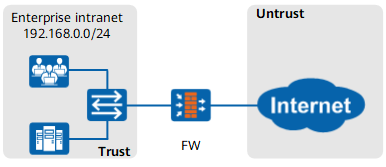
When detecting viruses in a compressed file, the FW decompresses the compressed file to obtain the original file and then checks whether the file is infected with viruses.
Files with multiple decompression layers are often transmitted over the network. When detecting viruses in these files, the FW decompresses the files several times to obtain the original file, which affects the processing performance.
Solution
The FW allows you to set the number of decompression layers of compressed files for virus detection. When detecting viruses in a multi-layer compressed file, the FW decompresses the file based on the configured number of decompression layers of compressed files. If a virus is detected, the file is processed based on the action defined in the antivirus profile. If no virus is detected, the file is permitted. If the number of compression layers of a compressed file is greater than the number of decompression layers, the FW does not decompress the file or implement virus detection.
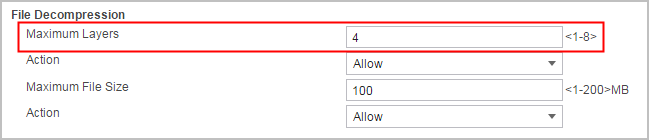
By default, the number of decompression layers is 3. The administrator of the enterprise network can set the number of decompression layers by considering the virus detection effect and processing performance.
Verification
Compress the EICAR test file three times into a ZIP compressed file and use FTP to transmit it. When the traffic carrying the file passes through the FW, the FW detects a virus in the file and blocks the file.
Compress the EICAR test file five times into a ZIP compressed file and use FTP to transmit it. When the traffic carrying the file passes through the FW, the FW does not detect any virus in the file and forwards the file.
Configuration Scripts
The configuration script related to the example is as follows:
#
 file-frame decompress depth 4
#
security-policy
 rule name policy1
  source-zone trust
  destination-zone untrust
  source-address 192.168.0.0 mask 255.255.255.0
  profile av default
  action permit
#