Authorized Access to a Domain Name Is Blocked After DNS Filtering Is Configured
After DNS filtering is configured, authorized access to a domain name is blocked.
Symptom
The domain name is added to a predefined category, and the control action is set to permit for the category. However, users cannot access the domain name.
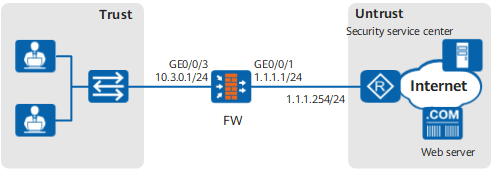
Figure 1 shows typical networking.
Procedure
- The domain name matches a security policy with a higher priority, and the action is set to block for the category in the DNS filtering profile referenced by the security policy.
Choose and check whether the domain name matches a security policy with a higher priority.
- If yes, refine the match conditions of security policies or adjust the priorities of security policies so that the domain name can match the desired security policy.
- If no, go to the next step.
- The domain name is added to a blacklist.
Choose . In DNS Filtering Profile, check whether the blacklist in the existing profile contains the domain name.
- If yes, delete the domain name from the blacklist.
- If no, go to the next step.
- The domain name matches other user defined categories with user-defined rules, and the action is block. Check the following possible causes:
- Other user-defined rules have higher priorities. The priority in descending order is as follows: Exact matching > suffix matching > prefix matching > keyword matching.
- If the matching method is the same, other user-defined rules are longer. The final matching result displays the category with the longest rule.
- If rules have the same length, the action mode is strict mode.
- The domain name matches a security policy with a higher priority, and the security policy does not reference the DNS filtering profile.
Choose and check whether the domain name matches a security policy with a higher priority.
- If yes, refine the match conditions of security policies or adjust the priorities of security policies so that the domain name can match the desired security policy. You can also reference the DNS filtering profile in the security policy.
- If no, go to the next step.
- The DNS filtering profile is not referenced in the security policy.
Choose and click the security policies for the source and destination security zones. In Content Security, check whether the DNS filtering profile is referenced by the security policy.
- If no, select the DNS filtering profile from the drop-down list of DNS Filtering and click OK to reference the DNS filtering profile in the security policy.
- If yes, go to the next step.
- The modified DNS filtering profile is not committed for compilation.
If the modified DNS filtering profile is not committed for compilation, click Commit for compilation.

Committing the configurations of the blacklist, whitelist, or user-defined categories leads to configuration recompilation, which deteriorates the performance consequently. You are advised to commit configurations at a time after all modifications are complete.
Choose to view logs indicating that the access to the domain name is blocked.
Possible causes and the troubleshooting procedure are as follows:
Choose to verify that this domain name has no relevant DNS request logs.
Possible causes and the troubleshooting procedure are as follows: