Application Scenarios for File Blocking
File blocking reduces the risks of information leaks and virus infections on the intranet, and blocks the transfer of files that may exhaust bandwidth and reduce employee productivity.
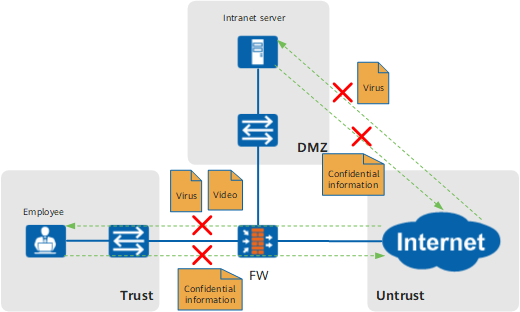
Figure 1 shows an application scenario of file blocking. The FW blocks files to provide security protection in the following ways:
Reduces the risks of confidential information leaks.
Confidential information is generally saved in documents and compressed files. If confidential information is not adequately protected, it may be uploaded to the Internet by employees or stolen by hackers. File blocking blocks the upload of documents and compressed files to the Internet and prevents Internet users from downloading documents and compressed files on the intranet server. Therefore, the risks of information leaks are greatly reduced.
Reduces the risks of virus infections on the intranet.
Viruses are generally attached to executable files and are increasingly difficult to detect and prevent. File blocking prevents intranet users from downloading executable files from the Internet and blocks Internet users from uploading executable files to the intranet server. Therefore, the risks of virus infection are greatly reduced.
Blocks the transfer of files that may exhaust bandwidth and affect employee productivity.
Some employees download non-work-related videos and compressed files that may exhaust bandwidth and compromise employee productivity. File blocking prevents intranet users from downloading non-work-related videos and compressed files to ensure sufficient bandwidth for normal services and high productivity.