Intrusion Prevention Commissioning Guide
This section describes how to configure and commission intrusion prevention on the FW.
Faced Problems
Intrusion prevention needs to be properly configured and commissioned on the FW to achieve a better defense effect.
Solution
Threats vary constantly, and intrusion methods are emerging rapidly. After completing the initial configuration of intrusion prevention, tune the intrusion prevention policy based on collected attack information and the analysis of threat logs.
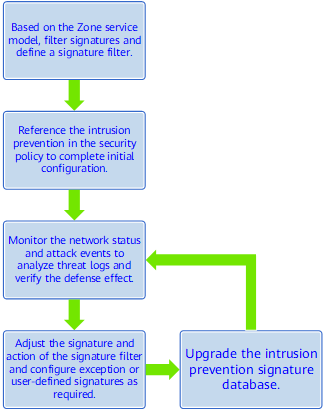
- First, filter signatures in the intrusion prevention to define a suitable signature filter based on the Zone service model, such as servers and intranet users.
- Reference the intrusion prevention profile in the security policy to complete the initial configuration.
- Monitor the network status and attack events, collect and analyze the threat logs generated by the FW, and verify the defense effect.
- Tune the signature filter and action in the intrusion prevention profile, and use the exception signatures and user-defined signatures if necessary.
- Update the intrusion prevention signature database in time to ensure the accuracy, effectivity, and timeliness of signatures.
- Repeat Step 3 to constantly tune and optimize the intrusion prevention policy to achieve a better defense effect.
Verification
None.
Configuration Scripts
None.