Protecting the Web Server on the Intranet
This section describes how to apply the intrusion prevention function on the FW to protect web servers on the intranet of an enterprise.
Faced Problems
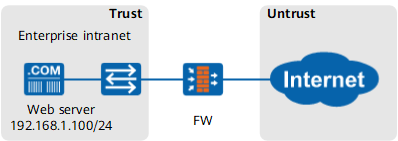
As shown in Figure 1, an enterprise deploys the FW as a gateway to connect the intranet to the Internet.
The enterprise provides a web server for Internet users to access the intranet. The web server often experiences the intrusion and attacks from the Internet, affecting normal service access.
Solution
With the intrusion prevention function, the FW detects and blocks various intrusion behavior to secure the network.
The FW provides an intrusion prevention signature database that contains the signatures of known intrusion behavior. The FW matches a behavior with signatures in the intrusion prevention signature database. If a match is found, the behavior is considered as an intrusion behavior.

To ensure the accuracy of the intrusion detection result, you are advised to update the intrusion prevention signature database every week.
Reference the intrusion prevention profile in the security policy that permits Internet users to access the web server to detect intrusion behaviors on the network.
Click Add Security Policy. Configure matching conditions for the security policy as required and reference intrusion prevention profile web_server in the security policy.
The FW provides several intrusion prevention profiles for different application scenarios by default. In this example, intrusion prevention profile web_server is used to protect the web server.
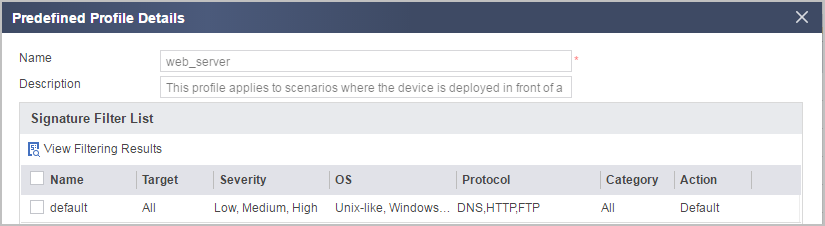
Set security policy parameters as follows:
Name policy1 Source Zone untrust Destination Zone dmz Destination Address/Region 192.168.1.100/255.255.255.255 Action permit Content Security Intrusion Prevention web_server - Click OK.
Verification
Exploit the known SQL injection vulnerability to launch the intrusion to the web server from the Internet. The FW blocks the intrusion.
Choose . You can view the intrusion logs generated by the FW.
Configuration Scripts
The configuration script related to the example is as follows:
#
security-policy
 rule name policy1
  source-zone untrust
  destination-zone dmz
  destination-address 192.168.1.100 mask 255.255.255.255
  profile ips web_server
  action permit
#