Blocking the Use of Windows XP OS to Access the Internet
This section describes how to apply the application identification function on the FW to disable users from using the Windows XP OS to access the Internet.
Faced Problems
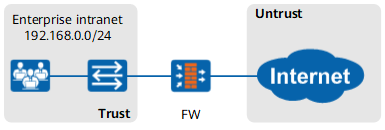
As shown in Figure 1, an enterprise deploys the FW as a gateway to connect the intranet to the Internet.
Intranet users use the Windows XP OS to access the Internet. Because Microsoft has stopped the security update service for the Windows XP OS, using the Windows XP OS to access the Internet makes the intranet vulnerable to attacks, causing critical security risks.
Solution
Generally, users use HTTP to access the Internet. The HTTP packet header has the User-Agent field. The field identifies the type and version of the browser, OS and its version, and core of the browser. The OS used by a user can be identified based on the User-Agent field. The following figure shows the User-Agent field value in the HTTP packet sent from the Windows XP OS.

The OS information value in the User-Agent field corresponding to the Windows XP OS is Windows NT 5.1.
The following table lists the User-Agent field values in the HTTP packets sent from the Windows 2000, Windows XP, and Windows Server 2003 obtained according to the analysis of HTTP packets and information provided on the Microsoft website.
OS |
User-Agent Field Value |
|---|---|
Windows Server 2003 |
Windows NT 5.2 |
Windows XP |
Windows NT 5.1 |
Windows 2000 |
Windows NT 5.0 |
Microsoft has stopped the security update service for the preceding three OSs, causing security risks. To solve the problem, configure a user-defined application on the FW to match the Windows NT5. string of HTTP packets. Then reference the user-defined application and set the action to deny in the security policy to disable the HTTP traffic sent from the three OSs to access the Internet.
Click the Rule tab. Click Add to create a rule for the user-defined application.
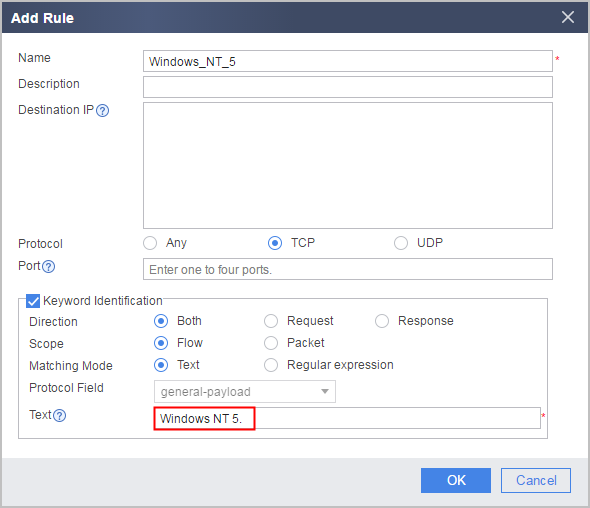
- Click OK to complete the setting of the user-defined application rule.
- Click OK to complete the configuration of the user-defined application.
After the configuration, click Commit at the right corner of the UI to commit the user-defined application for compilation.
Click Add, select Add Security Policy. Set matching conditions for the security policy as required and set the action to deny.
When setting the application matching condition for the security policy, use the user-defined application name as the search keyword to rapidly locate and select the application.
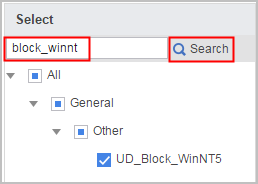
Set security policy parameters as follows:
Name policy1 Source Zone trust Destination Zone untrust Source Address/Region 192.168.0.0/255.255.255.0 Application UD_Block_WinNT5 Action Deny - Click OK.
Verification
Intranet users cannot use the Windows XP OS to access the Internet.
Configuration Scripts
The configuration script related to the example is as follows:
#
sa

 user-defined-application name UD_Block_WinNT5

  rule name Windows_NT_5
   protocol tcp
   signature context flow direction both plain-string "Windows NT 5." field General-Payload
#
security-policy
 rule name policy1
  source-zone trust
  destination-zone untrust
  source-address 192.168.0.0 mask 255.255.255.0
  application app UD_Block_WinNT5
  action deny
#