Application Scenarios for Update Center
This section describes update scenarios of the FW.
FW signature databases can be updated online, using a proxy server, or locally.
Online Update
The FW connects to the update center over the Internet to update the signature databases.
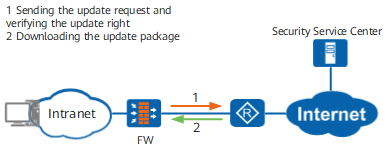
Signature databases can be updated immediately or as scheduled.
-
The FW accesses the update center on a scheduled basis to search for the latest signature databases. If the new versions of signature databases are found, the FW downloads the latest signature databases to update the local signature databases at scheduled time.
-
When new signature database on the network, you can immediately update signature databases instead of waiting for the scheduled update.
The download address and process for updating the signature database immediately is the same as that for the update through scheduled update. The two update modes differ in that immediate update can be performed at any time whereas scheduled update must be implemented at the specified time.
Update Using a Proxy Server
When the FW cannot communicate with the update center over the Internet, a proxy server can be used to connect to the update center and download signature databases for the FW.

If the proxy server runs the Windows operating system, CCProxy is recommended. If the proxy server runs the Linux operating system, Squid is recommended. Ensure that the proxy server enables the HTTP port and four access methods, namely, PUT, GET, CONNECT, and POST.
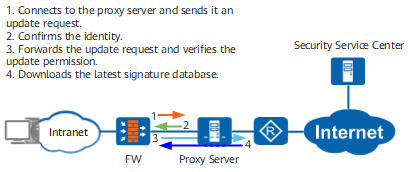
The FW supports HTTP proxy only. Therefore, the security policy that allows HTTP must be configured. You are advised to update the signature database in local or direct update mode. As HTTP is insecure, strict matching conditions of security policies are required.
Signature databases can be updated immediately or as scheduled via the proxy server.
-
The FW accesses the update center on a scheduled basis to search for the latest signature databases. If the new versions of signature databases are found, the FW downloads the latest signature databases to update the local signature databases at scheduled time.
-
When new signature database on the network, you can immediately update signature databases instead of waiting for the scheduled update.
The download address and process for updating the signature database immediately is the same as that for the update through scheduled update. The two update modes differ in that immediate update can be performed at any time whereas scheduled update must be implemented at the specified time.
Local Update
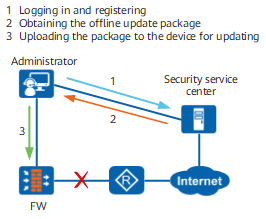
When the FW is physically isolated from the Internet and no proxy server is deployed on the intranet, you can update signature databases locally.
External Malicious URL Signature Database Update
When the FW is connected to the external update server, the FW checks whether there is a new version of the external malicious URL signature database. If a new version is available, the FW automatically downloads the new one and updates its external malicious URL signature database. The external malicious URL signature database supports only online update.
Local Reputation Update
Local reputation is updated in the following process: After the FW is connected to the HiSec Insight, the FW periodically checks whether a new local reputation version is available. If a new local reputation version is available on the HiSec Insight, the FW automatically downloads it and updates the local reputation as scheduled. Local reputation supports only scheduled update.