Signature Database Update Process
This section describes the signature database update process.
Scheduling center: The default domain name is sec.huawei.com. The scheduling center is used to allocate a download server and manage the download server status, that is, whether the download server and signature database files are available. The scheduling center is owned by Huawei and deployed in China in a secure and reliable manner.
Release server: distributes signature database files to the download server.
Download server: downloads signature database files. The download servers are deployed in different regions, including China, Asia, Europe, and America.
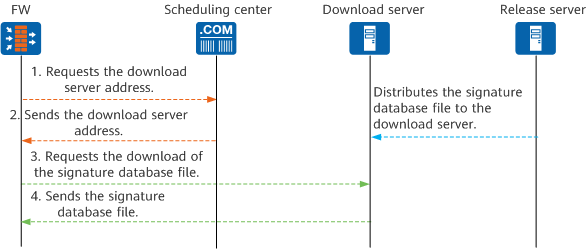
The FW connects to the scheduling center and initiates a signature database update request to request the address of a download server.
The request data includes the device model, device version, device ESN, signature database type, current version of the signature database, and country (optional). The FW transfers the data to the scheduling center in China so that the scheduling center can allocate the address of the download server according to the information. The data is only used to identify the country/region where your device and its device are located (excluding personal data). The transmission is encrypted. Only Huawei is involved in the data processing.
The FW uses HTTPS or HTTP to connect to the scheduling center. HTTPS uses port 443, and HTTP uses port 80. If the FW uses a proxy server for the update, only HTTP is supported.
The FW connects to the download server to request a signature database file.
The FW uses the following protocol and port to connect to the download server:- If the FW uses HTTPS to connect to the scheduling center, the FW also uses HTTPS to connect to the download server, and the port number is 443.
If the FW uses HTTP to connect to the scheduling center.
If the FW directly connects to the update center, the FW connects to the download server through FTP (passive mode). The FTP control channel port number is 21, and the data channel port number ranges from 10001 to 15000 (dynamically allocated).
If the FW uses a proxy server, the FW uses HTTP to connect to the download server, and the port number is 80.
After the request is approved, the download server sends the encrypted signature database file to the FW.

HTTPS is recommended because it is more secure than HTTP. To use the HTTP update mode, you must strictly specify the matching conditions of the security policy.