Updating the External Malicious URL Signature Database
This section describes how to update the external malicious URL signature database.
Preparations
Before updating the external malicious URL signature database, make the following preparations to ensure that the update is successful.
Checking the free space of the CF card and free memory
Before updating the external malicious URL signature database, check whether the free space of the CF card and free memory of the device meet requirements. The following table lists the CF card space and memory space required for updating the external malicious URL signature database.
Item
CF Card Space
Memory Space
External malicious URL signature database
30 MB or higher
16 MB or higher
The operations are described as follows:
Run the dir command in the user view to check the free space of the CF card.
<sysname> dir
 Directory of hda1:/

  Idx  Attr     Size(Byte)  Date        Time       FileName
     0  -rw-            754  Feb 06 2015 15:35:33   private-data.txt
     1  -rw-          5,805  Feb 06 2015 15:35:51   cfgfile.zip
     2  drw-              -  Feb 06 2015 09:07:58   default-sdb
     3  drw-              -  Jul 08 2014 17:02:48   conf
                                ........
    48  -rw-             36  Jan 30 2015 10:28:44   $_patchstate_reboot
    49  -rw-          1,063  Feb 06 2015 09:13:26   nlog.log
    50  -rw-    173,569,921  Feb 04 2015 20:31:10   sup_c30.bin

1,200,576 KB total (379,168 KB free)
In the user view, run the delete command to delete unwanted files from the CF card if the free space is insufficient.

Files are deleted and cannot be restored after the delete command with the /unreserved parameter is executed.
-
Before updating the external malicious URL signature database, check whether the update status is idle. The update can be performed only when the update status is idle.
The operations are described as follows:
Run the display update status command to check the update status.
<sysname> display update status
   Current Update Status: Idle.
In the preceding command output, the value Idle indicates that the signature database can be updated. If the value is not Idle, repeat the display update status command until Current Update Status changes to Idle, and then update the signature database.
Context
-
The FW periodically connects to the external update server to check whether a new version of the external malicious URL signature database exists. If a new version of the external malicious URL signature database is available, the FW automatically downloads the new one and updates its external malicious URL signature database based on the preset time.
-
When the new external malicious URL signature database is available on the network but the scheduled update time on the FW is not reached or scheduled update is not enabled, you can select immediate update.
The signature database download address for immediate update is the same as that for scheduled update, and the update processes in both modes are the same. The difference between two update modes is the update time. The immediate update can be implemented at any time.
Procedure
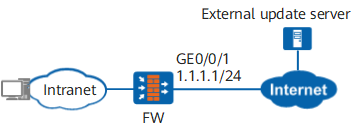
The FW is deployed at the border of the internal network as the security gateway to communicate with the external update server through the Internet. By configuring online update, the FW can automatically download and update the external malicious URL signature database.
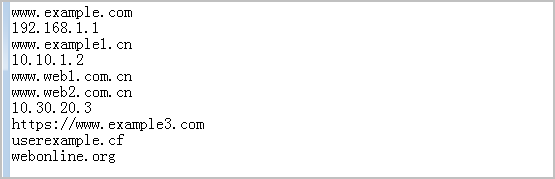
- Before updating the external malicious URL signature database, prepare the malicious URL list file and deploy the external update server.To ensure that the external malicious URL list is successfully loaded to the cache of the FW, the format of the malicious URL list released by external official websites must meet the following requirements on the FW:
Only one URL or IP address can be entered in a line. The length of URLs or IP addresses cannot exceed 1279 characters.
- The protocol of the external update server must be HTTPS.
- FW performs normalization when loading external malicious URL list files.
<FW> system-view
 [FW] interface GigabitEthernet 0/0/1
 [FW-GigabitEthernet0/0/1] ip address 1.1.1.1 24
 [FW-GigabitEthernet0/0/1] quit
 [FW] firewall zone untrust
 [FW-zone-untrust] add interface GigabitEthernet 0/0/1
 [FW-zone-untrust] quit
- Configure parameters for interconnection between the FW and an external update server, including the URI and CA certificate of the external update server.
[FW] update ext-server ext-url-sdb uri https://www.example.com/url-list.txt ca-certificate ext.cerOnly the HTTPS protocol can be used for interconnection between the FW and external update server. The default port number is 443. If the port number is not 443, the configured URI must carry the specific port number. In the preceding URI, www.example.com is the domain name of the external update server or the IP address, and /url-list.txt is the path of the external dynamic malicious URL file.
The CA certificate is used to verify the external update server. The CA certificate can be obtained from the external update server. The obtained CA certificate can be referenced only after being imported to the FW. For details on how to import a CA certificate, see SSL-Encrypted Traffic Detection. Only the CA certificate in PEM format can be imported for interconnection between the FW and an external update server.
The CA certificate that is being referenced cannot be modified or deleted. When the undo update ext-server ext-url-sdb command is used, the CA certificate is unbound. Then the CA certificate can be modified or deleted.
- Configure the DNS server to ensure that the FW can correctly parse the domain name of the external update server. If the URI uses the domain name, the DNS server must be configured.
[FW] dns resolve
[FW] dns server 2.2.2.2
- Optional: Specify the source IP address of online update request packets. For details, see Specifying the Source IP Address of Online Update Request Packets.
- Configure security policies to allow the FW to access the external update server and DNS server.
# Configure a security policy to allow the FW to access the external update server.
[FW] security-policy
[FW-policy-security] rule name policy_update_sever
[FW-policy-security-rule-policy_update_sever] source-zone local
[FW-policy-security-rule-policy_update_sever] destination-zone untrust
[FW-policy-security-rule-policy_update_sever] service https
[FW-policy-security-rule-policy_update_sever] action permit
[FW-policy-security-rule-policy_update_sever] quit
[FW-policy-security] quit
# Configure a security policy to allow the FW to access the DNS server.
[FW] security-policy
[FW-policy-security] rule name policy_dns_server
[FW-policy-security-rule-policy_dns_server] source-zone local
[FW-policy-security-rule-policy_dns_server] destination-address 2.2.2.2 32
[FW-policy-security-rule-policy_dns_server] service dns
[FW-policy-security-rule-policy_dns_server] action permit
[FW-policy-security-rule-policy_dns_server] quit
[FW-policy-security] quit
- Configure scheduled or immediate update.
-
[FW] update schedule ext-url-sdb enable              //Enable scheduled update of the external malicious URL signature database.
[FW] update schedule ext-url-sdb daily 8:00          //Set the scheduled update time of the external malicious URL signature database.
You need to set the scheduled update time based on your network settings. Ensure that the update does not take up the network resources of normal services. If the scheduled update time is not set, the sysname randomly selects a time between 22:00 and 07:59 as the daily scheduled upgrade time by default.
-
[FW] update online ext-url-sdb
-