Updating the Artificial Intelligence Engine Database Using the CLI
This section describes how to update the artificial intelligence engine database on the CLI.
Preparation
Before updating the artificial intelligence engine database, do as follows:
-
Before updating the artificial intelligence engine database, ensure that the artificial intelligence engine license has been purchased and activated.
To check the license status, perform the following operation:
Run the display license command to check whether the required license has been activated or has expired.
If the status is Disabled, activate the license. For details on how to activate the license, see License Management.
If the status is Enabled, check whether the license has expired. If yes, purchase the license.
Checking the Free Space of the CF Card and Memory
Before updating the artificial intelligence engine database, check whether the free space in the device CF card and memory is sufficient. The following table lists the CF card and memory space required for updating the artificial intelligence engine database.
Item
CF Card Space
Memory Space
artificial intelligence engine database
100 MB or higher
50 MB or higher
Perform the following operation:
In the user view, run the dir command to check the free space of CF card.
<sysname> dir
Directory of hda1:/

  Idx  Attr     Size(Byte)  Date        Time       FileName
    0  -rw-            754  Feb 06 2015 15:35:33   private-data.txt
    1  -rw-          5,805  Feb 06 2015 15:35:51   cfgfile.zip
    2  drw-              -  Feb 06 2015 09:07:58   default-sdb
    3  drw-              -  Jul 08 2014 17:02:48   conf
                               ........
   48  -rw-             36  Jan 30 2015 10:28:44   $_patchstate_reboot
   49  -rw-          1,063  Feb 06 2015 09:13:26   nlog.log
   50  -rw-    173,569,921  Feb 04 2015 20:31:10   sup_c30.bin

1,200,576 KB total (379,168 KB free)
In the user view, run the delete command to delete unwanted files from the CF card if the free space is insufficient.

Files are deleted and cannot be restored after the delete command with the /unreserved parameter is executed.
Checking the Current Update Status
You can update artificial intelligence engine database only after the current update status is idle.
To check the current update status, perform the following operation:
Run the display update status command to check the update status.
<sysname> display update status
  Current Update Status: Idle.
If Current Update Status is Idle, you can update the AI Engine. Otherwise, repeat the display update status command until Current Update Status changes to Idle, and then update the AI Engine.
Checking the artificial intelligence engine database Version
Check the artificial intelligence engine database version to determine whether the AI Engine needs to be updated.
Details are as follows:
Run the display version aie-sdb command to check the artificial intelligence engine database.
<sysname> display version aie-sdb
==============================================================================
AI-Engine Version
==============================================================================
Current Version
    Release Version               : xxxxxxxxxx
    Release Date                  : xxxx-xx-xx xx:xx:xx
    Release Size (kB)             : 11499
    Update Date                   : xxxx-xx-xx xx:xx:xx

    adapt                         : xxxxxxxxxx
    bruteforce                    : xxxxxxxxxx
    cc                            : xxxxxxxxxx
    dga                           : xxxxxxxxxx
    eca                           : xxxxxxxxxx


Init Version
    Release Version               : xxxxxxxxxx
    Release Date                  : xxxx-xx-xx xx:xx:xx
    Release Size (kB)             : 11499
    Update Date                   : xxxx-xx-xx xx:xx:xx

    adapt                         : xxxxxxxxxx
    bruteforce                    : xxxxxxxxxx
    cc                            : xxxxxxxxxx
    dga                           : xxxxxxxxxx
    eca                           : xxxxxxxxxx
------------------------------------------------------------------------------
Context
The artificial intelligence engine database can be updated in either of the following modes:
-
If the FW can communicate with the update center directly over the Internet or through a proxy server, you can update the artificial intelligence engine database in online mode.
-
When the FW is physically isolated from the Internet and no proxy server is deployed on the intranet, you can update artificial intelligence engine database locally.
Online Update
The FW is deployed at the border of the internal network as the security gateway. The FW can communicate with sec.huawei.com through the Internet. Through immediate update or scheduled update, the FW can automatically download the artificial intelligence engine database and update the local artificial intelligence engine database.
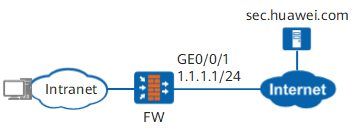
- Set the IP address and security zone of the interface.
<FW> system-view
[FW] interface GigabitEthernet 0/0/1
[FW-GigabitEthernet0/0/1] ip address 1.1.1.1 24
[FW-GigabitEthernet0/0/1] quit
[FW] firewall zone untrust
[FW-zone-untrust] add interface GigabitEthernet 0/0/1
[FW-zone-untrust] quit
- Configure the update center. This example uses the default configuration. To adjust parameter settings, see the Configure the update center.
- Optional: Configure a proxy server. Perform this step when the FW needs to access the update center using a proxy server. For the detailed configuration procedure, see Configure a proxy server.
- Configure the DNS server and ensure that the FW can correctly resolve domain name sec.huawei.com.
[FW] dns resolve
[FW] dns server 2.2.2.2
- Optional: Specify the source IP address for online update request packets. For the detailed configuration procedure, see Specify the source IP address for online update request packets.
- Configure a security policy to allow the FW to access sec.huawei.com and DNS server.
# Configure a security policy to allow the FW to access sec.huawei.com.
[FW] security-policy
[FW-policy-security] rule name policy_sec_huawei_com
[FW-policy-security-rule-policy_sec_huawei_com] source-zone local
[FW-policy-security-rule-policy_sec_huawei_com] destination-zone untrust
[FW-policy-security-rule-policy_sec_huawei_com] service https
[FW-policy-security-rule-policy_sec_huawei_com] action permit
[FW-policy-security-rule-policy_sec_huawei_com] quit
[FW-policy-security] quit
HTTPS is used by default for the update. You can run the update online-mode command to change the update mode to HTTP. However, HTTPS is more secure than HTTP, so HTTPS is recommended. To use the HTTP update mode, strictly specify the matching conditions of the security policy, specify the matching condition service as follows:The update through a proxy server only using HTTP. If the FW accesses the update center through a proxy server, set the matching condition service to HTTP.
# Configure a security policy to allow the FW to access DNS server.
[FW] security-policy
[FW-policy-security] rule name policy_dns_server
[FW-policy-security-rule-policy_dns_server] source-zone local
[FW-policy-security-rule-policy_dns_server] destination-address 2.2.2.2 32
[FW-policy-security-rule-policy_dns_server] service dns
[FW-policy-security-rule-policy_dns_server] action permit
[FW-policy-security-rule-policy_dns_server] quit
[FW-policy-security] quit
- Configure online update.
If the online update consumes too much bandwidth and interrupts normal services of the FW, you can run the update abort command to abort the update. Wait until the bandwidth is sufficient for the update and normal services.
- Configure immediate update.
update online aie-sdb
- Configure scheduled update.
- Enable the scheduled update function.
update schedule aie-sdb enable
- Set scheduled update time. You need to set the time for scheduled update based on your network settings, but ensure that the update does not take up the network resources of normal services.
update schedule aie-sdb { hourly minute | { daily | weekly { Mon | Tue | Wed | Thu | Fri | Sat | Sun } } time } - Scheduled update may fail due to some reasons. The system will retry update periodically. Therefore, you can set the retry interval.
# In the system view, set the retry interval for downloading the signature database for scheduled update. The default value is 3600 seconds.
update schedule retry-download interval interval-value
# In the system view, set the retry interval for loading the signature database for scheduled update. The default value is 3600 seconds.update schedule retry-load interval interval-value
- Enable the scheduled update function.
- Configure immediate update.
Local Update
The update package has been uploaded to the memory of the FW using SFTP, FTP or TFTP.
- Download the update package.
Download update packages from the security center (isecurity.huawei.com). For details, refer to Download the update package..
- Upload the update package from the PC to the memory of the FW.
The artificial intelligence engine database files can be placed in any directory of the FW storage. However, the root directory is recommended.
The artificial intelligence engine database files are in .zip format. You can upload them directly to the FW without decompressing them.
- Access the system view.
system-view
- Enable the local update function.
update local aie-sdb file filename