URL Filtering Mechanism
This section describes how a FW implements URL filtering.
If a user accesses a network resource using HTTP or HTTPS through the FW, the FW applies the filter, as shown in Figure 1.
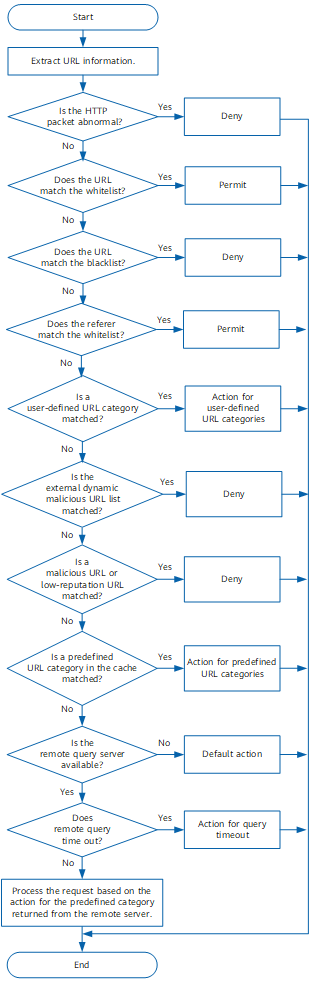
- A user initiates a URL access request. If the data flow matches a security policy, and the action of the policy is permit, the system implements URL filtering.
The FW checks the HTTP packet.
- If the HTTP packet is abnormal, the FW blocks the request.
- If the HTTP packet is normal, the FW performs the next detection.
The FW matches the URL with the whitelist.
- If the URL matches the whitelist, the FW permits the URL access request.
- If the URL does not match the whitelist, the FW proceeds to the next step.
The FW matches the URL with the blacklist.
- If URL information matches the blacklist, the FW blocks the URL access request.
- If the URL does not match the blacklist, the FW proceeds to the next step.
The FW matches the referer field in a received HTTP request with whitelist rules.
- If the referer field in the HTTP request matches the configured referer-host rule, the request is allowed.
- If the referer field in the HTTP request does not match the configured referer-host rule, the user can determine whether to match the referer field with all whitelist rules.
- When the function of matching the referer field with whitelist rules is enabled, the referer field will be matched with all whitelist rules.
- If a match is found, the HTTP request is allowed.
- If the no match is found, proceed to the next step.
- When the function of matching the referer field with whitelist rules is disabled, the referer field will not be matched with all whitelist rules, and the next detection step will be taken.
- When the function of matching the referer field with whitelist rules is enabled, the referer field will be matched with all whitelist rules.
By default, the function of matching the referer field in a URL request with whitelist rules is enabled. You can disable this function.

After URL filtering that supports only the whitelist mode is enabled, the data flow that has a matching whitelist rule is permitted, and the data flow that does not have a matching whitelist rule is blocked.
The FW matches URLs with the external dynamic malicious URL list.
The FW matches the URL information in the request with malicious URLs or low-reputation URLs.
- If the URL matches a malicious URL or low-reputation URL, the FW blocks the URL request.
- If the URL does not match any malicious URL or low-reputation URL, the FW proceeds to the next step.
The FW matches the URL with predefined categories in the cache.
-
If the remote server does not respond within a specific period, the FW will take the action configured for query timeout.
If the URL belongs to a defined category on the remote query server, the FW takes the action defined for the predefined category.
If the URL does not belong to any category, the FW will take the control action for Other categories.
If a session contains multiple URLs, the FW performs URL filtering on each URL and blocks the entire session as long as any one of the URLs is blocked.