URL Remote Query Process
This section describes how the FW implements URL remote query.
When the FW supports URL remote query, you can expand the local predefined URL category database through remote query to implement rapid query next time.
Generally, the scheduling center, dispatch server, and query server work together to implement URL remote query. Their functions are as follows:
Scheduling center: The domain name of the scheduling center is sec.huawei.com. The scheduling center authenticates the FW. If the authentication succeeds, the scheduling center provides the FW with the address and port of the dispatch server address in the country or region where the FW resides.
To enable the FW to interact with the scheduling center, configure the security policy to permit related traffic and set the protocol to TCP and the destination port number to 443 on the FW.
Dispatch server: provides the FW with the addresses and ports of query servers in the region where the FW resides. Dispatch servers are deployed by region. Therefore, you need to correctly configure country/region information on the FW. Otherwise, the addresses and port numbers of dispatch servers cannot be obtained.
To enable the FW to interact with a dispatch server, configure the security policy to permit related traffic and set the protocol to TCP and the destination port number to 12612 on the FW.
Query server: processes query requests and returns query results to the FW. Query servers are also deployed by region and are mapped with dispatch servers. A dispatch server provides the FW with the address and port number of the query server in the same region.
To enable the FW to interact with a query server, configure the security policy to permit related traffic and set the protocol to UDP and the destination port number to 12600 on the FW.
Based on the preceding content, it can be concluded that the FW can communicate with the scheduling center only when it is connected to the Internet. However, the FW of certain users cannot connect to the Internet. If these users need to use the URL remote query function, they can purchase Huawei SecoCenter and deploy it on the local network. The SecoCenter has the dispatch and query servers integrated. For details, see its product manual.
Based on the server deployment location, the FW supports two remote query modes, namely, the remote and local modes.
In remote mode, the FW communicates with the scheduling center. The dispatch server forwards query requests to the query server in the country/area configured on the FW.
In local mode, the FW communicates with the SecoCenter but not the scheduling center.
Figure 1 shows the interaction process in remote mode. In local mode, the interaction with the scheduling center shown in Figure 1 is not involved.
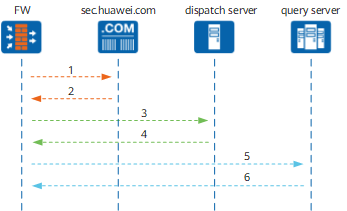
The FW sends an authentication request to scheduling center and requests the address of the dispatch server.
If the authentication succeeds, the scheduling center provides the FW with the address and port of the dispatch server address in the country or region where the FW resides.
The FW sends a request for the address and port of the query server to the dispatch server.
After confirming the device information of the FW, the dispatch server provides the FW with the address and port of the query server. Generally, the FW receives the addresses and port numbers of multiple query servers.
The FW sends a speed test message to all query servers, selects the query server that responds most quickly, and requests URL category information from the query server.
The query server sends the desired URL category information to the FW, and the FW continues URL filtering based on the category information.