Installing Optical Transceivers and Connecting Optical Fibers
This section describes how to install optical transceivers on the SFP or SFP+ ports and connect them to the ports of the peer device using optical fibers according to the network plan.
Context

Huawei optical modules are recommended. The optical modules from other vendors may cause faults on the USG due to incompatibility.

Do not look into the optical interface of the optical module or the optical fiber connector without eye protection.
- Do not overbend optical fibers, and the radius should not be shorter than 40 mm.
- Do not bundle the optical fibers too tight. Otherwise, the transmission performance of the optical fibers and the communication between devices might be adversely affected.
- The optical module has been installed.
Procedure
- Insert an optical transceiver into the SFP or SFP+ port of the USG.
- Remove the dust cap from the optical transceiver.

Set aside the dust cap properly for future use. After optical fiber are disconnected for maintenance, use the dust cap to prevent the optical transceiver from dust.
- Before connecting an optical fiber, attach temporary labels to both ends of the optical fiber for identification.
- Remove protective caps from optical fiber connectors, insert optical fibers into the optical transceiver, and connect the fiber to the peer device.
Ensure that the Tx and Rx ports are correctly connected.
Ensure that the TX and RX ports on one end of the optical fiber cable are connected to the RX and TX ports (respectively) on the other end.
Figure 1 Installing optical transceivers and connecting optical fibers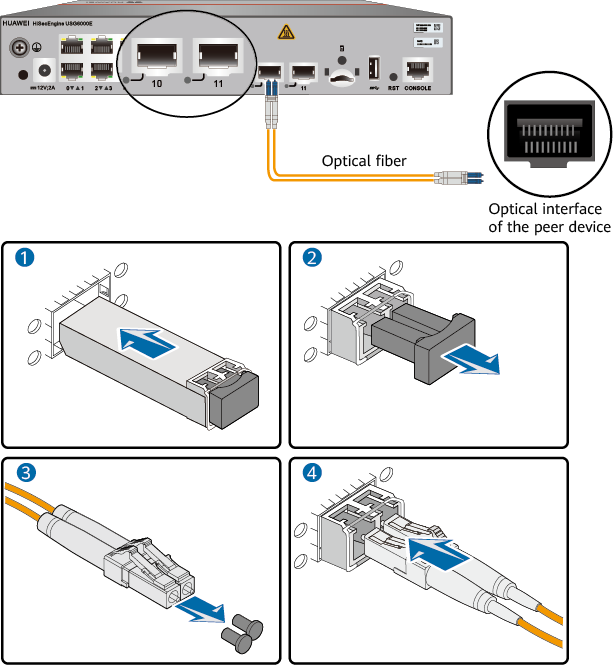
- Repeat 1 to 4 to install all optical transceivers and connect all optical fibers.
Follow-up Procedure
After you power on the USG, check the connection by observing the optical port indicator. If the indicator is on or blinks, the link is connected or data is being transmitted. If the indicator is off, the link is disconnected. Possible causes for the disconnection are as follows:
- The optical fiber is improperly inserted. Pull out the optical fiber and re-insert it.
- The RX and TX optical ports are inserted reversely. Pull out the optical fibers, change their position, and re-insert them.
- The optical module is damaged or the optical fiber is broken. Replace the optical module or the optical fiber.