Powering On or Off the USG6680E, USG6712E, USG6716E
This section describes how to power on or off the USG6680E, USG6712E, USG6716E. To ensure the normal start and security of the USG6680E, USG6712E, USG6716E, strictly follow the operation guide to power on or off the USG6680E, USG6712E, USG6716E.
Context
- The power cable and PGND cable are properly connected.
- The power switch in the equipment room is easy to locate so that you can power off devices in the case of accidents.
Procedure
- Power on the USG.
Turn on the switch of the power supply device. The USG starts.
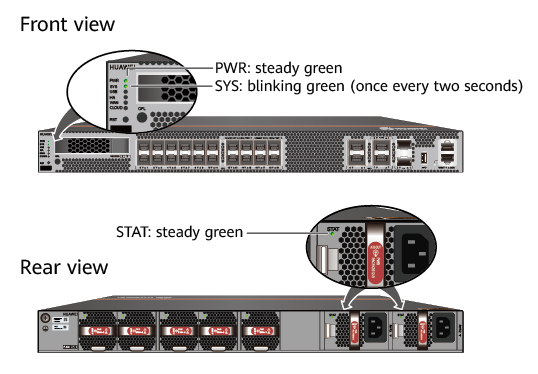
You can identify the USG status based on indicators on the front and rear panels. Indicators shown in USGFigure 1 indicate that the USG runs normally.
- Power off the USG.

Before powering off the USG, ensure that configuration data is saved. Otherwise, the configuration data may be lost.
If the USG will be administratively shut down for a long time, turn off the power switch. After powering off the USG, set it aside properly according to storage requirements.
If the USG has hard disks, do not power off the USG by removing the power cable or switching off the power supply to prevent data loss and hard disk damage. You must run the disk offline command in the system view first and wait for about 30 seconds. After the system prompts you with a message indicating that hard disks have stopped, turn off the power switch of the USG.