Configuring IP Address-based New Connection Rate Limiting
Overview
In IPTV scenarios, after the client software is upgraded or the server recovers from a fault, a large number of clients initiate a large number of TCP connection requests to the server at the same time. As a result, the server cannot respond to these requests within a short period of time. Then the clients continuously attempt to connect to the server, interrupting services for a long time. In this scenario, the TCP proxy and source detection functions for SYN flood attack defense do not take effect because these clients are real source devices. The cause of the service fault is that the requests sent from the clients at the same time are beyond the processing capability of the server. Therefore, you need to limit the new connection rate within the server performance range to ensure that the server can properly process the requests initiated by the clients.
You need to configure source IP address-based rate limiting on internal interfaces and destination IP address-based rate limiting on external interfaces. You are advised to set the defense mode to alarm mode. After a period of time, you can evaluate the new connection rate of a single IP address on the live network based on logs. After the maximum new connection rate is adjusted, you can set the defense mode to packet loss mode. If services are abnormal after the defense mode is set to packet loss mode, you can switch the defense mode to alarm mode and check whether services are restored.
Impact on the System
None
Procedure
- The following shows configurations of public network protection and internal network protection through Web:
- Configure public network protection. Public IP addresses may be used by malicious attackers from external networks. The malicious attackers continuously initiate a large number of new connections to the public IP addresses. Because blackhole routes are enabled for the public IP address pool, a large number of packets matching blackhole routes are discarded, causing high route cost and occupying a large number of firewall performance resources. As a result, other services are abnormal. In this case, the destination IP address of attack packets is in the address pool. Therefore, you need to configure destination IP address-based new connection rate limiting on external interfaces of the FW.
Choose Policy > Security Protection > IPCAR.
Click the WAN Protection tab and set IPCAR based on destination IP addresses.
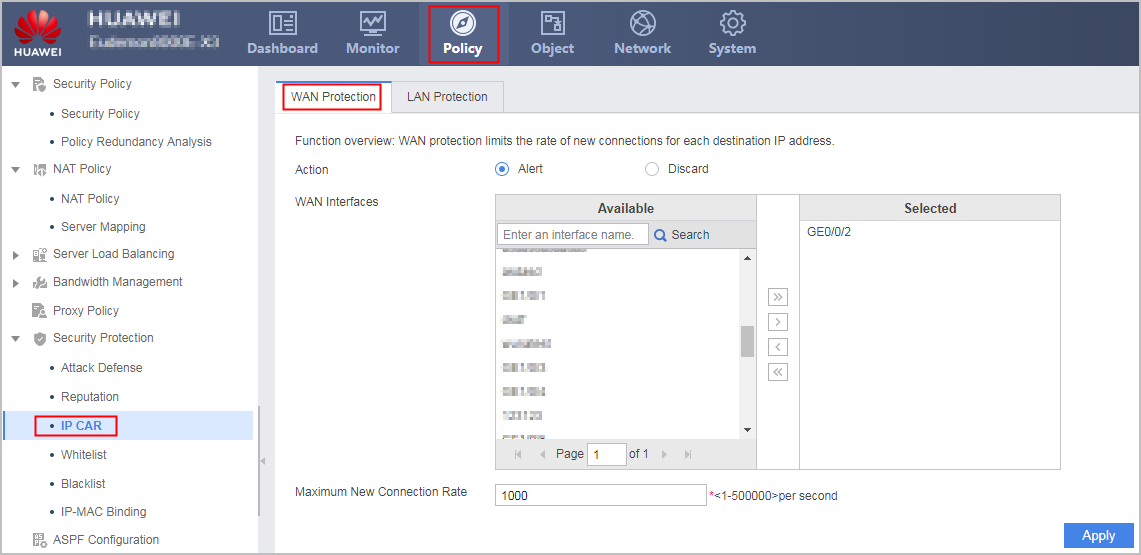
Click Apply.
- Configure internal network protection. If malicious attackers continuously initiate a large number of new connections to external networks using PCs on the internal network, a large number of performance resources of the FW are consumed, which may cause service faults. In this case, the source IP addresses of malicious attackers are fixed, and there are a large number of random destination IP addresses. Therefore, you need to configure source IP address-based new connection rate limiting on the internal interfaces of the FW.
Choose Policy > Security Protection > IPCAR.
Click the LAN Protection tab and set IPCAR based on source IP addresses. For details, see the WAN Protection configuration.
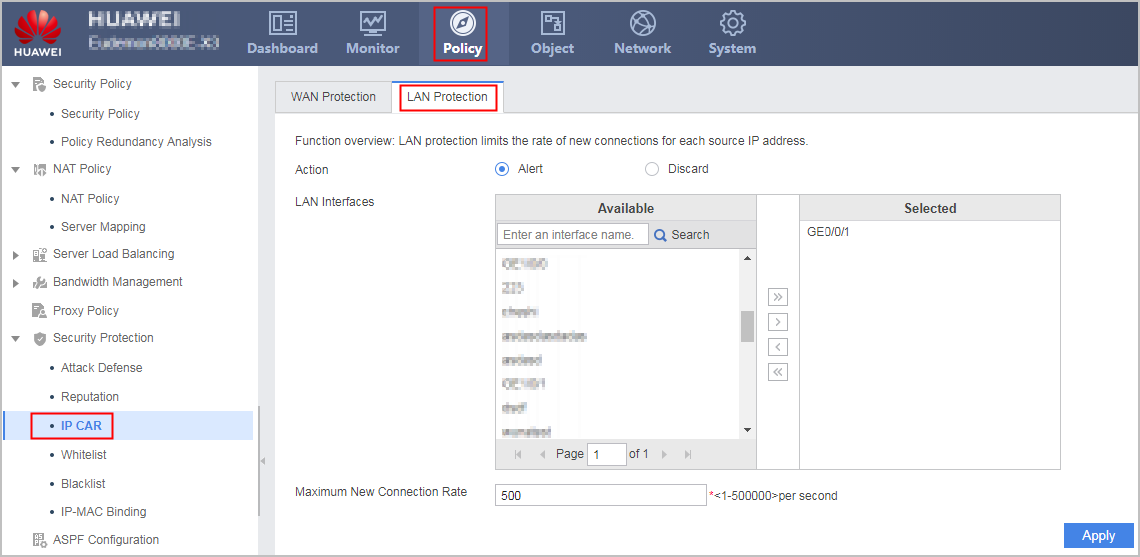
Click Apply.
- Configure public network protection. Public IP addresses may be used by malicious attackers from external networks. The malicious attackers continuously initiate a large number of new connections to the public IP addresses. Because blackhole routes are enabled for the public IP address pool, a large number of packets matching blackhole routes are discarded, causing high route cost and occupying a large number of firewall performance resources. As a result, other services are abnormal. In this case, the destination IP address of attack packets is in the address pool. Therefore, you need to configure destination IP address-based new connection rate limiting on external interfaces of the FW.
- The following shows configurations of public network protection and internal network protection through CLIs:
firewall defend ipcar source session-rate-limit 5000
firewall defend ipcar destination session-rate-limit 5000
firewall defend ipcar source mode alert
firewall defend ipcar destination mode alert
interface GigabitEthernet 0/0/1
firewall defend ipcar source session-rate-limit enable
quit
interface GigabitEthernet 0/0/2
firewall defend ipcar destination session-rate-limit enable
quit