Understanding Alarm
This section describes the mechanism for alarm output.
The FW outputs alarms through the information center. The information center is an information hub of system software modules on the FW. You can sort output system information in a refined manner to effectively filter information.

Information Output
10 information channels are defined for the information center to control information output in different directions. These channels are independent of each other. You can configure alarm output rules as required to allow information of different levels to be output through different channels, as shown in Figure 1.
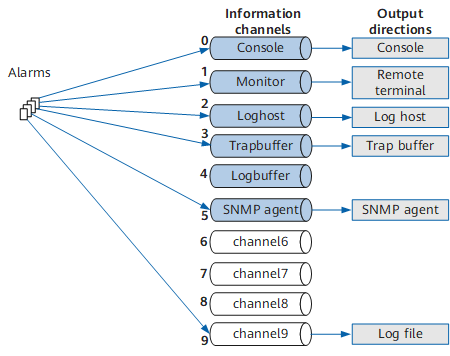
Table 1 shows the relationships between information channels and output directions.
Channel ID |
Default Channel Name |
Output Direction |
Description |
|---|---|---|---|
0 |
console |
console |
The console can receive logs, alarms, and debugging information. |
1 |
monitor |
monitor |
VTY terminals can receive logs, alarms, and debugging information, facilitating remote maintenance. |
2 |
loghost |
loghost |
Log hosts can receive logs, alarms, and debugging information. Information is stored in files on the log hosts. You can view the files at any time. |
3 |
trapbuffer |
trapbuffer |
The trap buffer can receive alarms. |
4 |
logbuffer |
logbuffer |
The log buffer can receive logs. |
5 |
snmpagent |
snmpagent |
The SNMP agent can receive alarms. |
6 |
channel6 |
Not specified |
This channel is reserved. You can specify the output direction. |
7 |
channel7 |
Not specified |
This channel is reserved. You can specify the output direction. |
8 |
channel8 |
Not specified |
This channel is reserved. You can specify the output direction. |
9 |
channel9 |
logfile |
Log files can receive logs, alarms, and debugging information. Information is stored in files on the storage medium of the device, such as the CF card or disk. |
If multiple log hosts are configured, you can configure the device to output alarms through one or more channels to log hosts. For example, configure the device to output some alarms to log hosts through channel 2 (loghost) and the rest alarms to log hosts through channel 6. You can rename channel 6 to facilitate information channel management.
Information Format
Figure 2 shows the alarm format.

Table 2 lists the description of every field in an alarm.
Field |
Meaning |
Description |
|---|---|---|
TimeStamp |
Timestamp, indicating when the alarm is output |
There are five timestamp formats:
|
HostName |
Host name |
It is the system name of a local host. The host name and module name are separated by a space. |
ModuleName |
Module name |
Indicates the module where an alarm is generated. |
Severity |
Severity |
Indicates the alarm severity, which can be:
|
Brief |
Brief description |
Indicates the brief description of an alarm. |
Description |
Description |
Indicates the description of an alarm. |