< Home

Configuring DS-Lite NAT

This section describes how to configure DS-Lite NAT.

Prerequisites

The following configurations must be complete before configuring an interzone NAT policy:

Context

As shown in Figure 1, private network user PC1 (at 192.168.1.2/24) under the CPE accesses a server (at 1.1.3.1/24) on the Internet, and the packet travels through the DS-Lite tunnel and reaches the CGN. The CGN decapsulates the packet, matches the DS-Lite NAT policy, and translates the IP address of the packet into a public address. The packet is finally passed to the Internet.
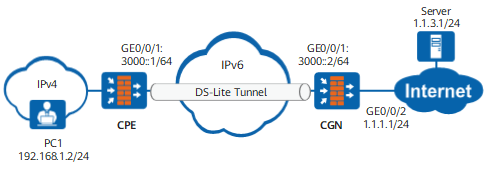
Figure 1 DS-Lite NAT scenario

In the DS-Lite NAT scenario, the CGN uses related IPv6 information to check the DS-Lite policy. The source address defined in the DS-Lite NAT policy is that of the peer interface of the DS-Lite tunnel, that is, address of the interface connecting the CPE to the IPv6 network.

Procedure

  1. Create a NAT address pool.
    1. Run the system-view command to access the system view.
    2. Run the nat address-group group-name [ group-number ] command to create a NAT address pool.
    3. Configure parameters for the NAT address pool.

      1. Run the mode { pat | full-cone { global | local } command to set a NAT mode for the address pool.

      2. Run the section [ id ] start-ipv4 [ end-ipv4 ] command to configure an IP address range.

      3. Optional:

        Run the route enable command to enable the user network routes (UNRs) for addresses in the NAT address pool.

        After this command is configured, the FW generates a UNR for addresses in the NAT address pool. The UNR, similar to the black-hole route, can prevent routing loops and can be imported and advertised by dynamic routing protocols, such as OSPF.

    4. Run the quit command to exit the address pool view.
  2. Configure the DS-Lite NAT policy.
    1. Run the nat-policy command to access the NAT policy view.
    2. Run the rule name rule-name command to create a NAT rule in the NAT policy view. Then the NAT rule view is displayed.

      If multiple NAT rules are created, the policies are matched top down. If the traffic matches a NAT rule, the remaining rules are ignored.

      After creating the NAT rules, you can run the description description command to describe the rules for administrators to get familiar with the rule usage.

    3. Run the nat-type ds-lite command to configure the DS-Lite NAT policy type.
    4. Configure matching conditions for the source NAT rule.

      All matching conditions are optional for traffic matching. The default condition is any. If optional matching conditions are configured, traffic must meet all the conditions. If no matching condition is configured, traffic is not matched with any condition.

      • Configure a source IP address that needs to match the traffic.

        source-address { address-set address-set-name &<1-6> | ipv4-address [ ipv4-mask-length | mask mask-address ] | ipv6-address ipv6-prefix-length | range { ipv4-start-address ipv4-end-address | ipv6-start-address ipv6-end-address } | mac-address &<1-6> | any }

        MAC addresses can be configured only on the USG6000E series.

      • Configure a destination IP address that needs to match the traffic.

        destination-address { address-set address-set-name &<1-6> | ipv4-address [ ipv4-mask-length | mask mask-address ] | ipv6-address ipv6-prefix-length | range { ipv4-start-address ipv4-end-address | ipv6-start-address ipv6-end-address } | mac-address &<1-6> | any }

        MAC addresses can be configured only on the USG6000E series.

      • Configure the source security zone for traffic, which is the intranet security zone.

        source-zone { zone-name &<1-6> | any }

      • Configure either a destination security zone or an outbound interface.

        • Configure the destination security zone for traffic, which is the Internet security zone.

          destination-zone zone-name

        • Configure the traffic outbound interface.

          egress-interface interface-type interface-number

      • Configure a service set that needs to match the traffic.

        service { service-name &<1-6> | any }

    5. Run the action { source-nat { { address-group address-group name } | easy-ip } | no-nat } command to configure actions for NAT rules.
Copyright © Huawei Technologies Co., Ltd.
Next topic >