Configuring the DS-Lite NAT Server
This section describes how to configure the NAT server in the DS-Lite Scenario for Internet hosts to access the intranet server.
Context
The NAT function in the DS-Lite scenario, like the common NAT function, hides the intranet topology and shields the intranet hosts. In practice, a WWW server or an FTP server is required to provide services for the Internet hosts to access intranet hosts. Configuring the NAT server in the DS-Lite scenario can enable such access.
As shown in Figure 1, the private IP address of the FTP server is 192.168.1.2/24. The NAT server in the DS-Lite scenario is configured on the CGN. The public IP address of the FTP server is 2.1.2.12. The CPE IP address and DS-Lite tunnel interface are specified. With the preceding configuration, PC1 on the Internet can access the FTP server on the intranet. Ensure the IP connectivity between PC1 at 2.1.3.1 on the Internet and the CGN at global address 2.1.2.12.
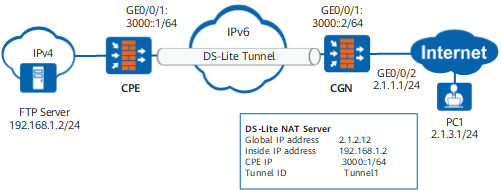
Procedure
- Access the system view.
- Configure the NAT server function in the DS-Lite scenario.
Run the nat-dslite server [ server-id ] [ zone zone-name ] [ protocol { protocol-type | protocol-number } ] global global-address global-port inside host-address host-port [ unr-route ] [ vrrp virtual-router-id [ no-reverse ] ] cpe cpe-ip tunnel tunne-number [ description text ] or nat-dslite server [ server-id ] [ zone zone-name ] [ protocol { protocol-type | protocol-number } ] global global-address inside host-address [ unr-route ] [ vrrp virtual-router-id [ no-reverse ] ] cpe cpe-ip tunnel tunne-number [ description text ] command to configure the NAT server function in the DS-lite scenario.
global: Indicates the public IP address of the server.

The global address cannot be the same as any address in the configured address pool.
inside: Indicates the private IP address of the server.
unr-route: indicates the delivered user network route (UNR). The UNR, similar to the black-hole route, can prevent routing loops and can be imported and advertised by dynamic routing protocols, such as OSPF.
- The VRRP keyword is used to divert traffic and implement load balancing on dual-system hot backup networks. Recommended configurations are as follows:
- Active/standby backup: Only one device forwards traffic. Therefore, no VRRP keywords are required.
- Load balancing:
- No VRRP keyword is not required in most cases. The system automatically binds a VRRP group with the smallest VRID. In this group, the virtual IP address and the public IP address of the NAT server reside on the same network. This binding ensures that traffic is transmitted by the active device in the group.
- If multiple VRRP groups exist, configure the VRRP keyword to specify the direction for traffic forwarding and enable the traffic to be transmitted by the active device in the specified VRRP group.
If you specify no-reverse, the CGN does not create a reverse mapping entry after the NAT server is successfully configured. This parameter is used to configure translation from one inside address of the server to two or more global addresses.
Example
As shown in Figure 1, configure the NAT server in the DS-Lite scenario to allow PC1 (2.1.3.1) on the Internet to access the FTP server (192.168.1.2) on the intranet.
# Configure the NAT server in the DS-Lite scenario.
<CGN> system-view
[CGN] nat-dslite server  protocol tcp global 2.1.2.12 ftp inside 192.168.1.2 ftp unr-route cpe 3000::1 tunnel 1
# Configure a route to PC1 (2.1.3.1) on the Internet. Assume that the external next hop address is 2.1.1.2.
[CGN] ip route-static 2.1.3.1 255.255.255.255 2.1.1.2

A route should be configured on PC1 (2.1.3.1) on the Internet to the global address (2.1.2.12) on the CGN.
Follow-up Procedure
After the configuration, run the display firewall server-map ds-lite command in any view of the CGN to view server map entries.
<CGN> display firewall server-map ds-lite
 Type: DS-Lite Nat Server , ANY -> 2.1.2.12:21[192.168.1.2:21], Zone:---
 Protocol: tcp, To CPE: 3000::1, Tunnel Id: 1, Left-Time:---

 Type: DS-Lite Nat Server Reverse,  192.168.1.2[2.1.2.12] -> ANY, Zone:---
 Protocol: tcp, From CPE: 3000::1, Tunnel Id: 1, Left-Time:---, counter: 3
If the nat-dslite server command with the no-reverse parameter specified as follows
[CGN] nat-dslite server protocol tcp global 2.1.2.12 ftp inside 192.168.1.2 ftp no-reverse cpe 3000::1 tunnel 1
Run the display firewall server-map ds-lite command to display the server map entries as follows:
<CGN> display firewall server-map ds-lite
 Type: DS-Lite Nat Server , ANY -> 2.1.2.12:21[192.168.1.2:21], Zone:---
 Protocol: tcp, To CPE: 3000::1, Tunnel Id: 1, Left-Time:---