Configuring an IPv6 over IPv4 Automatic Tunnel
The IPv6 over IPv4 automatic tunnel is a point-to-multipoint one. Such tunnels use the IPv4-compatible IPv6 addresses.
Prerequisites
- IPv6 packet forwarding is enabled globally.
- The IPv4 address of the interface connecting to the IPv4 network is specified, the interface is Up, and the IPv4 address is routable.
Context
The IPv6 over IPv4 automatic tunnel connects only different IPv6 devices. However, these devices do not forward packets from the connected hosts, because only the IPv4 addresses of the interfaces connecting to the IPv4 network are required by two border devices.
Application ScenarioThe IPv6 over IPv4 automatic tunnel is configured between two border devices.
As shown in Figure 1, FW_A and FW_B support the dual stack, and are connected to the IPv6 networks and the IPv4 network respectively. The IPv6 over IPv4 automatic tunnel connects to two border devices, and enables them to communicate with each other.
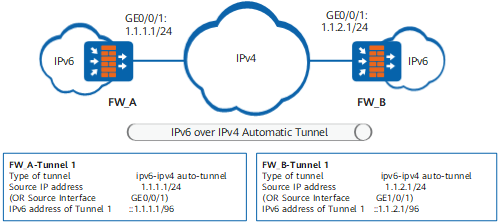
- The IPv6 over IPv4 automatic tunnel connects only different border devices. Therefore, you do not need to configure tunnel routes to connect hosts on different IPv6 networks.
- The address of the tunnel interface is an IPv4-compatible IPv6 address. Its prefix is ::/96 and the last 32-bit is the source address.
Procedure
- Access the system view.
- Create a tunnel interface and access the tunnel interface
view.
interface tunnel interface-number
- Set the tunnel encapsulation mode to automatic tunnel.
tunnel-protocol ipv6-ipv4 auto-tunnel
- Specify the source IP address or source interface of the
automatic tunnel.
source { ipv4-address | interface-type interface-number }

You can set the source address of a IPv6 over IPv4 automatic tunnel to the IPv4 address of the interface connecting to the IPv4 network or configure this interface as the source interface.
Moreover, you can specify a physical interface or a logical interface such as the loopback interface as the source interface.
The source address or source interface of the IPv6 over IPv4 automatic tunnel must be unique.
- Enable the IPv6 function on the tunnel interface.
- Set the address of the tunnel interface to an IPv4-compatible
IPv6 address.
ipv6 address { ipv6-address prefix-length | ipv6-address/prefix-length }
The IPv6 address specified on the tunnel interface must be compatible with the IPv4 address. That is, the first 96 bits are all 0s and the last 32-bit is the IPv4 address of the source address or interface for the automatic tunnel, with ::ipv4-address as the format. As shown in Figure 1, the source address of the automatic tunnel for FW_A is 1.1.1.1/24 and the IPv6 address of the tunnel interface is ::1.1.1.1/96.
Example
FW_A and FW_B are border devices between IPv6 and IPv4 networks. The IPv4 address of the GigabitEthernet0/0/1 interface on FW_A that connects to the IPv4 network is 1.1.1.1/24, and that of the GigabitEthernet0/0/1 interface on FW_B that connects to the IPv4 network is 1.1.1.2/24. The IPv6 over IPv4 automatic tunnel is established between FW_A and FW_B.
# Set the encapsulation type and source address of the tunnel, and the IPv6 address of the tunnel interface for FW_A.
<FW> system-view
[FW] sysname FW_A
[FW_A] ipv6
[FW_A] interface tunnel 1
[FW_A-Tunnel1] tunnel-protocol ipv6-ipv4 auto-tunnel
[FW_A-Tunnel1] ipv6 enable
[FW_A-Tunnel1] source 1.1.1.1
[FW_A-Tunnel1] ipv6 address ::1.1.1.1 96
# Set the encapsulation type and source address of the tunnel, and the IPv6 address of the tunnel interface for FW_B.
<FW> system-view
[FW] sysname FW_B
[FW_B] ipv6
[FW_B] interface tunnel 1
[FW_B-Tunnel1] tunnel-protocol ipv6-ipv4 auto-tunnel
[FW_B-Tunnel1] ipv6 enable
[FW_B-Tunnel1] source 1.1.2.1
[FW_B-Tunnel1] ipv6 address ::1.1.2.1 96