Configuring a 6to4 Tunnel
6to4 tunnels are point-to-multipoint (P2MP) tunnels that connect to isolated IPv6 domains. 6to4 tunnels use IPv4-embedded IPv6 addresses.
Prerequisites
- IPv6 packet forwarding is enabled globally.
- An IPv4 address is configured for the interface connecting to an IPv4 network, the interface is Up, and the IPv4 address is routable.
Context
Application Scenario
A 6to4 tunnel is used in either of the following networking scenarios:
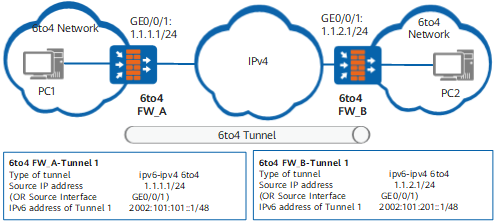
Networking scenario with a 6to4 tunnel connecting to different 6to4 networks
The devices at both ends of the 6to4 tunnel are 6to4 routers or 6to4 relay routers, enabling hosts or devices on different 6to4 networks to communicate.
As shown in Figure 1, 6to4 FW_A and FW_B support the dual stack and connect to a 6to4 network and an IPv4 network. The 6to4 tunnel connects two different 6to4 networks, which enables the PCs or devices on the 6to4 networks to communicate.
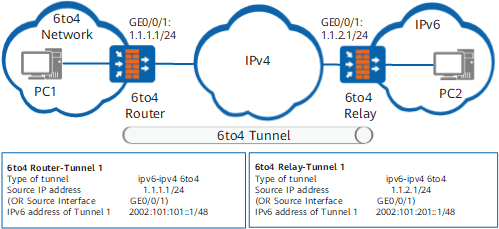
Networking scenario in which a 6to4 tunnel connecting to 6to4 and IPv6 networks
The devices at both ends of the 6to4 tunnel are a 6to4 router and a 6to4 relay router, enabling hosts or devices on the 6to4 and IPv6 networks to communicate.
As shown in Figure 2, the 6to4 router and 6to4 relay router support the dual stack. The 6to4 router connects to a 6to4 network and an IPv4 network. The 6to4 relay router connects to an IPv4 network and an IPv6 network. The 6to4 tunnel connects the 6to4 and IPv6 networks, which enables PCs or devices on the 6to4 and IPv6 networks to communicate.
Tunnel Route
After you configure a tunnel, ensure that the source and destination of the tunnel have a route to each other to implement normal packet forwarding. The routes can be either static or dynamic.
To configure a static route, set the destination address of the route to the IPv6 address of the tunnel interface on the IPv6 network and the outbound interface to the local tunnel interface. In the networking with a 6to4 tunnel connecting 6to4 and IPv6 networks, to enable devices or hosts on the 6to4 network communicate with devices or hosts on the IPv6 network, configure a static route from to 6to4 router to 6to4 relay router.
To configure a dynamic route, enable dynamic routing protocols on the tunnel interfaces and interfaces connected to the IPv4 and IPv6 networks. The 6to4 tunnel supports BGP4+.
Procedure
- Access the system view.
- Create a tunnel interface and access the tunnel interface view.
interface tunnel interface-number
- Set the tunnel encapsulation mode to 6to4.
tunnel-protocol ipv6-ipv4 6to4
- Set a source address or interface for the 6to4 tunnel.
source { ipv4-address | interface-type interface-number }

You can set the source address of a 6to4 tunnel to the IPv4 address of the interface connecting to the IPv4 network or configure this interface as the source interface.
Moreover, you can specify a physical or logical interface, such as a loopback interface as the source interface.
The source address or interface of a 6to4 tunnel must be unique.
- Enable the IPv6 function on the tunnel interface.
- Set a 6to4 address for the tunnel interface.
ipv6 address { ipv6-address prefix-length | ipv6-address/prefix-length }
The prefix of a 6to4 address is 2002:ipv4-address, with 48 bits. ipv4-address specifies the IPv4 address of the source address or interface for the tunnel.
Example
FW_A and FW_B are 6to4 routers and connect to border devices of IPv6 and IPv4 networks. The IPv4 address of GE0/0/1 that connects FW_A to the IPv4 network is 1.1.1.1/24, and the IPv4 address of GE0/0/1 that connects FW_B to the IPv4 network is 1.1.2.1/24. A 6to4 tunnel is established between FW_A and FW_B.
# On FW_A, configure an encapsulation type, a source address, and a destination address for the tunnel and configure an IPv6 address for the tunnel interface.
<FW> system-view
[FW] sysname FW_A
[FW_A] ipv6
[FW_A] interface tunnel 1
[FW_A-Tunnel1] tunnel-protocol ipv6-ipv4 6to4
[FW_A-Tunnel1] ipv6 enable
[FW_A-Tunnel1] source 1.1.1.1
[FW_A-Tunnel1] ipv6 address 2002:0101:101::1 48
# Configure a route from FW_A to the IPv6 network connected to FW_B.
[FW_A] ipv6 route-static :: 0 tunnel 1
# On FW_B, configure an encapsulation type, a source address, and a destination address for the tunnel and configure an IPv6 address for the tunnel interface.
<FW> system-view
[FW] sysname FW_B
[FW_B] ipv6
[FW_B] interface tunnel 1
[FW_B-Tunnel1] tunnel-protocol ipv6-ipv4 6to4
[FW_B-Tunnel1] ipv6 enable
[FW_B-Tunnel1] source 1.1.2.1
[FW_B-Tunnel1] ipv6 address 2002:0101:201::2 48
# Configure a route from FW_B to the IPv6 network connected to FW_A.
[FW_B] ipv6 route-static 2002:: 16 tunnel 1