Configuring Static LACP Parameters
If an Eth-Trunk interface works in static LACP mode, you need to configure static LACP parameters. An Eth-Trunk interface in static LACP mode allows its members to implement M:N backup, which improves fault tolerance performance and reliability of the Eth-Trunk interface.
Prerequisites
- Configuring a Layer-3 Eth-Trunk Interface or Configuring a Layer-2 Eth-Trunk Interface has been complete.
- Configuring a Working Mode for an Eth-Trunk Interface has been complete.
- Adding Physical Interfaces to an Eth-Trunk Interface has been complete.
Context
Based on IEEE 802.3ad, the Link Aggregation Control Protocol (LACP) is developed for link aggregation. LACP-enabled devices exchange information by sending Link Aggregation Control Protocol Data Units (LACPDUs).
As shown in Figure 1, two devices are connected using Eth-Trunk interfaces in static LACP mode.
The device with a higher system LACP priority is the Actor, and the device with a lower system LACP priority is the Partner.
The Actor selects the active interfaces at both ends based on its interface LACP priority. M member interfaces with a higher LACP priority in the Eth-Trunk interface are active interfaces and forward traffic. The remaining N member interfaces are standby interfaces and do not forward traffic.
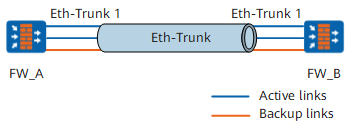

An Eth-Trunk interface in static LACP mode can have member interfaces on different boards.
When you configure Eth-Trunk in static LACP mode, member interfaces must have the same bandwidth.
Procedure
- Access the system view.
system-view
- Set a system LACP priority value for the FW.
lacp priority priority
The system LACP priority value is set to prioritize the devices on both ends of an Eth-Trunk link. The device with a higher system LACP priority is selected as the Actor of the aggregation group, and active interfaces are selected based on the priorities of interfaces on the Actor.
A smaller system LACP priority value represents a higher priority.
Select one device on the Eth-Trunk link as the Actor and set a smaller system LACP priority value for the device. By default, the system LACP priority value is 32768. Therefore, the device whose system LACP priority value is smaller than 32768 can be the Actor.
If neither of the devices at the two ends of an Eth-Trunk link has a system LACP priority value, the devices use the default value 32768. In this case, the Actor is selected based on device system IDs. The device with the smaller system ID becomes the Actor.
- Access the Eth-Trunk member interface view.
interface interface-type interface-number
- Set an LACP priority value for the interface.
lacp priority priority
The interface LACP priority value is set to prioritize interfaces on a device. The interface of a higher priority is selected as the active interface.
The interface LACP priority value represents the priority of the interface to become active. The smaller interface LACP priority value indicates a higher priority. The default interface LACP priority value is 32768.
- Exit from the interface view.
quit
- Access the Eth-Trunk interface view.
interface eth-trunk trunk-id
- Set an upper threshold for the number of active member interfaces.
max active-linknumber link-number
After the upper threshold for the number of active member interfaces is set, adding more interfaces to the Eth-Trunk interface does not increase the number of active member interfaces.
Set the same upper threshold for the number of active member interfaces in the Eth-Trunk interfaces at both ends of an Eth-Trunk link. Otherwise, the smaller upper threshold takes effect.
- Enable LACP preemption for the Eth-Trunk interface.
lacp preempt enable
LACP preemption ensures that the interfaces with higher LACP priorities are active interfaces. For example, an interface with a higher LACP priority becomes an inactive interface due to a fault. If the interface recovers and LACP preemption is enabled, the interface can become an active interface again. If the interface recovers and LACP preemption is disabled, the interface cannot become an active interface again.
It is recommended that both ends of an Eth-Trunk link be enabled with LACP priority preemption or both ends be disabled from LACP priority preemption, which ensures the normal operating of the Eth-Trunk link.
- Set an LACP preemption delay for the Eth-Trunk interface.
lacp preempt delay delay-time
The LACP preemption delay indicates the time for inactive interfaces in an Eth-Trunk interface in static LACP mode to wait to become active interfaces.
Set the same LACP preemption delay on both ends of an Eth-Trunk link. Otherwise, a longer LACP preemption delay is used when both ends have the same number upper threshold for the number of Up links.
- Set a timeout period for the interface to receive LACP packets.
lacp timeout { fast | slow }
The default timeout period is 90s (slow).
After you run the command in this step, the local Eth-Trunk interface sends the timeout period to the peer end using LACP packets.
If you specify fast, the timeout period for receiving packets is 3s on the local end, and the interval at which the peer end sends LACP packets is 1s.
If you specify slow, the timeout period for receiving packets is 90s on the local end, and the interval at which the peer end sends LACP packets is 30s.
Different timeout periods for receiving packets can be set for both ends of an Eth-Trunk link. The same timeout period for receiving packets is recommended for both ends of an Eth-Trunk link, which facilitates network maintenance.
Follow-up Procedure
After configuring an Eth-Trunk interface in static LACP mode, view information about the Eth-Trunk interface, including the interface ID, working mode, member interface status, system LACP priority, interface LACP priority, and LACP preemption delay.
- Run the display trunkmembership eth-trunk trunk-id command to check the member interfaces of the Eth-Trunk interface.
- Run the display eth-trunk [ trunk-id [ interface interface-type interface-number ] ] command to check the link aggregation group and active interfaces.
Example
Run the display eth-trunk command. The command output shows whether the configured working mode, system LACP priority, and interface LACP priority take effect and the interfaces that are selected as active member interfaces.
<sysname> display eth-trunk 1
Eth-Trunk1's state information is:
 Local:
 LAG ID: 1                   WorkingMode: STATIC
 Preempt Delay: Disabled     Hash arithmetic: According to flow
 System Priority: 60         System ID: 00e0-fca8-041a
 Least Active-linknumber: 1  Max active-linknumber: 3
 Operate status: up          Number Of Up Port In Trunk: 3
 ------------------------------------------------------------------------------

 ActorPortName          Status    PortType  PortPri PortNo  PortKey   PortState Weight
 GigabitEthernet0/0/1   Selected  1GE       32768   387     561       11111100  1
 GigabitEthernet0/0/2   Selected  1GE       10      388     561       11111100  1
 GigabitEthernet0/0/3   Selected  1GE       32768   389     561       11111100  1
 GigabitEthernet0/0/4   Unselect  1GE       32768   64      577       11100000  1
 GigabitEthernet0/0/5   Unselect  1GE       32768   192     577       11100010  1

 Partner:
 ------------------------------------------------------------------------------
 ActorPortName          SysPri    SystemID         PortPri PortNo  PortKey   PortState
 GigabitEthernet0/0/1   32768     00e0-fca6-7f85   32768   387     561       11111100
 GigabitEthernet0/0/2   32768     00e0-fca6-7f85   32768   388     561       11111100
 GigabitEthernet0/0/3   32768     00e0-fca6-7f85   32768   389     561       11111100
 GigabitEthernet0/0/4   32768     00e0-fca6-7f85   32768   64      577       11100000
 GigabitEthernet0/0/5
<sysname> display trunkmembership eth-trunk 1
Trunk ID: 1
used status: VALID
TYPE: ethernet
Working Mode : Static
Number Of Ports in Trunk = 5
Number Of UP Ports in Trunk = 3
Operate status: up

Interface GigabitEthernet0/0/1, valid, operate up, weight=1
Interface GigabitEthernet0/0/2, valid, operate up, weight=1
Interface GigabitEthernet0/0/3, valid, operate up, weight=1
Interface GigabitEthernet0/0/4, valid, operate down, weight=1
Interface GigabitEthernet0/0/5, valid, operate down, weight=1