CLI Example for Configuring OSPF NSSA Areas
To import external routes to the OSPF routing table and still keep other stub area features, the network administrator can configure the area as the NSSA area.
Networking Requirements
As shown in Figure 1, all the FWs run OSPF, and the whole AS is divided into three areas. The FW_A and FW_B serve as ABRs to forward the routes between these areas. The FW_D serves as ASBR to import external routes (static routes).
Configure Area 1 as an NSSA area and configure the FW_C as ASBR to import external routes (static routes). The routing information can be transmitted correctly inside the AS.
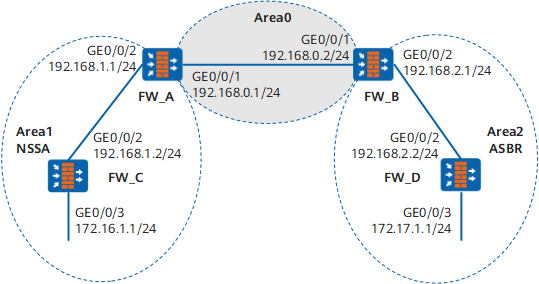
Configuration Roadmap
The configuration roadmap is as follows:
- Enabling OSPF on each FW and configuring the basic OSPF function
- Configuring the static route on the FW_D and importing it into OSPF
- Configuring Area 1 as the NSSA area and checking the OSPF routing information of the FW_C
- Configuring the static route on the FW_C and importing it into OSPF
- Checking the OSPF routing information of the FW_D
Data Preparation
To complete the configuration, you need the following data:
- The router ID of the FW_A is 1.1.1.1. the OSPF process number is 1. Network segment 192.168.0.0/24 is specified in Area 0, and network segment 192.168.1.0/24 is specified in Area 1.
- The router ID of the FW_B is 2.2.2.2. the OSPF process number is 1. Network segment 192.168.0.0/24 is specified in Area 0, and network segment 192.168.2.0/24 is specified in Area 2.
- The router ID of the FW_C is 3.3.3.3. the OSPF process number is 1. Network segment 192.168.1.0/24 and 172.16.1.0/24 are specified in Area 1.
- The router ID of the FW_D is 4.4.4.4. the OSPF process number is 1. Network segment 192.168.2.0/24 and 172.17.1.0/24 are specified in Area 2.
Procedure
- Set the IP addresses for the interfaces, add the interfaces to security zones, and configure the security policy.
# Configure the FW_A.
<FW> system-view
[FW] sysname FW_A
[FW_A] interface GigabitEthernet 0/0/1
[FW_A-GigabitEthernet0/0/1] ip address 192.168.0.1 24
[FW_A-GigabitEthernet0/0/1] quit
[FW_A] interface GigabitEthernet 0/0/2
[FW_A-GigabitEthernet0/0/2] ip address 192.168.1.1 24
[FW_A-GigabitEthernet0/0/2] quit
[FW_A] firewall zone trust
[FW_A-zone-trust] add interface GigabitEthernet 0/0/1
[FW_A-zone-trust] add interface GigabitEthernet 0/0/2
[FW_A-zone-trust] quit
[FW_A] security-policy
[FW_A-policy-security] rule name policy_sec_1
[FW_A-policy-security-rule-policy_sec_1] source-zone trust local
[FW_A-policy-security-rule-policy_sec_1] destination-zone local trust
[FW_A-policy-security-rule-policy_sec_1] action permit
[FW_A-policy-security-rule-policy_sec_1] quit
# Configure the FW_B.
<FW> system-view
[FW] sysname FW_B
[FW_B] interface GigabitEthernet 0/0/1
[FW_B-GigabitEthernet0/0/1] ip address 192.168.0.2 24
[FW_B-GigabitEthernet0/0/1] quit
[FW_B] interface GigabitEthernet 0/0/2
[FW_B-GigabitEthernet0/0/2] ip address 192.168.2.1 24
[FW_B-GigabitEthernet0/0/2] quit
[FW_B] firewall zone trust
[FW_B-zone-trust] add interface GigabitEthernet 0/0/1
[FW_B-zone-trust] add interface GigabitEthernet 0/0/2
[FW_B-zone-trust] quit
[FW_B] security-policy
[FW_B-policy-security] rule name policy_sec_1
[FW_B-policy-security-rule-policy_sec_1] source-zone trust local
[FW_B-policy-security-rule-policy_sec_1] destination-zone local trust
[FW_B-policy-security-rule-policy_sec_1] action permit
[FW_B-policy-security-rule-policy_sec_1] quit
# Configure the FW_C.
<FW> system-view
[FW] sysname FW_C
[FW_C] interface GigabitEthernet 0/0/2
[FW_C-GigabitEthernet0/0/2] ip address 192.168.1.2 24
[FW_C-GigabitEthernet0/0/2] quit
[FW_C] interface GigabitEthernet 0/0/3
[FW_C-GigabitEthernet0/0/3] ip address 172.16.1.1 24
[FW_C-GigabitEthernet0/0/3] quit
[FW_C] firewall zone trust
[FW_C-zone-trust] add interface GigabitEthernet 0/0/2
[FW_C-zone-trust] add interface GigabitEthernet 0/0/3
[FW_C-zone-trust] quit
[FW_C] security-policy
[FW_C-policy-security] rule name policy_sec_1
[FW_C-policy-security-rule-policy_sec_1] source-zone trust local
[FW_C-policy-security-rule-policy_sec_1] destination-zone local trust
[FW_C-policy-security-rule-policy_sec_1] action permit
[FW_C-policy-security-rule-policy_sec_1] quit
# Configure the FW_D.
<FW> system-view
[FW] sysname FW_D
[FW_D] interface GigabitEthernet 0/0/2
[FW_D-GigabitEthernet0/0/2] ip address 192.168.2.2 24
[FW_D-GigabitEthernet0/0/2] quit
[FW_D] interface GigabitEthernet 0/0/3
[FW_D-GigabitEthernet0/0/3] ip address 172.17.1.1 24
[FW_D-GigabitEthernet0/0/3] quit
[FW_D] firewall zone trust
[FW_D-zone-trust] add interface GigabitEthernet 0/0/2
[FW_D-zone-trust] add interface GigabitEthernet 0/0/3
[FW_D-zone-trust] quit
[FW_D] security-policy
[FW_D-policy-security] rule name policy_sec_1
[FW_D-policy-security-rule-policy_sec_1] source-zone trust local
[FW_D-policy-security-rule-policy_sec_1] destination-zone local trust
[FW_D-policy-security-rule-policy_sec_1] action permit
[FW_D-policy-security-rule-policy_sec_1] quit
- Configure basic OSPF functions.
- Configure the FW_D to import static routes.
# Set the destination address and outbound interface of the static route to 1.0.0.0 and null0.
[FW_D] ip route-static 1.1.1.0 8 null 0# Enable OSPF on the FW_D.
[FW_D] ospf# Specify a static route as the route of Type-1.
[FW_D-ospf-1] import-route static type 1# Return to the system view.
[FW_D-ospf-1] quit - Configure Area 1 as an NSSA area.
# Enable OSPF on the FW_A.
[FW_A] ospf# Configure Area 1 as an NSSA area.
[FW_A-ospf-1] area 1
[FW_A-ospf-1-area-0.0.0.1] nssa default-route-advertise no-summary
[FW_A-ospf-1-area-0.0.0.1] quit
# Return to the system view.
[FW_A-ospf-1] quit# Enable OSPF on the FW_C.
[FW_C] ospf# Configure Area1 as an NSSA area.
[FW_C-ospf-1] area 1
[FW_C-ospf-1-area-0.0.0.1] nssa
[FW_C-ospf-1-area-0.0.0.1] quit

It is recommended to configure the ABR (refers to the FW_A here) with the default-route-advertise no-summary parameter, thus reducing the size of the routing table of the NSSA router. Other NSSA routers only need to be configured with the nssa command.
# Display the OSPF routing table of the FW_C.
[FW_C] display ospf routing
          OSPF Process 1 with Router ID 3.3.3.3
                   Routing Tables

 Routing for Network
 Destination        Cost  Type       NextHop         AdvRouter       Area
 0.0.0.0/0          2     Inter-area 192.168.1.1     1.1.1.1         0.0.0.1
 172.16.1.0/24      1     Stub       172.16.1.1      3.3.3.3         0.0.0.1
 192.168.1.0/24     1     Transit    192.168.1.2     3.3.3.3         0.0.0.1

 Total Nets: 3
 Intra Area: 2  Inter Area: 1  ASE: 0  NSSA: 0
When the area where the FW_C is located is configured as a nssa area, you see a default route rather than external routes.
- Configure the FW_C to import the static route.
# Configure the static route.
[FW_C] ip route-static 100.0.0.0 8 null 0# Enable OSPF on the FW_C.
[FW_C] ospf# Import the static route.
[FW_C-ospf-1] import-route static
[FW_C-ospf-1] quit
# Display the OSPF routing table of the FW_D.
[FW_D] display ospf routing

          OSPF Process 1 with Router ID 172.17.1.1
                   Routing Tables

 Routing for Network
 Destination        Cost  Type       NextHop         AdvRouter       Area
 172.16.1.0/24      4     Inter-area 192.168.2.1     2.2.2.2         0.0.0.2
 172.17.1.0/24      1     Stub       172.17.1.1      4.4.4.4         0.0.0.2
 192.168.0.0/24     2     Inter-area 192.168.2.1     2.2.2.2         0.0.0.2
 192.168.1.0/24     3     Inter-area 192.168.2.1     2.2.2.2         0.0.0.2
 192.168.2.0/24     1     Transit    192.168.2.2     4.4.4.4         0.0.0.2

 Routing for ASEs
 Destination        Cost      Type       Tag         NextHop         AdvRouter
 100.0.0.0/8        1         Type2      1           192.168.2.1     1.1.1.1

 Total Nets: 6
 Intra Area: 2  Inter Area: 3  ASE: 1  NSSA: 0
You can see an external route imported by the NSSA area on the FW_D.
Configuration Script
Configuration script of FW_A
#
 sysname FW_A
#
router id 1.1.1.1
#
interface GigabitEthernet0/0/1
 undo shutdown
 ip address 192.168.0.1 255.255.255.0
#
interface GigabitEthernet0/0/2
 undo shutdown
 ip address 192.168.1.1 255.255.255.0
#
firewall zone trust
add interface GigabitEthernet 0/0/1
add interface GigabitEthernet 0/0/2
#
ospf 1
 area 0.0.0.0
  network 192.168.0.0 0.0.0.255
 area 0.0.0.1
  network 192.168.1.0 0.0.0.255
  nssa default-route-advertise no-summary
#
security-policy
  rule name policy_sec_1
    source-zone local
    source-zone trust
    destination-zone local
    destination-zone trust
    action permit
#
return
Configuration script of FW_B
#
 sysname FW_B
#
router id 2.2.2.2
#
interface GigabitEthernet0/0/1
 undo shutdown
 ip address 192.168.0.2 255.255.255.0
#
interface GigabitEthernet0/0/2
 undo shutdown
 ip address 192.168.2.1 255.255.255.0
#
firewall zone trust
add interface GigabitEthernet 0/0/1
add interface GigabitEthernet0/0/2
#
ospf 1
 area 0.0.0.0
  network 192.168.0.0 0.0.0.255
 area 0.0.0.2
  network 192.168.2.0 0.0.0.255
#
security-policy
  rule name policy_sec_1
    source-zone local
    source-zone trust
    destination-zone local
    destination-zone trust
    action permit
#
return
Configuration script of FW_C
#
 sysname FW_C
#
router id 3.3.3.3
#
interface GigabitEthernet0/0/2
 undo shutdown
 ip address 192.168.1.2 255.255.255.0
#
interface GigabitEthernet0/0/3
 undo shutdown
 ip address 172.16.1.1 255.255.255.0
#
firewall zone trust
add interface GigabitEthernet 0/0/2
add interface GigabitEthernet 0/0/3
#
ospf 1
import-route static
 area 0.0.0.1
  network 172.16.1.0 0.0.0.255
  network 192.168.1.0 0.0.0.255
#
ip route-static 100.0.0.0 255.0.0.0 NULL0
#
security-policy
  rule name policy_sec_1
    source-zone local
    source-zone trust
    destination-zone local
    destination-zone trust
    action permit
#
return
Configuration script of FW_D
#
 sysname FW_D
#
router id 4.4.4.4
#
interface GigabitEthernet0/0/2
 undo shutdown
 ip address 192.168.2.2 255.255.255.0
#
interface GigabitEthernet0/0/3
 undo shutdown
 ip address 172.17.1.1 255.255.255.0
#
firewall zone trust
add interface GigabitEthernet 0/0/2
add interface GigabitEthernet 0/0/3
#
ospf 1
 import-route static type 1
 area 0.0.0.2
  network 172.17.1.0 0.0.0.255
  network 192.168.2.0 0.0.0.255
#
ip route-static 1.0.0.0 255.0.0.0 NULL0
#
security-policy
  rule name policy_sec_1
    source-zone local
    source-zone trust
    destination-zone local
    destination-zone trust
    action permit
#
return