Users Who Are Authenticated Using Agile Controller SSO Cannot Access Network Resources
This section describes how to troubleshoot the fault that users who are authenticated using Agile Controller SSO cannot access network resources.
Symptom
An enterprise has deployed a FW as the access gateway that connects the intranet to the Internet, as shown in Figure 1. The Agile Controller identity authentication mechanism is enabled on the intranet. The user management and authentication mechanisms are configured on the FW to implement authentication on internet users in Agile Controller SSO mode.
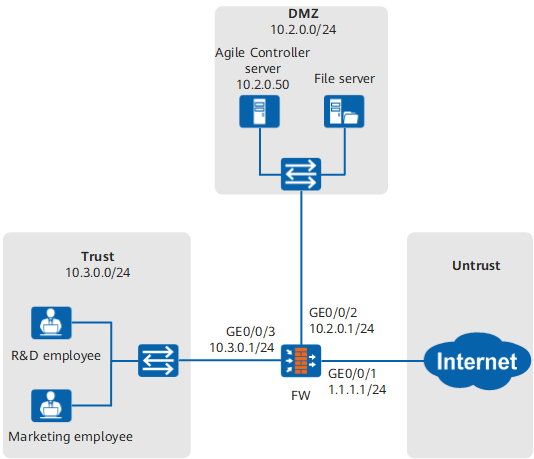
In practice, the R&D and marketing employees can log in to the Agile Controller server, but cannot access network resources.
Fault Diagnosis
Choose . In Online User List, enter the login names of R&D and marketing employees to check whether the user objects of the R&D and marketing employees exist. You can troubleshoot user management and authentication based on the following results:
Procedure
The Agile Controller is incorrectly configured.
Check the Agile Controller configuration. The parameter settings of the Agile Controller must be consistent with those on the FW.
The number of online users reaches the upper limit.
Choose and check whether the number of online users reaches the upper limit.
User objects of the R&D and marketing employees are locked out.
Choose and check for the user objects that are locked out. If the user objects of the R&D and marketing employees are locked out, unlock them.
The R&D and marketing employees are new users and have been added to the group to which permissions are incorrectly specified.
Choose and find the temporary group used for Agile Controller SSO. Then use the temporary group to search for security policies that reference this group and verify that the security policies and profiles do not block the traffic from the R&D and marketing employees.
The security policy is incorrectly configured.
Choose , use the user names of the R&D and marketing employees to search for all security policies that reference the user objects, verify that the security policies and profiles do not block the traffic from the R&D and marketing employees.
Choose , enter the user names or source addresses of the R&D and marketing employees to search for all matched security policies, and verify that the security policies and profiles do not block traffic from the R&D and marketing employees.
User objects of the R&D and marketing employees do not exist.
Possible causes and the troubleshooting procedure are as follows:
User objects of the R&D and marketing employees exist.
Possible causes and the troubleshooting procedure are as follows: