CLI: Example for Applying Port Pre-Allocation and Incremental Allocation to the DS-Lite Scenario
This section provides an example for configuring the port pre-allocation and incremental allocation functions in the DS-Lite scenario.
Networking Requirements
The Metropolitan Area Network (MAN) of Carrier A is upgraded to the IPv6 network, but still needs to process certain IPv4 services to adapt to network development. In this case, carrier A requires the network segments to:
- Ensure the Internet access of private IPv4 users.
- Properly allocate ports.
- Trace user addresses.
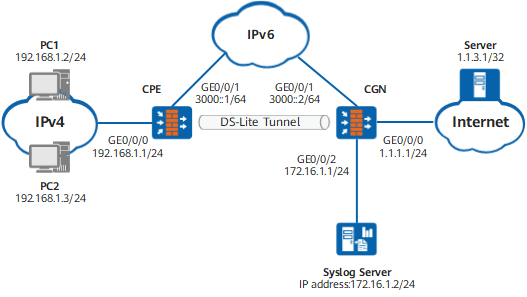
Figure 1 shows the networking plan. The network plan is described in detail as follows:
To enable private IPv4 users to access the public network, set up a DS-Lite tunnel between the CPE and CGN, and configure the DS-Lite NAT policy on the CGN.
To properly allocate ports, configure the DS-Lite NAT policy with the port pre-allocation and incremental allocation functions on the CGN. In this way, the service traffic from the CPE uses the pre-allocated or incrementally allocated ports.
To trace user addresses, configure the syslog server to interwork with the CGN. The CGN generates logs on port allocation and recovery. The syslog server parses the logs to obtain source addresses and port ranges for user address tracing.
Data Planning
Item |
Data |
Remarks |
|
|---|---|---|---|
CPE |
GE0/0/0 Trust |
Private IPv4 address: 192.168.1.1/24 |
Interface that is connected to private IPv4 users |
GigabitEthernet 0/0/1 Untrust |
Carrier IPv6 address: 3000::1/64 |
Interface that is connected to the IPv6 network |
|
Tunnel1 Untrust |
Tunnel type: ipv4-ipv6 Source address: 3000::1 Destination address: 3000::2 IPv4 address of the tunnel interface: 10.1.1.1/24 |
Interface that is used to establish a DS-Lite tunnel to the CGN |
|
CGN |
GE0/0/0 Untrust |
Public IPv4 address: 1.1.1.1/24 |
Interface that is connected to the IPv4 network. Assume that the next-hop address is 1.1.1.2/24. |
GigabitEthernet 0/0/1 Trust |
Carrier IPv6 address: 3000::2/64 |
Interface that is connected to the IPv6 network. |
|
Tunnel1 Trust |
Tunnel type: ipv4-ipv6 ds-lite Source address: 3000::2 IPv4 address of the tunnel interface: 10.1.1.2/24 |
Interface that is used to establish a DS-Lite tunnel to the CPE |
|
GigabitEthernet 0/0/2 DMZ |
IP address: 172.16.1.1/24 |
Interface that is used to interwork with the syslog server |
|
Address pool |
Addresses in the address pool: 1.1.2.1 to 1.1.2.5 |
Address pool that is used in the DS-Lite NAT policy to translate private IPv4 addresses to IPv4 addresses |
|
PC1 |
Private IPv4 address: 192.168.1.2/24 |
- |
|
PC2 |
Private IPv4 address: 192.168.1.3/24 |
- |
|
Internet Server |
Public IPv4 address: 1.1.3.1/32 |
- |
|
Syslog server |
IPv4 address: 172.16.1.2/24 |
Syslog server that parses log packets to trace the addresses of the users (CPEs). |
|
Procedure
- Configure the CPE.
- Configure the CGN.
- Configure the hash-based CPU selection mode to be oriented to source IP address.
<FW> system-view
[FW] sysname CGN
[CGN] firewall hash-mode source-only

The modified hash mode takes effect only after the device is restarted.
- Configure the hash-based CPU selection mode to be oriented to source IP address.
- Configure the Internet server.
In common cases, the ISP configures servers. This following describes only the key points of server configuration:
- Configure the IP address of the server to 1.1.3.1/32.
- The server must maintain a route to an address in the address pool on the CGN.
- Configure PC1 and PC2 on the intranet.
Configure the gateway for PC1 and PC2 on the intranet as 192.168.1.1.
- Configure the syslog server.
The configuration varies according to the version of the syslog server. For details, see related documents.
Verification
# After the configuration is complete, ping the IP address of the server from PC1.
C:\Documents and Settings\Administrator>ping 1.1.3.1

Pinging 1.1.3.1 with 32 bytes of data:

Reply from 1.1.3.1: bytes=32 time=9ms TTL=253
Reply from 1.1.3.1: bytes=32 time<1ms TTL=253
Reply from 1.1.3.1: bytes=32 time<1ms TTL=253
Reply from 1.1.3.1: bytes=32 time<1ms TTL=253

Ping statistics for 1.1.3.1:
    Packets: Sent = 4, Received = 4, Lost = 0 (0% loss),
Approximate round trip times in milli-seconds:
    Minimum = 0ms, Maximum = 9ms, Average = 2ms
In any view of the CGN, run the display cpe-user information cpe-ipv6 3000::1 command to check the details about the CPE user residing at 3000::1.
[CGN] display cpe-user information cpe-ipv6 3000::1 slot 6 cpu 0
 This operation will take a few minutes. Press 'Ctrl+C' to break ...
 UserTbl item(s) on slot 6 cpu 0
 --------------------------------------------------------------------
 Scene: Ds-Lite  DstZone: untrust  TunnelID: 1  CPEIP: 3000::1
 TTL: 40   LeftTime: 39 Increase Count: 0  VPN: public
 PoolID: addressgroup1  SectionID: 1  PublicIP: 1.1.2.3  StartPort: 2048
 PortNumber: 256  PortTotal: 256  Used Port Number: 0
As shown in the output, the source addresses of service flows sent by the CPE at 3000::1 are translated into 1.1.2.3. The port range is from 2048 to 2303, containing 256 ports.
Ping the IP address of the server from PC2. In any view of the CGN, run the display cpe-user information cpe-ipv6 3000::1 command to check the details about the CPE user residing at 3000::1. The translated addresses and port range remain the same.
When the service traffic is heavy, the port is used for more than 256 times. In this case, after you run the display cpe-user information cpe-ipv6 3000::1 command in any view of the CGN, the port range in the displayed information changes. The ports are incrementally allocated.
During port pre-allocation and incremental allocation, the syslog server receives a log. The log is displayed as follows on the syslog server (This example is displayed when the port is pre-allocated for the first time and the syslog packet is in the format of France Telecom. If the China Telecom format is required, run the nat port-block syslog descriptive format cn command in system view.)
dsliteuserbased - %%01SEC/6/BIND(l): An initial portrange is assigned, in dslite scene. privateip='3000::1' srcvrfid='0' publicip='1.1.2.2' publicportrange='2048~2303' time='2012-05-02 18:24:09'.
The log displays the IP address of the CPE, translated IP address, port range, and time stamp for address source tracing.
Configuration Scripts
The CPE configuration script is as follows:
#
 sysname CPE
#
 ipv6
#
interface GigabitEthernet0/0/0
 ip address 192.168.1.1 255.255.255.0
#
interface GigabitEthernet 0/0/1
 ipv6 enable
 ipv6 address 3000::1/64
#
interface Tunnel1
 ip address 10.1.1.1 255.255.255.0
 tunnel-protocol ipv4-ipv6
 source 3000::1
 destination 3000::2
#
firewall zone trust
 set priority 85
 add interface GigabitEthernet0/0/0
#
firewall zone untrust
 set priority 5
 add interface GigabitEthernet 0/0/1
 add interface Tunnel1
#
 ip route-static 0.0.0.0 0.0.0.0 Tunnel1
#
security-policy
  rule name policy_sec_1
    source-zone trust
    destination-zone untrust
    source-address 192.168.1.0 24
    action permit
#
return
The CGN configuration script is as follows:
#
 sysname CGN
#
 ipv6
#  firewall hash-mode source-only
#
interface GigabitEthernet0/0/0
 ip address 1.1.1.1 255.255.255.0
#
interface GigabitEthernet 0/0/1
 ipv6 enable
 ipv6 address 3000::2/64
#
interface GigabitEthernet 0/0/2
 ip address 172.16.1.1 255.255.255.0
#
interface Tunnel1
 ip address 10.1.1.2 255.255.255.0
 tunnel-protocol ipv4-ipv6 ds-lite
 source 3000::2
#
firewall zone trust
 set priority 85
 add interface GigabitEthernet 0/0/1
 add interface Tunnel1
#
firewall zone dmz
 set priority 50
 add interface GigabitEthernet 0/0/2
#
firewall zone untrust
 set priority 5
 add interface GigabitEthernet0/0/0
#
 ip route-static 1.1.3.1 255.255.255.255 1.1.1.2
#
 nat port-block assigning syslog enable
 nat port-block freeing syslog enable
 nat port-block syslog host 172.16.1.2 source CGN 172.16.1.1 514
#
 nat address-group addressgroup1
   port-block-size 256
   section 1 1.1.2.1 1.1.2.5
#
security-policy
  rule name policy_sec_1
    source-zone trust
    destination-zone local
    source-address 3000:: 64
    action permit
  rule name policy_sec_2
    source-zone local
    destination-zone dmz
    source-address destination-address 172.16.1.0 24
    action permit
#
nat-policy
  rule name policy_nat_1
    nat-type ds-lite
    source-zone trust
    destination-zone untrust
    source-address 3000::1 64
    action source-nat address-group addressgroup1
#
return